

Martyn Brown Photography
Participant
July 13, 2024
Question

Missing photos from Library

  • July 13, 2024
  • 2 replies
  • 652 views

LRc has lost  files from my Library, this is what is currently displayed

The files are in the correct location, are not corrupt, and are even shown on some 'collections' i have created, but are not shown below
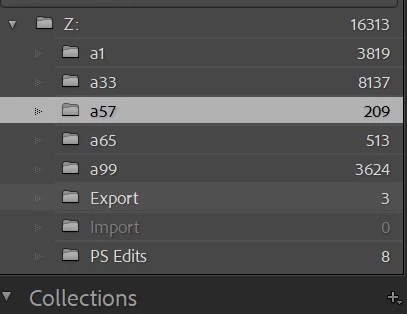
Folder a1, should have 17,584 files in it

Folder a33, should have 12,556 files in it

etc


I have tried the 'find allmissing photos' optin its added in a few but thats all

I do have a backup of the catalog which I can try tomorrow when back home


But any ideas or thoughts ?


Thanks,  Martyn

This topic has been closed for replies.

2 replies

JohanElzenga
Community Expert
Community Expert
July 13, 2024

'Missing photos' are photos that Lightroom does show in folders, but are not actually in that folder, so this seems to be the opposite and explains why the 'Find All Missing Photos' menu is not useful in this situation.


You say that some photos even show in some collections. If that is the case, then select one of those photos in the collection and then choose 'Photo > Go to Folder in Library'. Lightroom will then show you in which folder this photo is located.


Sometimes Lightroom does not show these numbers correctly, because the 'catalogname helper.lrdata' is corrupted. You can try if that is the case by quitting Lightroom, deleting this folder from the catalog folder, and then start Lightroom again (Lightroom will simply rebuild it).


-- Johan W. Elzenga
Martyn Brown Photography
Participant
July 13, 2024

Thanks for your help, its rebuilt most files, the 'metadatahelper' file within 'Lightroom Catalog-2-v13-4 Helper.lrdata' stopped at 253mb in size, with approx 4,500 photos still 'missing'

dj_paige
Legend
July 13, 2024

What about trying the other suggestion from @JohanElzenga ?

john beardsworth
Community Expert
Community Expert
July 13, 2024

Have you opened the wrong catalogue? An old copy, for example. See what's under File > Open Recent.

Martyn Brown Photography
Participant
July 13, 2024

Hi John, 

Nope same catalogue, i only have the one (plus backups in another folder, which I guess i will have to restore)

Thanks, Martyn

john beardsworth
Community Expert
Community Expert
July 13, 2024

So what makes you say "Folder a1, should have 17,584 files in it"?


LrC doesn't usually just lose photos, and we have no idea of your experience using it. So how can you be so specific or certain?