


Participant
January 11, 2018
Answered

Move photo library to new external hard drive

  • January 11, 2018
  • 1 reply
  • 1997 views

I have moved all files to a new (replacement) hard drive.

I launched Lightroom, and right clicked on the root folder of my photo library.

I selected option "find missing folder", navigated to the folder on the new hard drive, and opened it.

All photos are found in Lightroom.

All Lightroom functions work correctly.

The next time I open Lightroom, I get the following error:
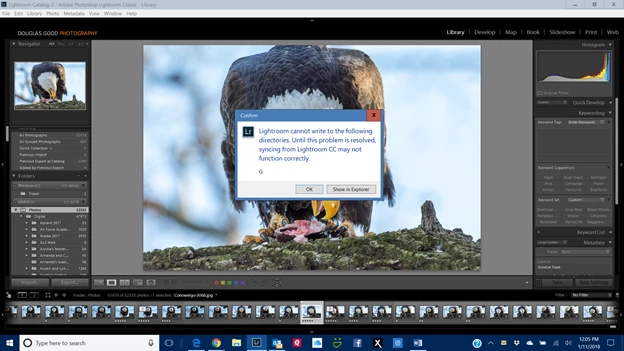
G: is the drive letter of the old external drive, which is disconnected (but still available).

I click OK.

I can still access all photos on my new external hard drive - volume GRAID, mounted as drive letter I.

How do I tell Lightroom to forget about G:

This topic has been closed for replies.
Correct answer Doug Good

Hi Doug,

Thanks for the update. Please backup your Lightroom catalog and restore Lightroom preferences How to set Lightroom Classic CC preferences

Let us know the outcome.

~Akash


Hello Akash,

I found the conflict when reviewing my Lightroom preferences.

In the Lightroom Synch preferences tab, I had chosen a folder subordinate to my main Photos folder (named iPhone, as I have Lightroom Mobile installed on my Apple iPhone).  The default location (My Pictures) would not have presented a problem.  But I had to specify a path to my custom location, which included the drive letter G:  I changed it to drive letter "I", and I now no longer get the error message on startup of Lightroom.  Looking back, I might have been able to determine this from the text of the error message if it had included the full path "G:\Photos|iPhone" instead of just the drive letter G:

So I did not have to reset my Preferences file.

1 reply

Akash Sharma
Legend
January 11, 2018

Hi DougGood,

Which version of Lightroom are you using?

Please refer this similar discussion Lightroom cannot write to the following directories and set permissions to read/write for the directory your images reside into.

Thanks,

Akash

Doug GoodAuthor
Participant
January 11, 2018

Hello Akash,

I have Lightroom Classic CC - most current release, running on Windows 10 - most current release.

I saw the discussion you referenced, but have a different issue.

I have no trouble , reading or writing to the directories on my new external hard drive - GRAID on drive letter I .

Lightroom functions completely normally.

The error message references the drive letter of the old external hard drive - drive letter G.

That old drive is not connected to my computer.
Thanks,

Doug

Akash Sharma
Legend
January 11, 2018

Hi Doug,

Thanks for the update. Please backup your Lightroom catalog and restore Lightroom preferences How to set Lightroom Classic CC preferences

Let us know the outcome.

~Akash