
Multiple Adobe processes preventing reinstall
Trying to fix (Lightroom not responding), very laggy in general even accessing preferances comes up with not responding for a few seconds.
Have had the following happen a couple of times in recent months, when optomising the catalogue to try and fix above issue, lightroom quits and then doesnt restart. From this point cant launch lightroom at all. Uninstalling lightroom is prevented by multiple lightroom processes running processes in task manager
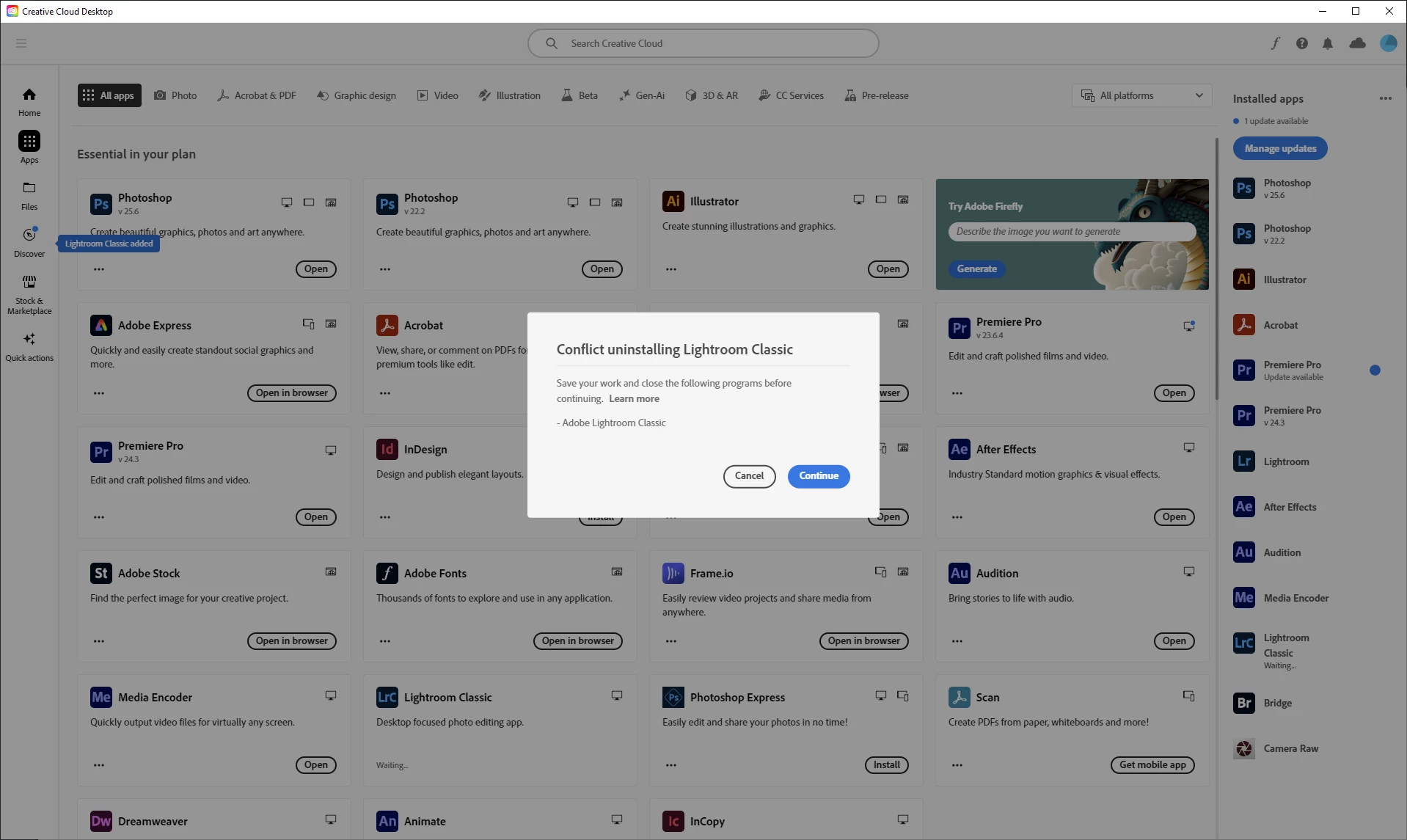
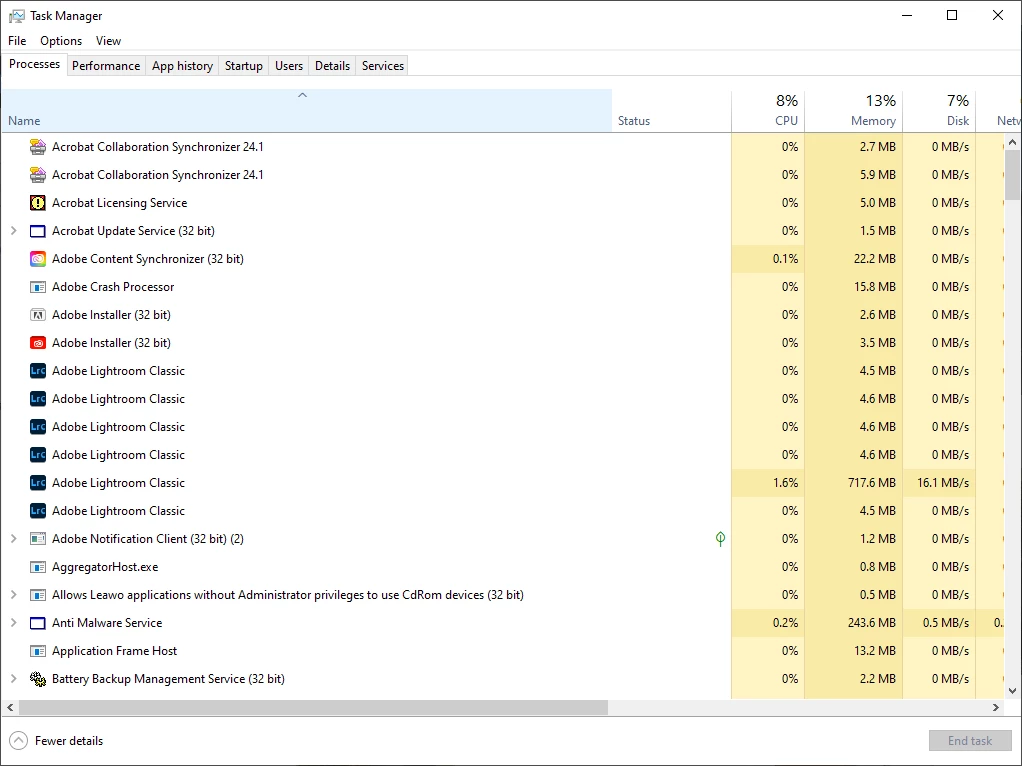
Winows 10. Latest version of lightroom, will add specs when/if I get it running.
Lightroom Classic version: 13.2 [ 202402141005-bf1aeb84 ]
License: Creative Cloud
Language setting: en
Operating system: Windows 10 - Business Edition
Version: 10.0.19045
Application architecture: x64
System architecture: x64
Logical processor count: 32
Processor speed: 3.4GHz
SqLite Version: 3.36.0
CPU Utilisation: 0.0%
Built-in memory: 65457.0 MB
Dedicated GPU memory used by Lightroom: 16.4MB / 8009.0MB (0%)
Real memory available to Lightroom: 65457.0 MB
Real memory used by Lightroom: 3960.9 MB (6.0%)
Virtual memory used by Lightroom: 4146.8 MB
GDI objects count: 886
USER objects count: 3287
Process handles count: 5741
Memory cache size: 533.5MB
Internal Camera Raw version: 16.2 [ 1763 ]
Maximum thread count used by Camera Raw: 5
Camera Raw SIMD optimization: SSE2,AVX,AVX2
Camera Raw virtual memory: 357MB / 32728MB (1%)
Camera Raw real memory: -6668MB / 65457MB (-10%)
Cache1:
Preview1- RAM:22.0MB, VRAM:0.0MB, 01.jpg
Preview2- RAM:22.0MB, VRAM:0.0MB, 03.jpg
Preview3- RAM:22.0MB, VRAM:0.0MB, 02.jpg
NT- RAM:66.0MB, VRAM:0.0MB, Combined:66.0MB
Cache2:
final1- RAM:64.0MB, VRAM:0.0MB, 03.jpg
final2- RAM:64.0MB, VRAM:0.0MB, 02.jpg
final3- RAM:65.0MB, VRAM:0.0MB, 01.jpg
T- RAM:193.0MB, VRAM:0.0MB, Combined:193.0MB
Cache3:
m:533.5MB, n:111.6MB
U-main: 205.0MB
System DPI setting: 96 DPI
Desktop composition enabled: Yes
Standard Preview Size: 1920 pixels
Displays: 1) 1920x1200, 2) 1920x1200
Input types: Multitouch: No, Integrated touch: No, Integrated pen: Yes, External touch: No, External pen: Yes, Keyboard: No
Graphics Processor Info:
DirectX: NVIDIA Quadro RTX 4000 (31.0.15.3849)
Init State: GPU for Export supported by default
User Preference: Off
Application folder: C:\Program Files\Adobe\Adobe Lightroom Classic
Library Path: L:\Lightroom Cat\Lightroom Catalog-2-2-v13.lrcat
Settings Folder: C:\Users\sknig\AppData\Roaming\Adobe\Lightroom
Installed Plugins:
1) AdobeStock
2) ColorChecker Camera Calibration
3) Flickr
4) Negative Lab Pro v3
5) Nikon Tether Plugin
6) ON1 Resize 10
Config.lua flags: None
Adapter #1: Vendor : 10de
Device : 1eb1
Subsystem : 12a010de
Revision : a1
Video Memory : 8009
Adapter #2: Vendor : 1414
Device : 8c
Subsystem : 0
Revision : 0
Video Memory : 0
AudioDeviceIOBlockSize: 1024
AudioDeviceName: $$$/dvaaudiodevice/SystemDefaultAndEffectiveDeviceName=System Default - Speakers (Realtek High Definition Audio)#{comment}DVAAU-4201250: Open the audio hardware preferences page.
AudioDeviceNumberOfChannels: 2
AudioDeviceSampleRate: 48000
Build: LR5x120
Direct2DEnabled: false
GL_ACCUM_ALPHA_BITS: 16
GL_ACCUM_BLUE_BITS: 16
GL_ACCUM_GREEN_BITS: 16
GL_ACCUM_RED_BITS: 16
GL_ALPHA_BITS: 0
GL_BLUE_BITS: 8
GL_DEPTH_BITS: 24
GL_GREEN_BITS: 8
GL_MAX_3D_TEXTURE_SIZE: 16384
GL_MAX_TEXTURE_SIZE: 32768
GL_MAX_TEXTURE_UNITS: 4
GL_MAX_VIEWPORT_DIMS: 32768,32768
GL_RED_BITS: 8
GL_RENDERER: Quadro RTX 4000/PCIe/SSE2
GL_SHADING_LANGUAGE_VERSION: 4.60 NVIDIA
GL_STENCIL_BITS: 8
GL_VENDOR: NVIDIA Corporation
GL_VERSION: 4.6.0 NVIDIA 538.49
GPUDeviceEnabled: false
OGLEnabled: true
[shorted to most relevant information]
[moved from bugs to discussions according to the community rules - Mod.]
 AdChoices