Participating Frequently
January 9, 2017
Question

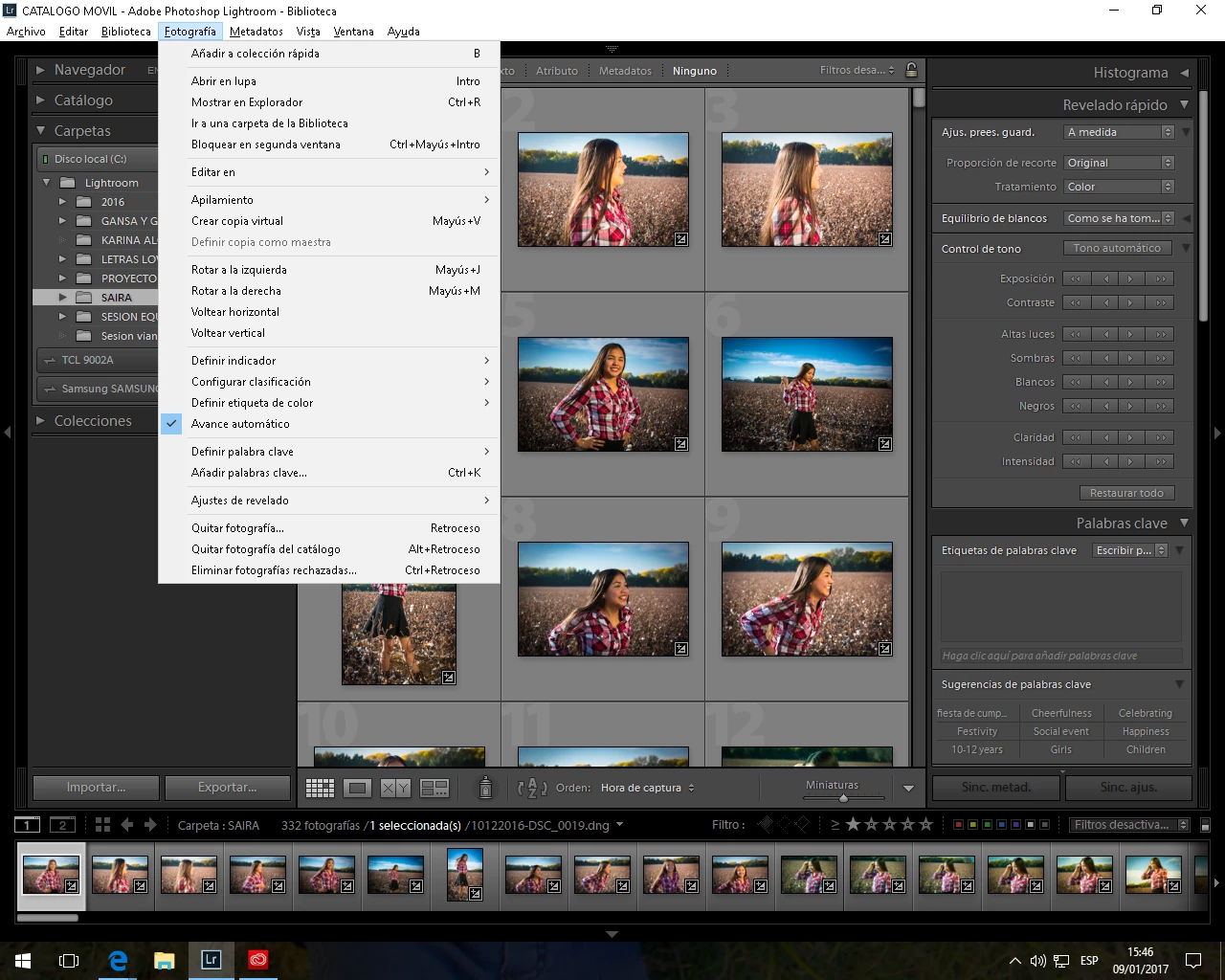
MY LIGHTROOM DON´T HAVE DE MERGE TO HDR MENU WHY¿

  • January 9, 2017
  • 4 replies
  • 2550 views

    This topic has been closed for replies.

    4 replies

    Participating Frequently
    January 10, 2017

    Instead the photo merge option i have EDIT IN Photoshop and i want to do the HDR in lightroom not in Photoshop

    JP Hess
    Inspiring
    January 10, 2017

    To do the HDR merge in Lightroom you have to have Lightroom CC or Lightroom 6. That feature is not part of Lightroom 5. Never has been, and never will be. It looks like you are using Windows 10. If that is the case then you and went to Settings/System and then click on About  at the bottom of the list and it will tell you whether you have a 32-bit or 64-bit operating system.

    I'm wondering, however, if maybe you have installed Lightroom CC and you previously were using Lightroom 5. The two programs can be installed on the same computer and they have the same desktop icon. Is it possible that you have installed Lightroom CC, but are still using your Lightroom 5? Since your "Edit in" menu gives you the option of editing in Photoshop CC 2017, I think you have installed Lightroom CC 2015, but the desktop icon you are using is still pointing to your old Lightroom 5. What happens if you open the creative cloud application manager? Do you have the option to run Lightroom CC?

    Participating Frequently
    January 13, 2017

    LET ME CHECK

    Participating Frequently
    January 10, 2017

    Instead the photo merge option i have EDIT IN Photoshop and i want to do the HDR in lightroom no in Photoshop

    JP Hess
    Inspiring
    January 10, 2017

    Lightroom 5.7.1 was the last update of Lightroom 5. Merge to HDR was introduced in Lightroom 6. If you are using Lightroom CC and are still on 5.7.1 then you either haven't installed the upgrade or you have a 32-bit operating system. Lightroom CC/6 is 64-bit only.

    Participating Frequently
    January 10, 2017

    How a i can know if my sistem is 32 bit or 64 bit?

    ManiacJoe
    Inspiring
    January 9, 2017

    In the menu /help/system info/

    What version of Lightroom are you running?

    If you are using the standalone version 6.x, you need to wait for version 7.0 for the new feature.

    If you have the subscription 2015.x version, and if Lightroom thinks it is running in the standalone mode,

    use the menu to log out,

    exit LR

    restart LR

    log in, that should get LR back into the correct mode.

    JP Hess
    Inspiring
    January 10, 2017

    Are you sure about that? According to this comparison chart the HDR feature is also in Lightroom 6.

    Compare Lightroom CC vs. versions 5 & 6 | Adobe Photoshop Lightroom CC history

    Participating Frequently
    January 10, 2017

    yes i don´t know why the MERGE TO HDR option is not apeearing in my menu

    JP Hess
    Inspiring
    January 9, 2017

    What options do you have under "Editar en"? What version of Lightroom are you using?

    Participating Frequently
    January 10, 2017

    ok thank you i´ll check it when i´ll be at home