
Pbeck1
Participating Frequently
August 2, 2013
Question

My Lightroom lens corrections need correcting. Is this normal?

  • August 2, 2013
  • 4 replies
  • 22758 views

I have bought myself my 1st DSLR camera (Nikon D3100) as i now want to shoot Raw instead of Jpeg. I've always shot Jpegs in the past with my old cameras. The in-camera Jpegs from my new Nikon don't show any lens distortion. However, when i open the Raw (NEF) files in Lightroom and tick 'enable profile correction' in the Lens corrections section, the distortion correction seems too much and i have to manually adjust it every time.

The lens profile comes from Lightroom itself (not from other users), & so this doesn't seem quite right to me that the correction is somewhat wrong each time.

I'm wondering if i'm doing something wrong or that maybe its even normal to have to adjust the correction further yourself each time (and perhaps most users have to do that too)?

I've included 3 Jpegs of the same image to demonstrate the problem (detailed below):

1) The export from Lightroom with the lens distortion corrected by Lightroom (note the straight red line).

2) An exported Jpeg version of the uncorrected Nef from Lightroom  (to show the full original lens distortion)

3) The original in-camera Jpeg (obviously the distortion corrected by the camera)

I've  drawn straight red lines on to the images to demonstrate the differences.

Any ideas?

^ above image is a Lightroom exported Jpeg (from NEF) with lens correction ON (note the red line along the top of the roof)

^ above image is a Lightroom exported Jpeg (from NEF) with NO lens correction yet, thus showing original distortion.
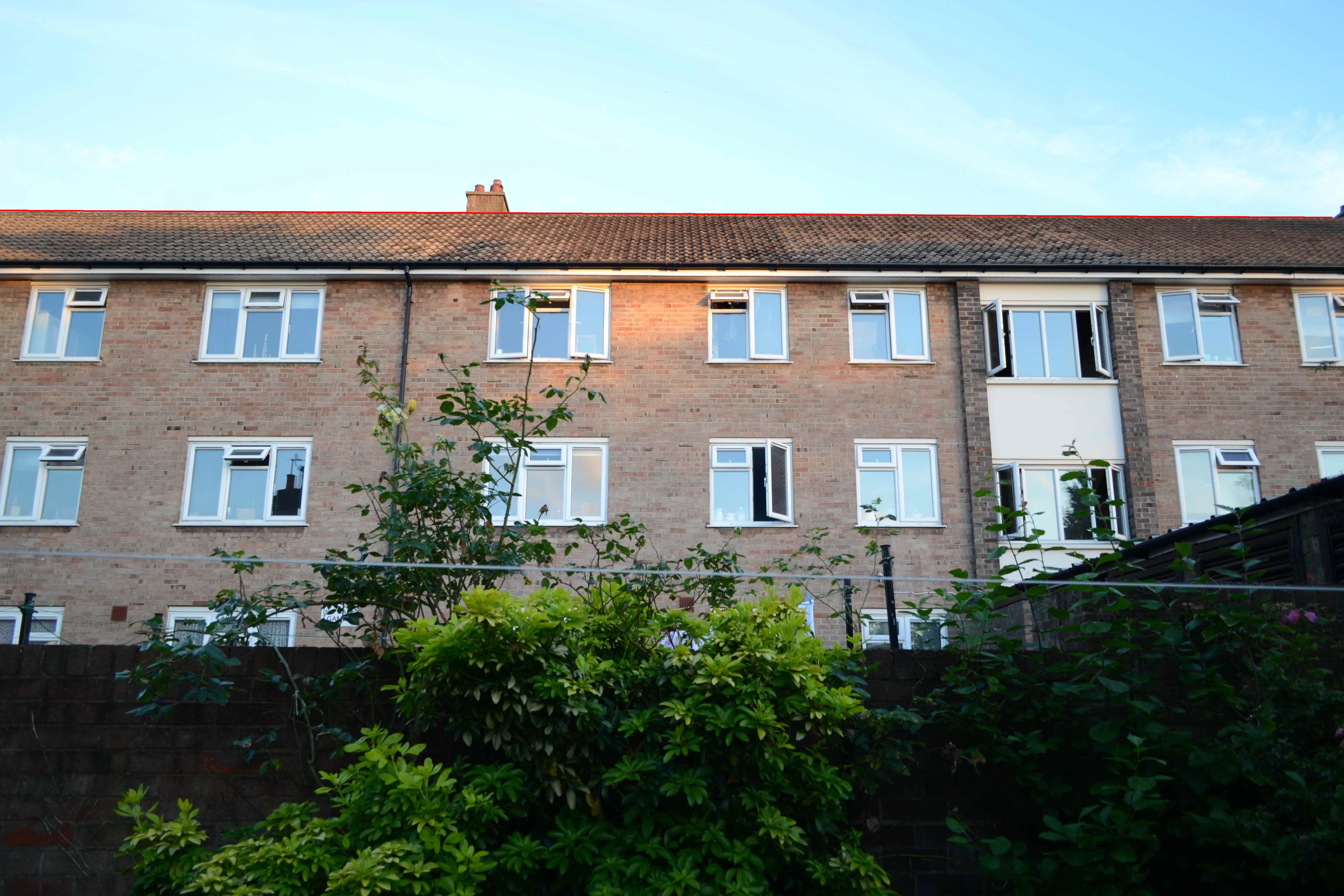
^ above image is the ORIGINAL in-camera JPEG showing no distortion at all (note the red line along the top of the roof).

P.s i've taken different shots too and the problem is the same for them all (at least at 18mm anyway).

Additional information:

The Nikon D3100 has an APS-C sensor (I'm not sure if that's significant or not). Also the lens described in the profile correction matches the one from my camera.

    This topic has been closed for replies.

    4 replies

    areohbee
    Legend
    August 15, 2013

    Paul,

    If distortion is a primary concern, I'm guessing you're shooting buildings, or shots with buildings in the background...

    If so, and you haven't tried Lr5's new 'Upright' feature - try it.

    Sometimes just one click of the Upright/Auto button makes everything look about right (and sometimes it needs a little extra "help"...).

    It's supposedly useful in non-architecture-oriented shots too, but that (architecture) seems to be where it really excels, in my experience so far.

    Cheers,

    Rob

    Pbeck1
    Pbeck1Author
    Participating Frequently
    August 15, 2013

    No mate, I only really take photos of my child. I became uneasy after noticing that the lens corrections in Lightroom were far from perfect (to give you a rough idea, some photos needed a manual adjustment of -65 on top of what Lightroom was suggesting).

    I've since made my own lens profile with the Adobe lens profile creator and have compared a lot of shots with it vs DxO and they render almost identical, and so i've settled for that now.

    I dont think i want to upgrade to LR5 yet as all my catalogues have been made with LR4 and i just feel safer somehow knowing that at the moment they are all still being opened by their original program. Also, i dont see a lot of difference between 4 & 5. I think i'll probably upgrade to LR6 if a new processs version is developed and is better.

    Perhaps i should expand my photography interests into other areas other than my child too?

    areohbee
    Legend
    August 15, 2013

    Pbeck1 wrote:

    I only really take photos of my child.

    Right - I forgot about that. So I guess the distortion is noticeable in the interiors - doorways and ceiling lines, maybe some furniture etc... Anyway, if you get around to trying Lr5 or Lr6, the upright may help. But it sounds like you've got it under control for now. - Cheers, R.

    PS - Nuthin' wrong w/shootin' yer kid. I'm sure you'll start shootin' something else if it seems more interesting .

    areohbee
    Legend
    August 3, 2013

    Yep - Lr's lens corrections leave something to be desired, for lenses like Nikon's 18-200 (and 18-55 from the sound of it). - NX2 is better, and DxO is better still.

    Pbeck1
    Pbeck1Author
    Participating Frequently
    August 3, 2013

    Hi Rob

    Yes, i looked at DxO and found the lens corrections brilliant but the rest of it not. A lot of my images end up when shot a bit overexposed as i'm still an amatuer, DxO just wanted to reduce the exposure across the entire image rather than just recovering the highlights like Lightroom does. This meant the whole image getting darker (including any already too dark subjects) and the shadows becoming too dark to really work with afterwards in Lightroom. I dont really want to be reducing the exposure in DxO then increasing it again in Lightroom afterwards, so i kind of gave up on the idea of DxO. I also felt the smartlighting tool gave very artificial looking results too.

    web-weaver
    Inspiring
    August 3, 2013

    Personally I'd concentrate on learning how to better use the lens correction tools already in LR! With the new Defringe tools in LR4/5 I'm getting outstanding lens corrections.

    Here's a screenshot of an image shot with a Canon 8-15mm F4L lens, which while an excellent lens exhibits high CA. I  doubt DxO can do any better!

    (click on image to see full-size)

          W/O Lens Corrections                    With 'Remove CA' and Defringe

    Pbeck1 you want the 'Lens Profile Downloader,' not the 'Lens Profile Creator:'

    Windows Version

    Mac OS X Version

    Just keep in mind that correcting distortion and vignetting by 100% (i.e. Perfect?) is generally not necessary and can even cause image degradation.

    Distortion correction forces cropping of the image to retain straight borders, otherwise they would appear bowed. You will need to account for that during the shoot, since you are effectively increasing the lens focal length. When using ultrawide angle lenses it can also cause elongation or stretching of objects near the image edges and  image softening in these areas. In most cases this can look worse than simple geometric distortion.

    When Vignetting is corrected 100% it can cause the image to take on a less natural appearance, since we are used to seeing some vignetting in most pictures. Ultrawide angle and fast lenses (F2 and wider) tend to have significant vignetting (up to -3EV). With 100% vignetting correction you are increasing the exposure significantly across the image, which raises noise levels and makes CA, astigmatism and other aberrations much more visible. In short it can noticeably deteriorate the image quality.

    This is why I set my Lens Profile "defaults" for Vignetting at 50% and Distortion at 0% and only set higher for images that "visually" require it.


    trshaner wrote:

    When Vignetting is corrected 100% it can cause the image to take on a less natural appearance, since we are used to seeing some vignetting in most pictures.

    Not only that, Vignetting is used by many fine art photographers as a means to draw the eye towards the center of interest in an image, and they apply more vignetting on top of what the lens does already.

    Naturally it always comes down to personal tastes and styles. But I find that letting the "incorrections" of the lens be and not striving for an image that is 100% correct, often gives more satisfying results .

    August 2, 2013

    You did a very good job of explaining and demonstrating your problem.

    web-weaver
    Inspiring
    August 2, 2013

    You didn't say which lens you used.

    But generally speaking, yes, sometimes the lens profiles need a bit of adjustment.

    Apparently you have already figured out how to to that manually for individual photos.

    But you can make this adjustment the default so that it will be automatically applied to all images with this lens.

    When you have done the necessary adjustment (I take it you moved the Distortion slider in Lens Correction / Profile to the right or to the left.

    You might have notices that the word "Default" - just a line below "Enable Lens Profile Corrections" - has changed to "Custom". Now click on the double triangle besides the word "Custom" and select "Save New Lens Profile Defaults". This will make your adjustments the new "Default", and you just have to make sure that "Default" is selected.

    If you don't like your adjustments later on, you can change it any time and save it as "new default".

    Your adjustment will then automatically applied.

    Pbeck1
    Pbeck1Author
    Participating Frequently
    August 2, 2013

    Thanks for the reply

    The lens of my camera is the kit lens (18-55mm f/3.5-5.6G AF-S VR DX NIKKOR). In lightroom the lens automatically selected says: Nikon AF-S DX NIKKOR 18-55 mm F3.5-5.6G VR, and the profile is Adobe (Nikon AF-S DX NIKKOR 18-55mm f/3.5 -5.6 G VR).

    P.s the day i got the camera i updated the Lens Distortion control data in the firmware as advised (not sure if that's significant or not)

    web-weaver
    Inspiring
    August 2, 2013

    Sounds like you have the correct profile - even if it is not quite correct ().