
Answered
NEF & Tiff Sequencing in LrC 12.3
Files edited in Photoshop show as Tiffs at the end of the folder in Lightroom.
I want to see them alongside the original NEFs. How do I do that?
Appreciate any inputs. Thank you!!

Files edited in Photoshop show as Tiffs at the end of the folder in Lightroom.
I want to see them alongside the original NEFs. How do I do that?
Appreciate any inputs. Thank you!!
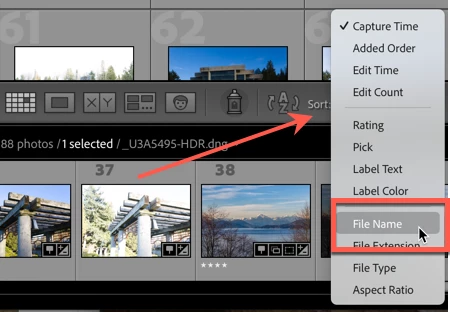
Go into Lightroom Classics Library mode, and select Grid View. Then go to the dropdown menu on the bottom right and select Sort by File Name.
Already have an account? Login
Enter your E-mail address. We'll send you an e-mail with instructions to reset your password.
 AdChoices