
Known Participant
November 1, 2019
Question

New Lightroom Install cannot open my catalog because "It is too new"??!?!? Help, how to fix this?
  • November 1, 2019
  • 5 replies
  • 1000 views

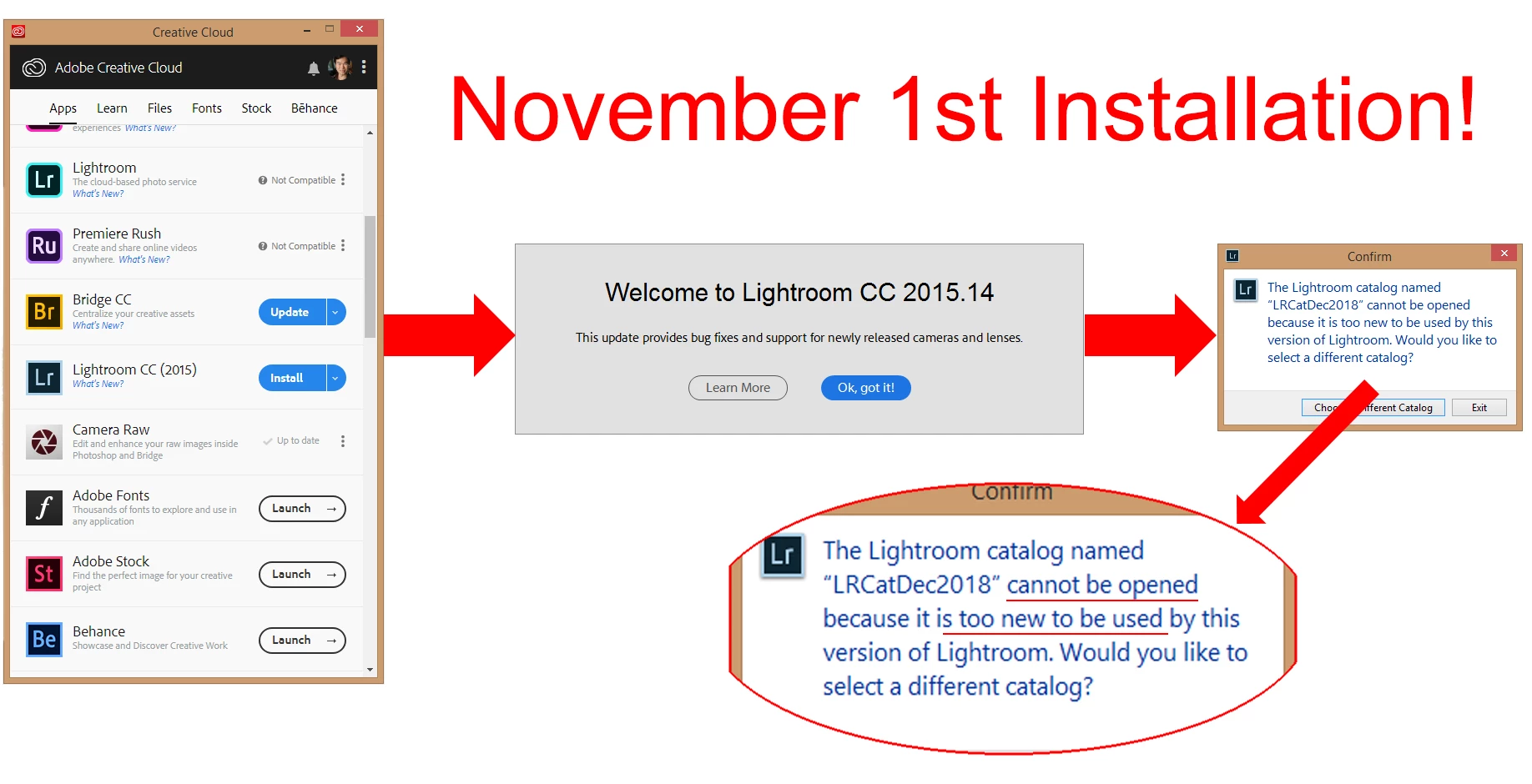
Please help! I cannot open my current Lightroom catalogs after I reinstalled Lightroom CC Classic. The error message says "cannot be opened because it it too new to be used...?"


What I did:

1) I noticed that my LR program wasn't importing a folder. In order to solve this I did two things:
a) Installed all the updates for Windows 8.1
b) Uninstalled LR CC Classice


2) Then I went to the Creative Cloud panel and installed 'Lightroom CC (2015)' as its the only option.


3) Then after I open LR I will use it to open my Catalog, which worked just prior, but now it gives me the error message.


What am I doing wrong?


I assume that installing from the Creative Cloud panel would give me the most current LR, right?


IS THERE A WAY I CAN save my current LR catalog as an previous version, so this can be opened?


Please help.


This topic has been closed for replies.

5 replies

Participant
November 1, 2019

In order to use the current version of LR, you need to have Windows 10. Not compatable with windows 8 or below. If you had a previous version installed and you imported images, you could edit and everything, because things would be compatable. You really need to update to Windows 10 to be able to take advantage of LR going forward. Older versions are being eliminated due to copyright infringement agreements and versions below win 10 are not being supported by MS and Adobe will not support versions that are pre win 10. If you don't upgrade OS, you will be left out and no way to support your LR. Once you upgrade, you can import older catalogs and system will update them. Problem in upgrading OS is that your computer may not be powerful enough to support it, which will require new computer (Had that happen to me in past). 

GoldingD
Legend
November 1, 2019

As to your current install problem.


Not at a computer just now (to test). but if I remember correctly, that button that states a Installed, the down symbol to the right, should allow fir a manage pull down, should allow for a install other version. Take a look.


However you might have to uninstall, then manage and install the newer version


P.S. check your computer and see if somehow you have 2 versions installed.


GoldingD
Legend
November 1, 2019

Also, in addition, Windows v8 is largely seen as a huge error by Microsoft. And Adobe absolutly hates it. Apparently a free upgrade to Windows 10 is still possible. Following a bit dated


https://www.digitaltrends.com/computing/how-to-get-windows-10-for-free/


GoldingD
Legend
November 1, 2019

In addition (but not a solution to your issue)


Your copy of the Adobe Creative Cloud Desktop App, is old. You need to update it.


https://helpx.adobe.com/download-install/kb/creative-cloud-desktop-app-download.html


PLEASE USE THE REPLY FROM THE TOP POST WHEN REPLYING TO POSTS.
Helps to show posts in date/time order, improves visibility (as not hidden in a reply to a reply), and is easier to use


nikunj.m
Community Manager
Community Manager
November 1, 2019

Hi there,


The version, Lightroom CC 2015 you are currently installing through the Creative cloud is the predecessor to Lightroom Classic. You might have had Lightroom Classic CC version 7.0 or higher installed on the computer which is no longer available for installation through the Creative Cloud. If the catalog you are trying to open was created using the Lightroom Classic CC version 7.x then it would not be compatible with the version you have installed.


Lightroom CC 2015.14 (Lightroom 6.14) and Lightroom Classic version 8.2.1 and above are the versions available for installation through the Creaive cloud now out of which Lightroom Classic is not compatible with Windows 8.1.

Please check: https://helpx.adobe.com/in/lightroom-classic/system-requirements.html


We would request you to upgrade to Windows 10 to install Lightroom Classic.


Regards,

Nikunj