
New WINDOWS 11 Computer - issues with OneDrive, multiple hard drives and multiple catalogs
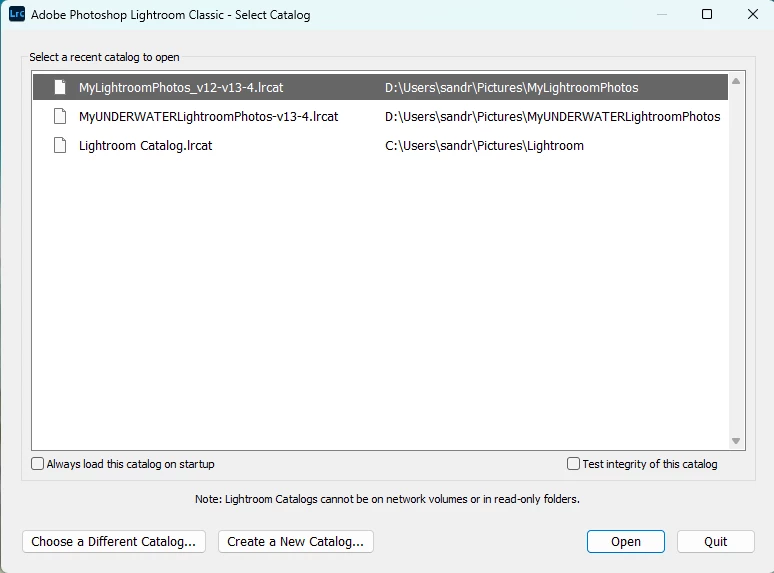
I have 2 drives on my new Windows 11 machine
- C: for applications (including Adobe)
- 😧 for documents, photos, LR catalogs, etc.
I also have 2 distinct LR catalogs on my D drive under PICTURES.
- Land photos: MyLightroomPhotos
- Underwater photos: MyUnderwaterLightroomPhotos
ONEDRIVE set up a new LR catalog on my C drive (automatically) which I don’t want and haven’t opened.
Question 1: CAN I JUST DELETE the ONEDRIVE Lightroom Catalog on the C drive???
Question 2: CAN I TURN OFF ONEDRIVE ALL TOGETHER?
Question 3: Why would the D drive catalog (“MyLighroomPhotos”) pull in my entire D drive (including all videos, documents, pictures, etc, including 141 (of 13,000) images from MyUNDERWATERLightroomPhotos catalog?
Question 4: I can use the command ”remove from lightroom” to get all the misc. documents, videos, and unrelated pictures out of my MyLighroomPhotos hierarchy/catalog – BUT - if I try and move the MyUNDERWATERLightroomPhotos folder out of the folder hierarchy, where they belong (in the other catalog on my new D drive), I can’t see any images in the MyUNDERWATERLightroomPhotos hierachy/catalog. I see that there are files, folders and collections – but all the photos are “zeroed out” as if nothing is in them.
Question 5: (final, whew) I’m running Lightroom V13.4. MANY of the photos I imported to my new computer show up with “!” marks. “ The metadata for this photo has been changed by both Lightroom and another application (presumably Photoshop). Should Lightroom import setting from disk or overwrite disk settings with those from the catalog? (choice A: import settings from disk, B: overwrite settings).. Huh???? If I edited in Photoshop I’d like to keep the edits. What does this even mean?
{Moved from Lightroom Cloud to Lightroom Classic Forum by Moderator}
 AdChoices