
flashpixx
Inspiring
December 26, 2021
Answered

Nikon Z9 Camera Preset in LRC

  • December 26, 2021
  • 1 reply
  • 6394 views

LRC 11.1 Camera Raw 14 Windows 10

The settings in LRC for the Nikon Z9 Camera profile are:

  • Texture +20
  • Clarity +10
  • Sharpening Radius 2.0
  • NR Luminance 39
  • Detail 75

I am not happy with the rendered image. Can I build a preset that adjusts these setting back to zero, or closer to zero?

I note in quick develop only clarity is available.

Thank you, appreciate any advice
This topic has been closed for replies.
Correct answer flashpixx

Sorry John my previous response was a bit confusing.

When I first imported images from the Z9 I noticed that the sliders were always in the same position, as noted in my first post. I'd not noticed this before with any other camera.

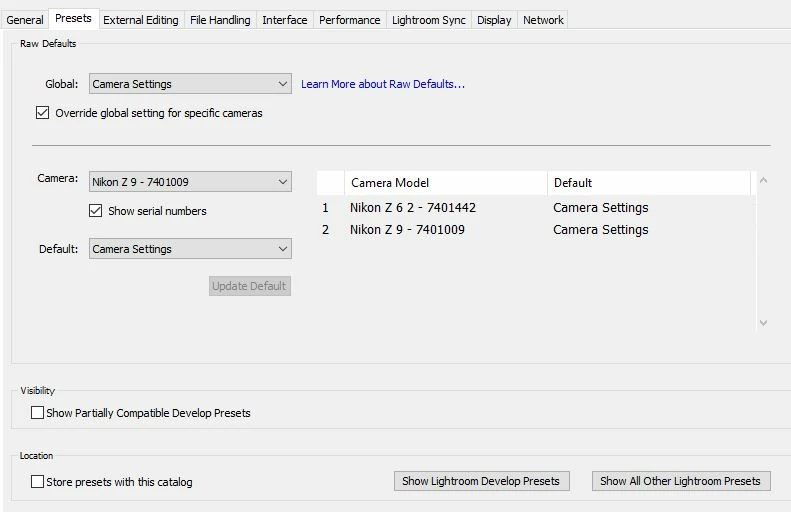
Prior to setting up my own preset this is what the preset tab looked like:


Thanks John, that certainly explains it.

1 reply

johnrellis
Legend
December 26, 2021

See this help article for how to change the default settings for imported raws:

https://helpx.adobe.com/lightroom-classic/help/raw-defaults.html

flashpixx
flashpixxAuthor
Inspiring
December 27, 2021

Thanks John, I had looked at that.

I will try again - appreciate your response

Best for 2022

johnrellis
Legend
December 28, 2021

Sorry John my previous response was a bit confusing.

When I first imported images from the Z9 I noticed that the sliders were always in the same position, as noted in my first post. I'd not noticed this before with any other camera.

Prior to setting up my own preset this is what the preset tab looked like:


"When I first imported images from the Z9 I noticed that the sliders were always in the same position, as noted in my first post."


I don't have a sample Z 9 .nef, but for other newer cameras, Nikon has been including default LR settings in the .nef file itself. For example, a Z 6 II .nef contains these develop settings:

[XMP]           Exposure 2012                   : 0.00
[XMP]           Highlights 2012                 : 0
[XMP]           Shadows 2012                    : 0
[XMP]           Luminance Smoothing             : 25
[XMP]           Luminance Noise Reduction Detail: 75
[XMP]           Luminance Noise Reduction Contrast: 0
[XMP]           Color Noise Reduction           : 10
[XMP]           Color Noise Reduction Detail    : 50
[XMP]           Color Noise Reduction Smoothness: 50
[XMP]           Sharpness                       : 40
[XMP]           Sharpen Radius                  : 2.00
[XMP]           Sharpen Detail                  : 25
[XMP]           Sharpen Edge Masking            : 0
[XMP]           Contrast 2012                   : 10
[XMP]           Saturation                      : 1
[XMP]           Camera Profile                  : Camera Standard


If you've told LR to use the Camera Settings as the default settings for that camera in Preferences > Presets, then when you import one of those .nefs, those settings will be used.