
Ohiomitch-2014
Participant
May 17, 2017
Answered

No support for Fujifilm X-T2 lenses

  • May 17, 2017
  • 5 replies
  • 18514 views

When I "enable lens correction" in Lr, I get the "can't find the lens message." I have a new Fujifilm X-T2 and multiple Fujinon lenses.  There are no Fuji lenses in the list, so I can't enter that.  Am I out of luck?
Correct answer DdeGannes

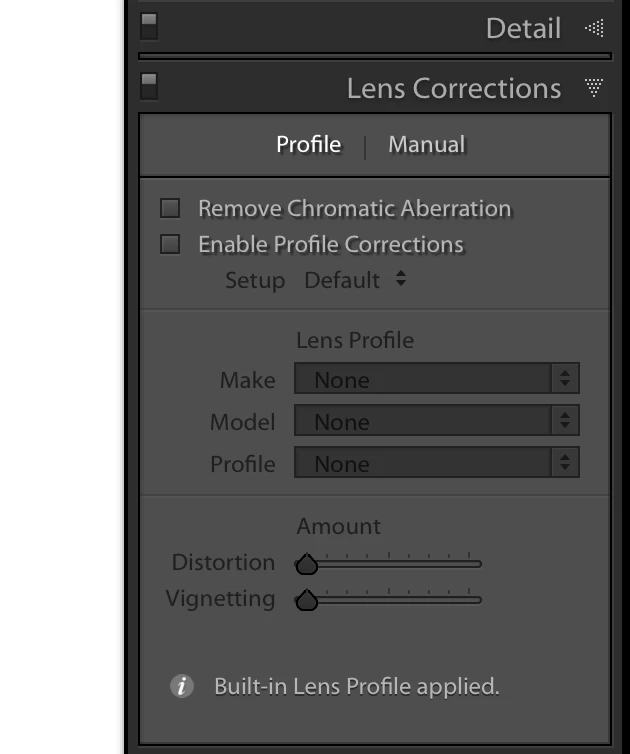
As far as I am aware Fujifilm mirrorless cameras like other models from Olympus, Panasonic etc have builtin lens correction info in the file header of the raw files from the camera and these are automatically applied by Lightroom /ACR it is not something that can be turned on/off.

This as designed by the Camera Manufacturer.

See the screen capture which shows and info note "Builtin lens profile applied."

More info can be obtained at the link below.

Work with lens profiles in Adobe Photoshop, Lightroom, and Camera Raw

5 replies

Participant
May 16, 2021

I am having the same issues with lens correction in both Lightroom and Photoshop. I don't options for neither Fujifilm XT4 body nor my lens xf 16-80mm. I am requesting to Adobe to upgrade their software. It feels like Adobe does not care about the Fujifilm users.

dj_paige
Legend
May 16, 2021

@tracys11563882 

We're not Adobe in this forum, we are other Lightroom Classic users who can't update the software.


Go to this link to submit the request to Adobe

https://feedback.photoshop.com/topics/lightroom-classic/5f5f2093785c1f1e6cc40872

johnrellis
Legend
March 27, 2021

The person in the other thread reports that resetting preferences fixed the problem:
https://www.lightroomqueen.com/articles-page/how-do-i-reset-lightrooms-preferences/

LR sometimes soils its preferences file, and resetting it can fix all sorts of wonky behavior. That article explains how to restore the old preferences if resetting doesn't help.


[Use the blue reply button under the first post to ensure replies sort properly.]

Participating Frequently
May 17, 2021

Yes, that's it! Resetting preferences fixed it, I can confirm it. Thanks John!

johnrellis
Legend
March 27, 2021

"After 4 years, I am here with the same issue 🙂 I am using Lightroom Classic 10.2 (the latest one). When I open a .RAF coming from my brand new X-T30 (+ XF 18-55), I do not have the "Built-in lens profile applied": I have the "unable to locate a matching profile automatically", exactly like the other guy up above 🙂 See the screenshot"


Someone else recently reported similar symptoms, with "Unable to locate a matching profile automtically" appearing instead of "Built-in lens profile applied":

https://feedback.photoshop.com/conversations/lightroom-classic/lightroom-classic-panasonic-dmc-tz70-automatic-lens-correction-not-applied/6058e9b2828912111a6f2075


Please add your details to that bug report, and be sure to click Like and Follow at the bottom of the first post. That will make it a little more likely that Adobe will prioritize a fix, and you'll be notified when the bug's status changes.


[Use the blue reply button under the first post to ensure replies sort properly.]

DdeGannes
Community Expert
DdeGannesCommunity ExpertCorrect answer
Community Expert
May 17, 2017

As far as I am aware Fujifilm mirrorless cameras like other models from Olympus, Panasonic etc have builtin lens correction info in the file header of the raw files from the camera and these are automatically applied by Lightroom /ACR it is not something that can be turned on/off.

This as designed by the Camera Manufacturer.

See the screen capture which shows and info note "Builtin lens profile applied."

More info can be obtained at the link below.

Work with lens profiles in Adobe Photoshop, Lightroom, and Camera Raw

Regards, Denis: iMac 27” mid-2015, macOS 11.7.10 Big Sur; 2TB SSD, 24 GB Ram, GPU 2 GB; LrC 12.5,; Lr 6.5, PS 24.7,; ACR 15.5,; (also Laptop Win 11, ver 24H2, LrC 15.0.1, PS 27.0; ) Camera Oly OM-D E-M1.
saraellenbost
Inspiring
November 11, 2017

I’m having trouble because when I click on the make Fujifilm doesnt even show up. And these files are in raw :/

saraellenbost
Inspiring
November 15, 2017

Are you using Fuji lenses?

If you are what Fuji lens?


Yes Im using fuji lenses, the 60 and the 23 1.4. I just updated to the Lightroom Classic today. Thank you so much. I really appreciate it.

Rikk Flohr_Photography
Community Manager
May 17, 2017

Make certain you are viewing a raw file and not a JPEG. Most lens profiles do not exist for JPEG files.

Rikk Flohr: Adobe Photography Org
john beardsworth
Community Expert
Community Expert
May 17, 2017

Does the bottom of the lens panel not show "Built in lens profile applied" ?