
Participating Frequently
January 18, 2020
Answered

No sync option to sync collection in Adobe Classic 9.1

  • January 18, 2020
  • 4 replies
  • 9033 views

I dont see the option to share my collection anymore.

There should be an option to sync when you right click on the collection and I have some collections that I synced quite some time ago, but they dont have the sync arrows anymore.

Have anyone else seen this ? I have the latest 9.1 version of Adobe Lightroom Classic for the (Mac) Desktop.

Have anyone a resolution ?
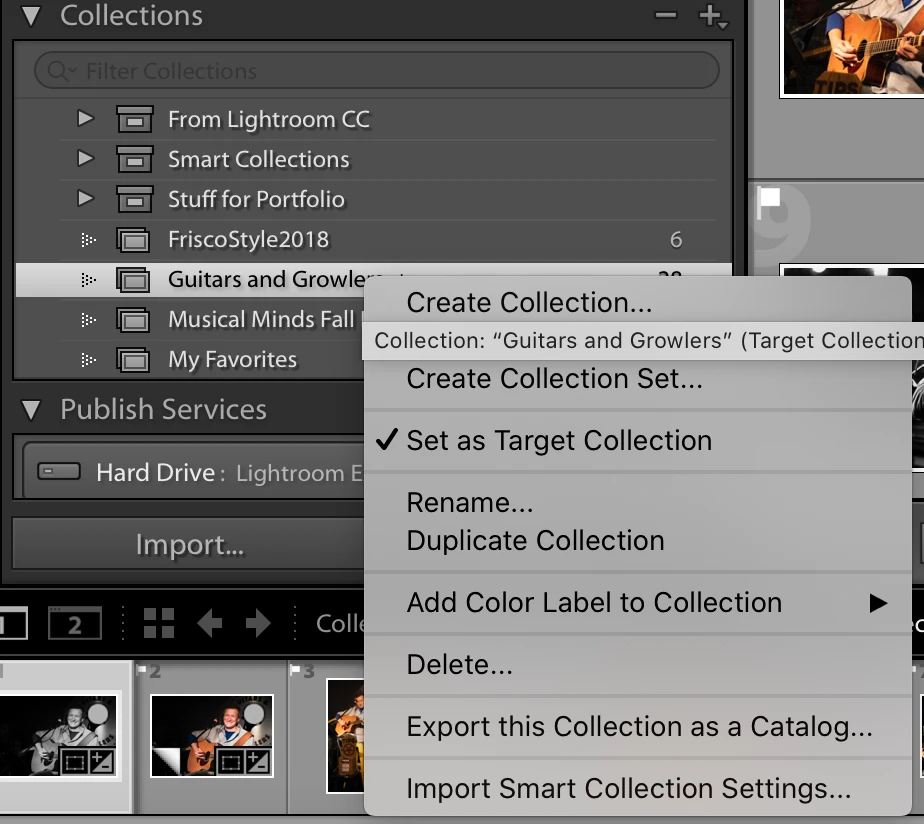
This topic has been closed for replies.
Correct answer JP Hess

Are you in the right catalog? It is only possible to sync one catalog. IF you are in the right catalog, click in the nameplate area and ensure that sync is enabled.

4 replies

JohanElzenga
Community Expert
Community Expert
June 28, 2020

Lightroom 9.3 has some changes, that you did not bother to read. One of those changes is that the sync options moved to a new icon at the top right.

-- Johan W. Elzenga
Participant
March 23, 2021

My issue was that I had an old catologe syncing and came back to lightroom after some time off. After re-installing Lightroom it wouldnt sync. 

It doesn't help that when you google the problem, Adobe's own documentation doesn't mention the new sync icon on the top right, next to Web. 

Participant
June 26, 2021

I had a similar problem here, I signed out of all Creative Cloud and apps on all devices, then signed back in, and it fixed it.

Participant
June 28, 2020

I have the same problem. No option to sync is displayed in identity plate. See screen shots. All Creative Cloud subscriptions updated 


(Image Edited By Moderator to remove email address of Adobe ID)

Just Shoot Me
Legend
June 28, 2020

You have replied to a 6 month old conversation and it seems your problem is not the same as the original poster.

Please start your own conversation and give as much info on your problem as possible.

At the top right of the LrC forum click the button that read "Post to Community".

Thanks

Just Shoot Me
Legend
January 18, 2020

Please verify you are using LR 9.1 by going to Help then System Info.

JP Hess
JP HessCorrect answer
Inspiring
January 18, 2020

Are you in the right catalog? It is only possible to sync one catalog. IF you are in the right catalog, click in the nameplate area and ensure that sync is enabled.

Participating Frequently
January 18, 2020

Thank you ! That did the trick !! I looked everywere for some option as the collection I created did show up in Lightroom web but not the photos.