
Participant
January 8, 2022
Question

No Sync option when creating collections in LR CLassic - Can't sync between Classic and CC

  • January 8, 2022
  • 4 replies
  • 2285 views

Hi all,


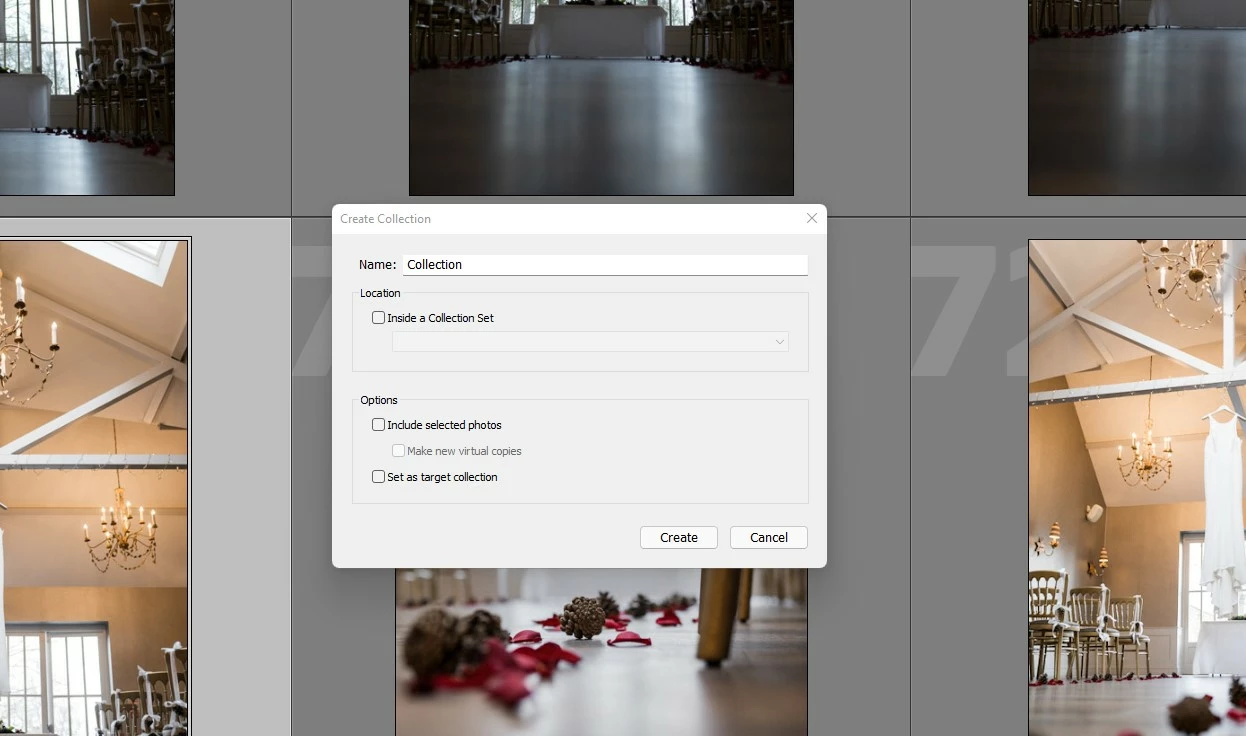
When I create a new collection the tick box for ''Sync with Lightroom'' is missing, there are no sync icons next to any of my other collections either.  When I click the Cloud shaped Sync icon in the top right corner I can start and stop Syncing with no error messages.


I am using Lightroom Classic Relase 11.1 on a Windows 11 PC, I am signed into my Adobe account through Lightroom and have a current subscription, I have 455GB of free HD space.  I am trying to Sync with Lightroom on my iPad Pro.


I would be so grateful of any suggestions, thank you in advance.

Image below shows missing tick box for syncing.


This topic has been closed for replies.

4 replies

Canon-Bas
Participant
December 20, 2023

Bedankt voor het aandragen van de oplossing Johan.

HansR65
Participant
November 5, 2023

same problem here. I only have one catalog and do not see the option to sync when creating a collection....

Participant
January 8, 2022

So it transpires that there was an issue with the actual installation and I had to uninstall and re-install Lightroom Classic.

There should have been a pop up box appear when I changed Catalogues and then clicked the Sync Cloud which said ''You can only Sync one catalogue at ones, would you like to switch this to the Synced catalogue?''


That now appears and everything is syncing fine with Lightroom CC 🙂

john beardsworth
Community Expert
Community Expert
January 8, 2022

There is such a popup when you try to sync the current catalogue and another is already synced.


Remember you can only sync one catalogue at a time. So if you want to sync a large number of those events at the same time, you're going to have to think how to work with that limitation. The easiest way, for example, is to adopt a single catalogue workflow which is perfectly practical with that many events.

JohanElzenga
Community Expert
Community Expert
January 9, 2022

Thanks John, the point is there is such a pop up but it was missing from my installation.  It is there now I have uninstalled and re-installed.  I can't imagine running a catalogue with 300-400 collections in it after a few years, I find it much easier to just start a new catalogue each year as I don't need access to previous years images but each to their own 🙂


@matthewt64 wrote:

Thanks John, the point is there is such a pop up but it was missing from my installation.  It is there now I have uninstalled and re-installed.  I can't imagine running a catalogue with 300-400 collections in it after a few years, I find it much easier to just start a new catalogue each year as I don't need access to previous years images but each to their own 🙂


You can do that, and switch syncing to the new catalog each year. There is nothing that stops you. Just remember that when you sync a new catalog, any image that is already in the cloud will be downloaded into the new synced catalog. You probably don't want that, so remove everything from the cloud (by removing the images from "All Synced Photographs") before you switch the syncing to the new catalog.


-- Johan W. Elzenga
JohanElzenga
Community Expert
Community Expert
January 8, 2022

Looks like sync is not enabled for this catalog. Do remember that you can only sync one single catalog!


-- Johan W. Elzenga
Participant
January 8, 2022

Hi Johan,


Thanks for your help.  How do I find out which Catalog is currently set to sync please?  Its the first time I have ever tried to use the Sync feature having only just bought an iPad Pro so can't think that I would have set an old catalog to sync.  Is there a way to set my current Catalogue to Sync and automatically disable and previous Sync settings?

dj_paige
Legend
January 8, 2022

You can go to File->Open Recent and try each catalog shown there and see if collections can be synched, until you find the one that allows this.


This is another great reason (among dozens of great reasons) to use one catalog.