
Participant
March 12, 2025
Answered

Onedrive fiasco on Windows

  • March 12, 2025
  • 2 replies
  • 941 views

Hi. 

I have Onedrive, like most pcs, and Lightroom stores the catalog files under photos. This automatically gets Onedrive to sync. It's causing me major headaches. Onedrive is asking me to confirm deleting thousands of files--which appear to be previews.


At this point I'd like to move lightroom out of onedrive. Can I just copy the files on another internal drive and redirect lightroom to that catalog? Under pictures I have a Lightroom folder and a Lightroom Catalog folder. I think the former is the more current. Does lightroom only create the one folder usually?


Any help would be greatly appreciated.
 

Correct answer Per Berntsen

LrC and Onedrive do not work well together, and can lead to catalog corruption.

The catalog folder can be anywhere, I suggest that you move it to the root of the C drive, like C:\Lightroom Catalog. Do this with LrC closed. Then double-click the catalog file to launch LrC from the new location.


You have to examine the two Lightroom folders you have and find out which one is current.

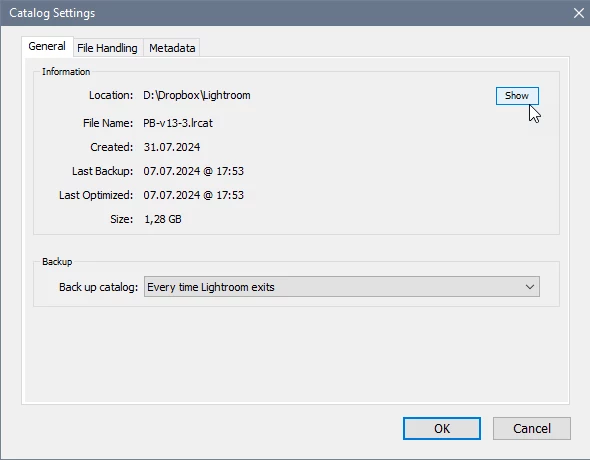
You can also go to Edit > Catalog settings and click the Show button to open the folder with the File explorer.

The catalog folder contains all the files and folders required, no additional folders are created.


2 replies

Per Berntsen
Community Expert
Per BerntsenCommunity ExpertCorrect answer
Community Expert
March 12, 2025

LrC and Onedrive do not work well together, and can lead to catalog corruption.

The catalog folder can be anywhere, I suggest that you move it to the root of the C drive, like C:\Lightroom Catalog. Do this with LrC closed. Then double-click the catalog file to launch LrC from the new location.


You have to examine the two Lightroom folders you have and find out which one is current.

You can also go to Edit > Catalog settings and click the Show button to open the folder with the File explorer.

The catalog folder contains all the files and folders required, no additional folders are created.


Participant
March 20, 2025

Thank you for this answer, I have spent days trying to find solutions this and to using Lightroom Classic on a new laptop win 11, in the same way I was using it on win10 without onedrive being involved.

DdeGannes
Community Expert
Community Expert
March 12, 2025

There are more than one option to avoid problems and that will depend on the resources available on your computer hardware.

Provide the actual version (numeric) of Lightroom and your operating system, Ram, HDD capacity, GPU etc.


Regards, Denis: iMac 27” mid-2015, macOS 11.7.10 Big Sur; 2TB SSD, 24 GB Ram, GPU 2 GB; LrC 12.5,; Lr 6.5, PS 24.7,; ACR 15.5,; (also Laptop Win 11, ver 24H2, LrC 15.0.1, PS 27.0; ) Camera Oly OM-D E-M1.