
cheriebrune
Participant
March 14, 2017
Answered

Organizing Catalog after Aperture Import

  • March 14, 2017
  • 1 reply
  • 385 views

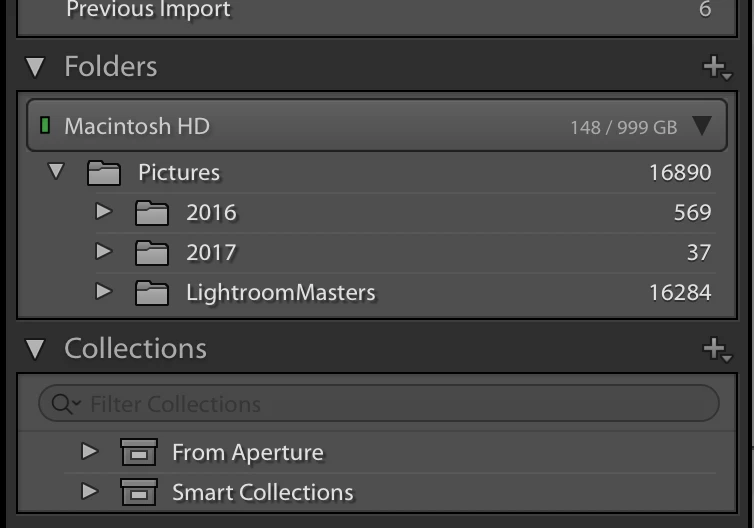
After importing my photos from Aperture into Lightroom via the Lightroom plug-in, all my Aperture photos are now in a subfolder within "Photos" entitled "Lightroom Masters". How do I integrate the "Lightroom Masters" into the "Pictures" folder without messing anything up?
    This topic has been closed for replies.
    Correct answer dj_paige

    May I suggest a different approach?

    Leave the folders as they are, and use keywords and other metadata to achieve organization and to search. This is not only simpler and more error proof — you do not have to perform the work to "integrate" your photos — and gives you a more powerful solution.

    If you ever need to find 2016 photos, you can do this using the Lightroom filter bar, even if the folders remain as you have shown.

    1 reply

    JP Hess
    Inspiring
    March 14, 2017

    The easiest and safest way to do that would be to close Lightroom and then use Finder to move the Masters folder as a  subfolder of the Pictures folder. Then open Lightroom and right-click on the Masters folder and update the folder location. If you are brave  you can try dragging the Masters folder and dropping it on the Pictures folder.

    cheriebrune
    Participant
    March 14, 2017

    The Lightroom Masters folder contains other subfolders of pictures by year. I have a 2016 and 2017 folder in both the Lightroom Masters folder and in the Pictures folder. I want to integrate the pictures together so I don't want the Lightroom Masters to remain a separate subfolder of the Pictures folder. Are you saying the safe way to move the Lightroom Masters folder would be to go into Finder and move it to the Pictures Folder? What happens to the Lightroom Masters name? Does it disappear? Sorry to sound dumb but I am so used to Aperture that this is new to me.

    dj_paige
    dj_paigeCorrect answer
    Legend
    March 14, 2017

    May I suggest a different approach?

    Leave the folders as they are, and use keywords and other metadata to achieve organization and to search. This is not only simpler and more error proof — you do not have to perform the work to "integrate" your photos — and gives you a more powerful solution.

    If you ever need to find 2016 photos, you can do this using the Lightroom filter bar, even if the folders remain as you have shown.