Inspiring
April 24, 2021
解決済み

P: Changes to Metadata Panel for targeting one or many images

  • April 24, 2021
  • 返信数 53.
  • 38312 ビュー

In LR 11.0, MacOS 11.6.


I select several images in the grid view. Edit the location info in the Image section. The metadata is only set on the 'most" selected image. It used to correctly set the data on all selected images.


This is a real problem for me. If I go out and shoot a few hundred images, now I have to edit each one individually. Unacceptable.


I did not check to see if any other fields exhibit the same behavior. This was enough for me.


Is there another (reasonable) way to set the location os a set of images?

解決に役立った回答 Ian Lyons

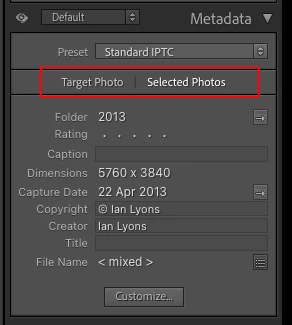
You need to tap on the 'new' and less than obvious 'Select Photos' button as shown in below screenshot. This enables the ability to apply metadata to multiple selected photos


返信数 53

RMACH
Known Participant
October 27, 2021

Lightroom Classic 11: It appears that when you try to apply the same title or caption to multiple photos in grid view only the first selected photo retains the title or caption. Please advise work around or confirm bug.

Inspiring
October 27, 2021

Make sure you have chosen the following when trying to change multiple photos - 


Ed Kruger
Participant
March 7, 2022

Thank you very much!

stefanv65892231
Participating Frequently
October 27, 2021

Hello,
I just installed LrC v11 and was shocked that all Image Metadata (Exif, IPTC, XMP,...) are disappeared.
The corresponding fields are all empty!
I went back to Version 10.4 with old catalogue file and they showed up again. See screenshots.
Win10 Home build 19043 / LrC v11 german language
Please fix this since Metadata especially IPTC Caption is the most important part for professional photo journalists.
See Screenshots:
Version V11

Rikk Flohr_Photography
Community Manager
Community Manager
October 27, 2021

We haven't seen any reports of dropped metadata. 

Do you still have your original 10.4 catalog and the 11.0 catalog that was upgraded? 

Rikk Flohr: Adobe Photography Org
Participating Frequently
April 24, 2021

Greetings! Is there a way to apply the same title to multiple photographs? I take bird photos and will end up with many of the same species. So far I haven't found a way to apply the species name to all of the photos of that bird. The spray can doesn't work for titles, for instance. Thanks in advance for any help.

Community Expert
April 24, 2021

What version of Lightroom are you referring to? The reference to spray can means it  might be Classic. There is n o spray can I think in what Adobe now calls Ligtroom which is the cloud oriented version of Lightroom. Anyway. giving the same title to multiple images works the same in both Lightroom Classic and Lightroom Cloud. You simply select multiple images in the grid view and type the title in the title metadata field. It will assign this same title to all selected images.

Participating Frequently
April 24, 2021
It is, indeed Lightroom Classic v10.2 that I'm using. It certainly makes
sense that selecting multiple images and then typing in a title would
result in that title being applied to all of the selected images. But it
doesn't work that way, at least not for me. Only the first of the selected
images receives the title; the title of the other selected images remains
blank.