Inspiring
April 24, 2021
해결됨

P: Changes to Metadata Panel for targeting one or many images

  • April 24, 2021
  • 53 답변들
  • 38313 조회

In LR 11.0, MacOS 11.6.


I select several images in the grid view. Edit the location info in the Image section. The metadata is only set on the 'most" selected image. It used to correctly set the data on all selected images.


This is a real problem for me. If I go out and shoot a few hundred images, now I have to edit each one individually. Unacceptable.


I did not check to see if any other fields exhibit the same behavior. This was enough for me.


Is there another (reasonable) way to set the location os a set of images?

최고의 답변: Ian Lyons

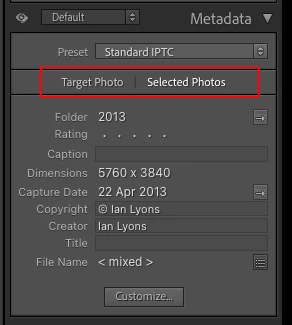
You need to tap on the 'new' and less than obvious 'Select Photos' button as shown in below screenshot. This enables the ability to apply metadata to multiple selected photos


53 답변

Participant
November 1, 2021

Issue

  • Lightroom Classic Version Number: 11.0
  • OS Version Number: Mac 11.6 (Big Sur)


Steps to reproduce:

  1.  In Map module
  2.  Select multiple images
  3. .Input geographic information such as Country Code, Country, State, City, Sublocation
  4.  Geographic information is saved in only one image, not all seleccted images.

Expected result:
Before 11.0, geographic information for multiple images was input at once. I expected same feature in 11.0.
Actual result

I must add information to each image, even when all of them were taken at the same place.

Ian Lyons
Community Expert
Community Expert
November 1, 2021

As with the Library module Metadata panel, in Map module you need to select the ' Selected Photos' option (see screenshot below)


Inspiring
November 1, 2021

Has anyone else noticed that you cannot caption multiple images simultaneously with the update to the new Lightroom 2021 (11.0)? In the previous version of Lightroom, it was possible to select multiple photos, give that selection an image title and caption, and Lightroom would save the information across the chosen images.


It would appear now if I have 300 images from the same event and want to caption them all as such—if I select all and paste the image caption, only the first image in the sequence is captioned. So it would appear that now all 300 images have to be captioned individually? Is there anyone else having this issue, or is it just my version of Lightroom that has this glitch.


Any assistance would be grateful,


Thanks, Steve

Community Expert
November 1, 2021

Same as before, there is an AutoSync setting for the Library module (independent from the equivalent option for Develop module). If you want to batch edit images in Library, this setting is worth turning on so that all highlighted images automatically receive that change rather than only the active image. It's a little toggle switch next to Sync button, at the lower left corner of the right side panels.

Inspiring
October 31, 2021

With release 11 of LR Classic it seems a bug has been introduced. Since my camera does not keep track of GPS coordinates I put them in myself into LR - did it for 2 years no problem. Now with v 11 I cannot paste the GPS coordinates into multiple photos. Only the first photo of the selection receives the GPS info and the others, though selected, are left blank. I hope Adobe gets this message. I'm not sure my time with their online help will do it.   Adding other metadata like keywords seems to work with multiple photos but GPS certainly does not work. I'm not about to check all the other metadata to see what does and does not work.


You need to ask program questions in the forum for the program you are using
To ask in the forum for your program please start at https://community.adobe.com/
Moving from Using the Community (which is about the forums) to the correct forum... Mod

Known Participant
October 31, 2021

After updating to Version 11.0 I select multiple images, then try to do a Paste into either the Title or Caption field (in the Library module). It only updates one image. I have to select the images one at a time and perform the Paste function individually. (I am running on Windows on a desktop PC)

Thanks for your help!

wanderer작성자
Inspiring
October 31, 2021

Check out Jim Wilde's answer above. Setting the hidden switch "Selected Photos" before pasting your metadata may fix your problem. When Jim highlights it in red it is actually visible. 🙂

Known Participant
November 1, 2021

Thanks, reading all the other posts I found the switch and solved the problem. I agree with everyone, a very obscure and frustrating change. But it solved my problem.

Thanks again.


Participant
October 31, 2021

With all previous versions of the Mac OS and Lightroom Classic, I have been able to add metadata to multiple photos, e.g. change capture date or add location data (GPS coordinates). As I am working with digitizing a large slide collection, this is particularly helpful. This morning I found that this no longer works.

I select multiple photos as before, add the data as before - but they are only added to one photo. I would appear that I have, in fact, only selected one photo. This is confusing as they appear to be selected in all other contexts (keyword, delete etc).

I have checked all settings I am aware of, but can't find out what this can be.

Participant
October 31, 2021

Issue

  • Lightroom Classic Version Number: 11
  • OS Version Number: 11.4


Steps to reproduce:

  1. Select a number of pics in bibliothek and give them trhe same title
  2. press confirm button
  3. only the first picture of the selection series takes on the title
  4. the same error occurs when assigning keywords

Expected result: Title and keyword in all selected pics like in LR 10
Actual result: only the first pic takes the title and keywords

Jim Wilde
Community Expert
Community Expert
October 31, 2021

Look at the top of the Metadata Panel and make sure you have "Selected Photos" selected. This is a new feature of LrC11:


Ke-Thie
Participating Frequently
October 30, 2021

Hello everyone,

I am including GPS coordinates to my photos and used to be able to select all pictures, drag into location and then just "confirm" in the field on the right by selecting the italic locations and confirm. Now, when I select multiple photos and confirm as I always used to, only ONE photo will have the correct location, the others remain in italic. I hope there is a simple fix for this as I don't think will really have to spend time on something that used to be working perfect before.


Does anyone have the same issue? Or ist there a workaround?


Thank you,

Kethie

Jim Wilde
Community Expert
Community Expert
October 30, 2021

Make sure you have selected the "Selected Photos" option at the top of the Metadata panel:


Ke-Thie
Participating Frequently
October 30, 2021

Thanks Jim!!!

All fine now. I knew there had to be something I missed. 😉


Thank you!

brunor91137898
Participating Frequently
October 28, 2021

Hello. I just installed latest version of Lightroom Classic (11.0) and all is working perfect but all of a sudden my legends stopped being recorded. I eddit my photos, sign the material and write all the legends but as soon as I export them to my hard drive in JPEG, no more legend and data. Signature, hashtags, legends, simply gone. Can anyone help? 

DdeGannes
Community Expert
Community Expert
October 28, 2021

This is a different issue from that posted by the original Author.

It is better to start a new thread with an appropriate heading.


Regards, Denis: iMac 27” mid-2015, macOS 11.7.10 Big Sur; 2TB SSD, 24 GB Ram, GPU 2 GB; LrC 12.5,; Lr 6.5, PS 24.7,; ACR 15.5,; (also Laptop Win 11, ver 24H2, LrC 15.0.1, PS 27.0; ) Camera Oly OM-D E-M1.
DdeGannes
Community Expert
Community Expert
October 28, 2021

It's as Rikk, has pointed out there are changes to the metadata workflow and it is indicated in the new features of the upgrade.


Regards, Denis: iMac 27” mid-2015, macOS 11.7.10 Big Sur; 2TB SSD, 24 GB Ram, GPU 2 GB; LrC 12.5,; Lr 6.5, PS 24.7,; ACR 15.5,; (also Laptop Win 11, ver 24H2, LrC 15.0.1, PS 27.0; ) Camera Oly OM-D E-M1.
Known Participant
October 28, 2021

Hello, this is about Lightroom Classic 11.0 (just released, totally fresh LR catalog) on Windows 10. In the Metadata panel in the "Title/Headline" (?) field, i assign image titles to several selected pics at once.


But checking after the deed, only the first selected pic got the title. I know very well that until 3 days ago, you could select a string of pics and they ALL got the title i typed into the Metada panel.Tags and Descriptions can still be assigned to a whole string of selected pics (i tried), but the title is only applied to the first in the selection.


That's horrible. There may be an assumption that one title can only go into 1 pic, and the next pic needs another title. But if that was ever a thought at Adobe, it is not correct. I sometimes want to apply the same title to many pics - and now i cannot, even though i could before. And i want to use Lightroom in this case, not Bridge.


I don't see a preference option to change this behaviour.


Your take?


Thanks!


*sorry, am re-translating from non-English LRC version. I mean the Metadata panel with the input field "Title/Headline" (?) right UNDER the subheader "Content" (?), and right above the fields "Description" and then "IPTC Subject Code".

Known Participant
October 28, 2021

My complaint from above is cleared - i changed to "Selected photos" and was ok. I hadn't at all seen this, and it's greyed out when less than 2 pics are selected.


I understand the improvements that this new option "Targeted"/"Selected" brings, still it's tricky.

Rikk Flohr_Photography
Community Manager
Community Manager
October 27, 2021

Changes were made to improve the Metadata Panel in 11.0. One of these changes is the ability to improve performance by chosing a mode for the behavior of the panel. 


At the top of the Metadata Panel is a new selection Targeted or Selected Photos. Do you have this set to Target?  Target only displays and affects metadata for the Targeted Photo (most selected). 


The previous behavior 10.4 and earlier requires the Selected Photos to be the toggle choice. 


Rikk Flohr: Adobe Photography Org
wanderer작성자
Inspiring
October 28, 2021

Thank you. This obscure, unrecognized and difficult to see setting fixed my problem. 


Adobe: Why? You introduced a "fix" for a problem that did not exist and it caused me a lot of concern and wasted time. You didn't even default the setting to the original behavior. You also introduced 2 indistinct buttons in an area that never contained them before. It only had data entry fields, except for the Preset drop down that I only look at once a year. In my opinion this does not follow good UI principles.

Known Participant
January 30, 2022

I agree. I'm just finding this thread two months later having lost hours that I spent setting metadata fields on a large number of photos only to discover that I was setting only the "target" photos. At the very least, the number of messages in this thread suggests that the UI design is problematic. Another piece of evidence: this strange selected/target toggle only applies to the metadata panel, not to keywords or comments.