


Participant
November 5, 2021
Answered

P: Local Adjustment (Masking) Sliders are affecting entire image

  • November 5, 2021
  • 37 replies
  • 51359 views

Hello, i can't seem to make the new masking tool to work correct.

When i make an adjusment, by brush, auto select or any other tool the mask shows up in my image, red by default, and when i make a change in the Basic-panel, the adjustments will be applied over the whole image and not just the masked part.
Is this a bug or am i doing something nog correct?
Help please... 🙂
 

Correct answer Per Berntsen

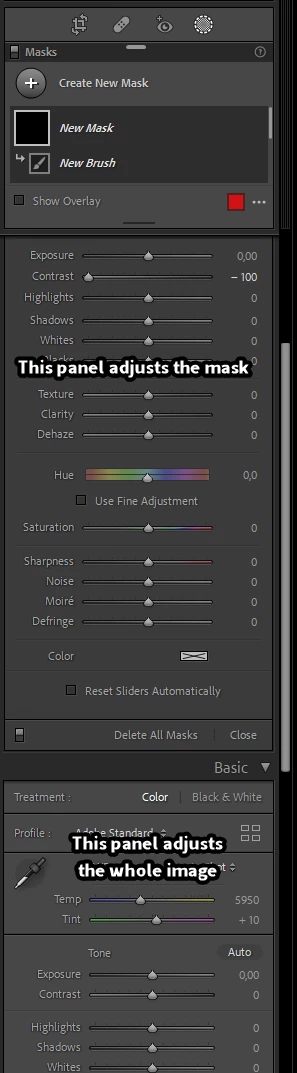
Sounds like you are using the Basic panel (adjusts the whole image) instead of the local adjustments panel.

Scroll up to see it.


37 replies

Known Participant
November 15, 2021

I'm not sure if this is a bug or just my not being used to the new masking features in LRc (11, I think).  In short, the selecdtions work, so far as advertised in separatring out the items to be masked.  But, when I make an adjustment after a selection (e.g. sky), the entire imate is adjusted.  The mask seems to have no effect, even though the mask shows until I select a slider.  What am I missing.  Using Win10x64, on RAW files.

Known Participant
November 15, 2021

...meant "image"

Participant
November 14, 2021

Why when I apply a linear gradient and try to make changes tio it the entire image is effected???


GoldingD
Legend
November 14, 2021

This one keeps coming up. The cause is that you are using the basic panel instead if the mask panel. Did you perhaps collsp the mask panel by clicking on that triangle, result would be that you see an amount slider instead if the full panel.


.Above image shows the triangle I am refering to, and that the mask overlay is on (another user thought the mask overlay was turning the whole imge red) you can ignor thst last bit, image from earlier solution.


Participant
November 14, 2021

I am having an issue with Lightroom V11. Windows. I make a mask using select subject, red mask shows subject selected. Try to make an adjustment (any kind of adjustment) and the whole photo is adjusted not just the mask. Anyone have any ideas what is up with this. I have uninstalled LR and reinstalled but no luck.

Rob_Cullen
Community Expert
Community Expert
November 14, 2021

You have scrolled down the right-hand panels and are adjusting sliders in the 'Basic' Panel.

Also it is possible the 'Brush/Gradient' adjustment panel is in 'collapsed' mode. Click on both the small white 'spinner' triangles on the right-hand edge of the panel to expand the Brush and Effect Mask adjustment panel-


Regards. My System: Windows-11, Lightroom-Classic 15.1.1, Photoshop 27.3.1, ACR 18.1.1, Lightroom 9.0, Lr-iOS 10.4.0, Bridge 16.0.2 .
Participant
March 30, 2022

Thank you so much for this input. 

I also could not work out how to affect just the masked area as my whole photo was effected. 

I tried previous responses in this thread to this common problem but it was your input that gave me a solution. 

so thankful there was a solution!!!!!! I was getting quite frustrated 😆

Participating Frequently
November 13, 2021

I am having a problem with the new masking in Lightroom.  I select Masking - Radial Gradient.  I draw an oval where I want to apply the edits (exposure in this case).  I slide the exposure bar and the exposure changes to the entire photograph, not where I placed the mask.  Am I missing something?

KR Seals
Community Expert
Community Expert
November 13, 2021

Can you post a screen shot of the Lightroom Classic screen showing the mask, mask controls and exposure slider?

Ken Seals - Nikon Z 9, Z 8, 14mm-800mm. Computer Win 11 Pro, I7-14700K, 64GB, RTX3070TI. Travel machine: 2021 MacBook Pro M1 MAX 64GB. All Adobe apps.
Participant
November 13, 2021

Hi , i'm new to lightroom . I've seen a couple of videos like this https://www.youtube.com/watch?v=tzPWzJQsYTI and things seem to be pretty straight forward to begin with , except .... once i apply the mask and start moving parameters (exposure , etc) the whole image gets affected - not just the area highlighted . What's going on  ?  

Participant
November 13, 2021

i solved it .  Don't know how to delete this post ...

Participant
November 13, 2021

I can mask easilly and that seems to work fine, what ever method I use no problems and get an overlay that looks right. But when I try and make any adjustments, they are applied to the whole image, regardless of what I try. 

I also seem to have trouble removing part of a selection with the brush, I can get the brush, with the - sign, and even see the red mask area to indicate what should be getting removed, but it doesnt have any effect. ( this could possible be something I am doing, considering I cant get step 1 to work, I havent tried all options to fix this second issue).

TIA

Mark

Rikk Flohr_Photography
Community Manager
Community Manager
November 13, 2021

Likely one of these two scenarios. In both cases you are inadvertantly using the Basic Panel sliders:


1. You have collapsed the Local Adjustment Sliders and need to expand them by clicking the disclosure triangle. 

or

2. You have scrolled past the Local Adjustment Sliders and are moving the Basic panel sliders.

Rikk Flohr: Adobe Photography Org
mikejduk
Participating Frequently
November 8, 2021

Hi, I am using Lightroom Classic CC and have the latest version 11.0 installed. I'm using an iMac OS. However, the new masking tools aren't working correctly. When I select radial filter for example, then make adjustments, exposure for instance, the effect is NOT restricted to the area I have selected but to the whole image. This applies to all the tools. I have uninstalled and reinstalled the software but no change.

GoldingD
Legend
November 5, 2021


when i make a change in the Basic-panel


Wrong panel


watch: https://www.youtube.com/watch?v=Y7Fld8eEHsE

biancAuthor
Participant
November 5, 2021

oh my.... thanks!! 


Vincent Walter
Participating Frequently
November 12, 2021

I see it was fixed, but without watching the 52 minute video can you say what you were getting wrong?


I've been using masks without issue for the past 5 days and now I have the same issue you describe and I've done the usual re-start, try a new image, and read a few things before jumping in here.  I'm stumped.