
Known Participant
June 25, 2024
Question

P: Map > Tracklog > Auto-Tag does not work in 13.3.1 and 13.4

  • June 25, 2024
  • 2 replies
  • 489 views

Tracklog auto-tagging may be broken in recent releases.


STEPS TO REPRODUCE


  1. Select photos
  2. Switch to Map module
  3. Load a tracklog
  4. Apply timezone adjustments if necessary
  5. Choose Auto-Tag


EXPECTED BEHAVIOR


Photos should be placed on the track appropriately.


ACTUAL BEHAVIOR


Lightroom reports "No matching photos"


VERSIONS


Lightroom Classic 13.3.1, 13.4 on OS X 14.5, MacBook Pro M3.


SCREENSHOT


The following screenshot shows a time-offset tracklog that should find matching photos, but does not.
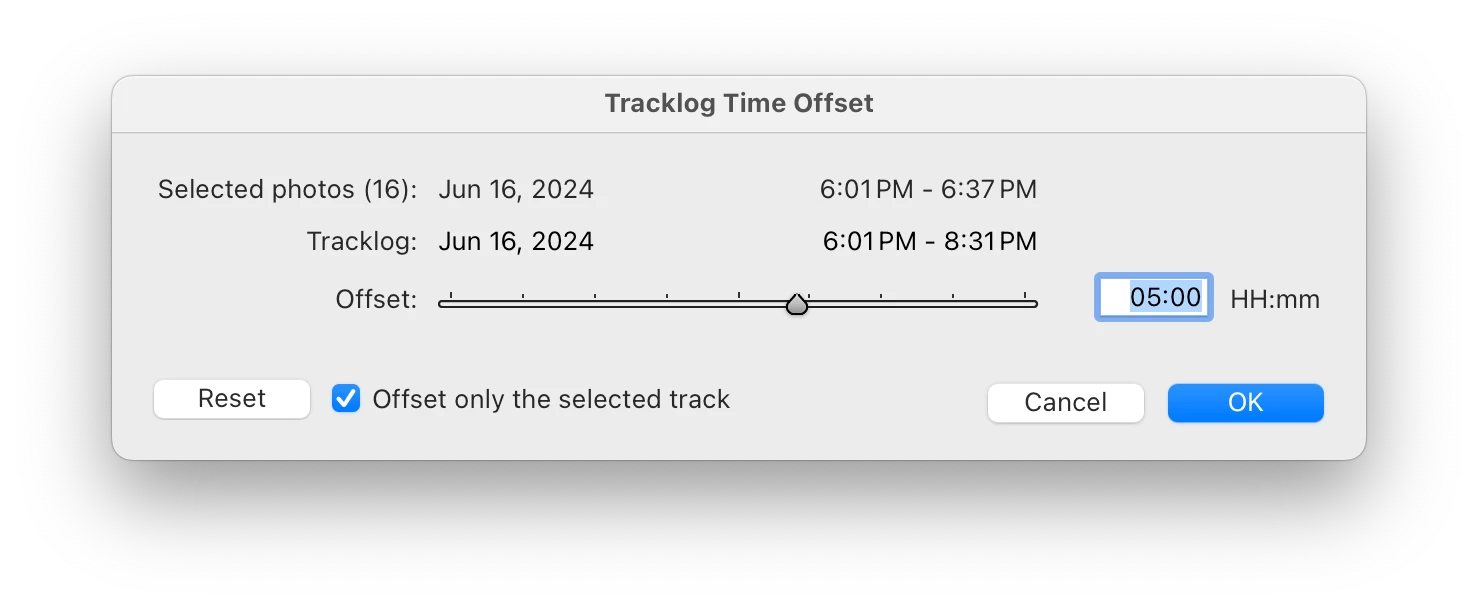
The time ranges for the selected photos and the tracklog overlap, but Lightroom still reports "No matching photos".


OTHER


Tracklog was generated with iOS app Geotag Photos 2, with both camera (Sony DSC-RX100M5A) and device (iPhone 12) set to UK timezone. Running Lightroom on a computer in US Eastern (-5 hours).


Auto-tagging has worked previously with similar tracklogs/timezone offsets.

2 replies

Participating Frequently
October 27, 2024

Hello,


exactly the same problem here : .GPX donne with an iOS app (GeoTracker Pro), time zone adjustement done, and LrC 13.5.1 return an error "No matching photos", even that the selected photos are in the time interval of .gpx file. I can even see the correct time by hovering over the track displayed by LrC in the map module. 


The same configuration (same cameras, same iOS app' and same workflow) worked well before this year. The only change was the update of LrC, but as I can see here, this bug existed already with former versions of LrC... 


Someone has found a workaround? Thanks.

Participating Frequently
October 27, 2024

Ok problem solved :

1) Remove all localisation data of my pictures

2) Quit and relaunch LrC

3) Load again the .gpx file

4) Set the time adjustement with the ruler rather than entering it manually (moreover because it's a negative adjustement (-1 hour) and maybe (I suppose) entering the minus symbol or something else generates a bug/a count shift in LrC)...  

Known Participant
June 25, 2024

UPDATE


This appears to be an issue only for certain tracklogs. Some other tracklog/photo sets generated with the same equipment work successfully. I thought it might be to do with the tracklog file containing multiple tracks, but that doesn't seem to be the issue, as some such files work correctly.


I'll keep trying to see if I can isolate this properly.

johnrellis
Legend
June 25, 2024

I tried a quickie test in LR 13.4, and Auto-Tag worked correctly, so as you've observed, the problem is likely specific to particular tracklogs or photos.  Upload a problem tracklog and a couple sample photos in a .zip to Dropbox, Google Drive, or similar and post the sharing link here. Adobe won't pay any attention unless they can easily reproduce the problem.