

P: Raw defaults aren't applied to a Denoise DNG when imported
Raw defaults aren't applied to a Denoise DNG when the DNG is imported. To reproduce in LR 13.2 / Mac OS:
1. Download, unzip, and open this small catalog in LR:
https://www.dropbox.com/s/ewd4kyct5pqw4t9/raw-defaults-bug.2024.05.19.zip?dl=0
2. Do File > Import Develop Profiles And Presets and import "Exposure = 5.xmp" from the catalog folder.
3. Set Preferences > Presets > Raw Defaults > Global to User Preset: Exposure = 5.
4. In the Library Folders panel, right-click the folder "raw-defaults" and do Synchronize, with Show Import Dialog Before Importing. Ensure that Build Previews: Standard and Develop Settings: None are set.
5. Observe that the raw default preset Exposure = 5 has been applied to IMG_9340.DNG (an Apple ProRAW photo) but not to DSCF2425-Enhanced-NR.dng (made with Denoise).
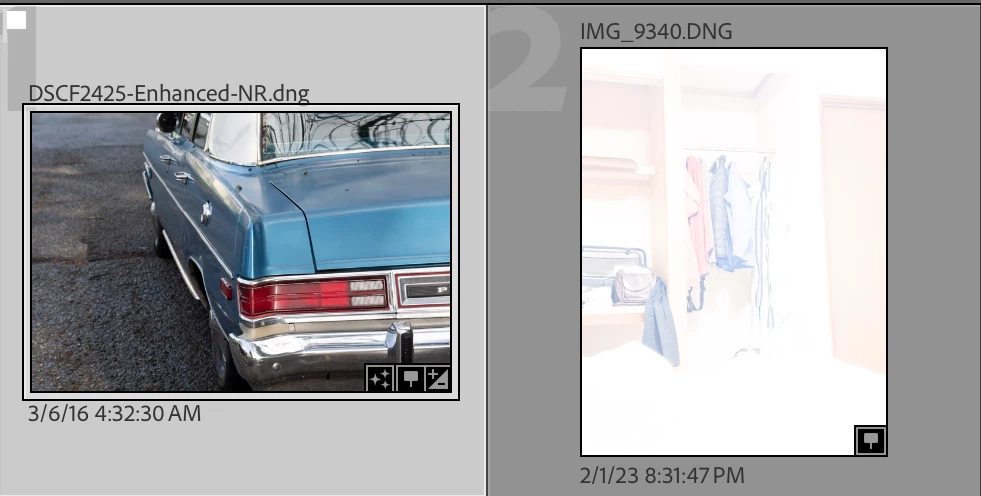
6. Edit DSCF2425-Enhanced-NR.dng in Develop. Observe that Exposure = 0.
7. Click Reset and observe that Exposure is now 5.
 AdChoices