
Participant
April 12, 2021
Answered

P: Toolbar [Done] Button has moved to tool bar beneath Histogram

  • April 12, 2021
  • 27 replies
  • 30044 views

Hola, tras la nueva actualizacion a Lightroom Classic 12.0, el botón "HECHO" que se encontraba en la esquina inferior derecha para dar el OK luego de añadir nuevas mascaras, recortes y algunos ajustyes locale.....pues ese botón ha desaparecido de mi programa LrC 12.0,,,,,no se que ha pasado, tengo que dar ENTER en mi teclado o bien doble click fuera de la imagen para aplicar cambios,,,,,,me pueden decir si esta nueva actualizacion se ha cargado ese botón o es que hay alguna forma de activarlo...??... antes se encontraba en este sitio, adjunto imagen de referencia.
 

Correct answer Rikk Flohr_Photography

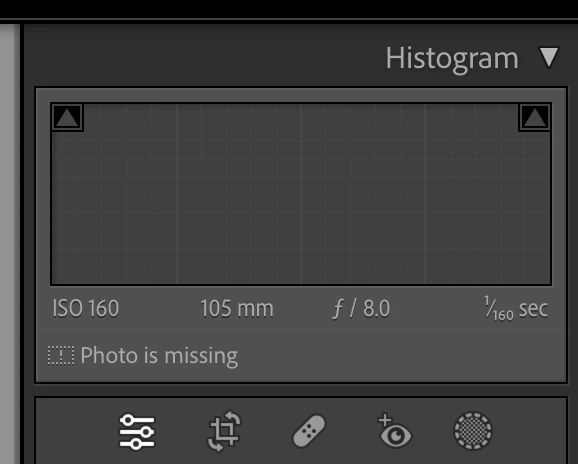
The [Done] button is no longer in the Tool Bar ([ T ]) for the Crop, Mask, Target Adjustment Tools (TAT), White Balance and the Guided Upright tools. It is replaced by the [Return to Edit] button to the left of the Crop tool under the Histogram. The button now applies and exits the active tool.

Note: There is more than one way to commit each of these tools.

Example: Crop Tool


  1. You can click the [Return to Edits] button that replaced [Done] or
  2. You can click the Crop icon again or
  3. You can use the [Enter/Return] key or
  4. You can use the [Esc] key or
  5. Use the Crop KBSC [ R] or 
  6.  Use the [Close] inside the Crop Panel (Thanks MattK - I missed that one)
  7. Simply move to the next image (if you want to maintain the tool between images)


Similar situations exist for the other tools for which the [Done] button was relocated.


27 replies

Participant
November 7, 2022

Olá. O botão OK sumiu na barra quando uso a ferramenta cortar. Quando aperto o T a barra reaparece, mas sem o OK. Como resolver?

George_F
Community Expert
Community Expert
November 7, 2022

Adobe has done away with the "Done" button in most of Lightroom in the most recent updates.  Instead, the Editing Panel has its own button now.  You just click on that button to get back to the editing panel.  It does take some getting used to, but I've found I like the update pretty well.

Cheers!

George F, Photographer & Forum Volunteer
Participant
November 3, 2022

In the last Lightroom update, the "OK" button disappeared. Is that right or is my Lightroom having problems?

dj_paige
Legend
November 3, 2022

What "OK" button in what function? Where did you see it before the update?


Are you perhaps talking about the "Done" button? If so, that has been removed in many places in Lightroom Classic.

Participant
November 2, 2022

After my update to LRC 23 in my masking tool and crop tool, I can't see the checkmark to accept the results. I have to go to the actual tool and select close. That doesn't seem like it use to be. Any advice?


MacOS Monterrey

LRC 12.0.1


Participant
November 1, 2022

PUT BACK THE DONE BUTTON!!!!!!  NOW!!!!  THANK YOU!!!!

Participating Frequently
October 30, 2022

Just updated to v12 and working with cropping tool.  Where did the button go to close on the bottom ribbon?  Now in order to close, I need to use the side right bar.  This is not as convenient.  Any chance the button is coming back?

BobLevine
Community Expert
Community Expert
October 30, 2022

Version 12 of what? I'll move your post if tell me where it's supposed to go.

Robert at ID-Tasker
Legend
October 30, 2022

I think screenshot is from Ligthroom ?

Inspiring
October 26, 2022

I've just upgraded to 12.0 for Lightroom Classic on Windows 10 on PC (didn't really seem to have a choice about that) and now the crop tool is no longer working like it used to and I don't know how to get it back.

If I go to crop, the Done button has disappeared, but worse than that, I can no longer manage the grop from one side or one corner. It now just automatically crops the whole lot keeping it in the same ratio the photo was taken.


I've searched in Preferences but can't find anything that will put the crop tool back to where it was. Does anyone know how please?

Rob_Cullen
Community Expert
Community Expert
October 26, 2022

The [Done] button has been removed in v12- It is redundant! (FOUR other ways to [Done].!!}

1) Click the (new) Edit Button instead, to return to Developing-

2) Or- Click on the Crop Tool icon once again,

3) Or press the [Enter/Return] key.

4) Or Press keyboard key [R]  which both opens and closes the Crop tool.


To enable changing the "Ratio"- click on the Padlock to 'open' it allowing a 'Freehand' crop.

Click on the context menu next to the padlock for crop ratio presets.

Use Custom ratios, that you define, and LrC will store up to Five of your custom ratios.


Regards. My System: Windows-11, Lightroom-Classic 15.1.1, Photoshop 27.3.1, ACR 18.1.1, Lightroom 9.0, Lr-iOS 10.4.0, Bridge 16.0.2 .
Inspiring
October 26, 2022

Thank you, Rob, appreciated. So I understand about the Done button. But with crop it means I still have to stick to a ratio, even if it's one I preset? I can't just freehand crop anymore?  I find that quite disappointing. Do you know why that decision was made? I found the freehand cropping so useful and used it constantly.

Known Participant
October 24, 2022

New version of LR Classic


When I'm in cropping, masking, healing, one of those 5 icons under the histogram, the option of "Done" that I have been clicking for the last 8 years is no longer there. I have to go up to "Reset | Close" and click close. That needs to be fixed ASAP please. Thank you. 


dj_paige
Legend
October 24, 2022

This has been discussed many times already. Either the Edit icon (left-most in the local adjustment panel) or the Masking icon (right-most in the local adjustment panel) or "Close" produces the same effect as the "Done" button used to produce. The "Done" button has been removed.

Rob_Cullen
Community Expert
Community Expert
October 22, 2022

I like my image window as large as possible- I regularly close the Tool bar - then I never see the [Done] button. I have no need for it with all the other options available.

A nice 'tidy up' Adobe.


Regards. My System: Windows-11, Lightroom-Classic 15.1.1, Photoshop 27.3.1, ACR 18.1.1, Lightroom 9.0, Lr-iOS 10.4.0, Bridge 16.0.2 .
Legend
October 22, 2022

The redundant Done button is gone because it's not needed.


Users do not need to hit the Enter key to close a tool. Click the open tool's icon or click the new Edit icon or click the Close at the bottom of the tool panel or press Enter. All these do the same as the old Done button.


Yes, users might find they have to retrain the muscle memory. It won't take long and is probably good for your brain.


Known Participant
October 24, 2022

I don't care if its redundant by 100 times. It's a feature I got used to and changing is frustrating. It didn't need to happen. Stop "improving" software, Adobe! 

kglad
Community Expert
Community Expert
October 24, 2022

@PatrickMcG, then stop updating your software.  install the version you want and leave alone for as long it's compatible with your computer.

Participant
October 21, 2022

This seems like a bad design decision. Now users must hit the keyboard to execute (DONE) instead continuing to edit with just the mouse?!?  Ouch! 

DdeGannes
Community Expert
Community Expert
October 22, 2022

SeaTurtleBud, stated "This seems like a bad design decision. Now users must hit the keyboard to execute (DONE) instead continuing to edit with just the mouse?!?  Ouch! "

Absolutely not if you are using an editing tool, e.g. the crop tool you click on the crop icon to activate carry out your crop task when you have completed your work and click on the crop icon it will save your work and return you to where you were working previously. If you click on another tool then the crop would save and you will be sent to the new selected option. No keyboard action is involved.


In my workflow I rearly use keyboard keys, no need for the "Done button".


Regards, Denis: iMac 27” mid-2015, macOS 11.7.10 Big Sur; 2TB SSD, 24 GB Ram, GPU 2 GB; LrC 12.5,; Lr 6.5, PS 24.7,; ACR 15.5,; (also Laptop Win 11, ver 24H2, LrC 15.0.1, PS 27.0; ) Camera Oly OM-D E-M1.