
Participant
May 29, 2025
Answered

panneau réglages de base plus disponible avec les masques

  • May 29, 2025
  • 2 replies
  • 555 views

Bonjour, 

Lorsque j'utilise un des masques, je n'ai plus la possibilité de travailler les réglages de base. Par exemple, je ne peux plus travailler l'exposition ou les hautes lumières du sujet sélectionné. LEs réglages de base s'appliquent à toute la photo. Cela fonctionnait il y a quelques jours. Pourriez-vous m'aider?
Correct answer Per Berntsen

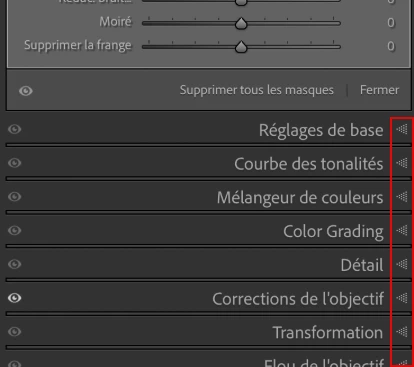
All the panels for global editing have been collapsed.

Click the arrows on the right to expand them.


2 replies

Participant
May 29, 2025


Participant
May 29, 2025

Thank you @AxelMatt for your feedback. I uploaded the picture as suggested. I'm trying to work on the bird : using a mask and trying to work on the basic settings such as the exposure... but this pannel does not show up anymore. I don't recall having change anything, perhaps the last LR update.. Would this help? 


Per Berntsen
Community Expert
Community Expert
May 29, 2025

If you work with masks you have to go back to the "normal" editings first bei clicking the mask symbol (1) again or the 3-slider symbol (2).


Normal (global) editing can be done even if a mask is active, so there is no need to close the masking panel. (although in most cases you would probably want to close it)

AxelMatt
Community Expert
Community Expert
May 29, 2025

Do you have closed the local editings? 

What has been changed on your system before the error occur?


Try to reset the preferences of Lightroom Classic:  How to reset Lightroom Classic preferences (adobe.com)

It's recommended to backup your preferences before you reset the preferences to the default settings: 

https://helpx.adobe.com/lightroom-classic/kb/preference-file-and-other-file-locations.html


If this doesn't help, please provide a copy of your 'System Info'. This can be get from the LrC Help > System Info menu item. There's a copy button in the System Info dialog. Press this button and paste the info into your next forum post.


Your attached screenshot is doesn't readable. To insert screenshots, please use the "Insert Photos" icon in the toolbar, so that we don't have to download them. 


My System: Intel i7-8700K - 64GB RAM - NVidia Geforce RTX 3060 - Windows 11 Pro 25H2 -- LR-Classic 15 - Photoshop 27 - Nik Collection 8 - PureRAW 6 - Topaz Photo AI