Big_Lynx
Known Participant
October 16, 2024
Question

Paper Size is missing

  • October 16, 2024
  • 1 reply
  • 1430 views

My environment:

  • MacBook Pro M1 Max
  • Lr Classic: 14.0
  • Printer: EPSON SC-P700

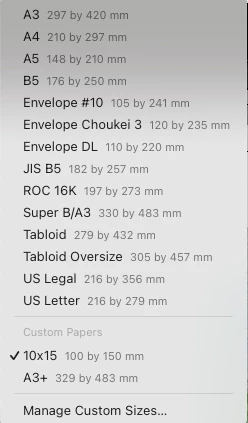
The issue is about available in printing module paper sizes and paper handling. Let me show you some screenshots:

  • Paper sizes in LrC:


As you see e.g. 10x15 (4x6") format is missing. As well as A3+ is missing (however you may use SuperB/A3 instead). Thanks to the Custom Size option I defined 10x15 but LrC produces very strange results (please ignore the color quality of the photo of the printing):



Printing parameters: "rotate to fit, maximum size (margins 0,3cm).


  • In opposition, Ps sees the available formats as follows:
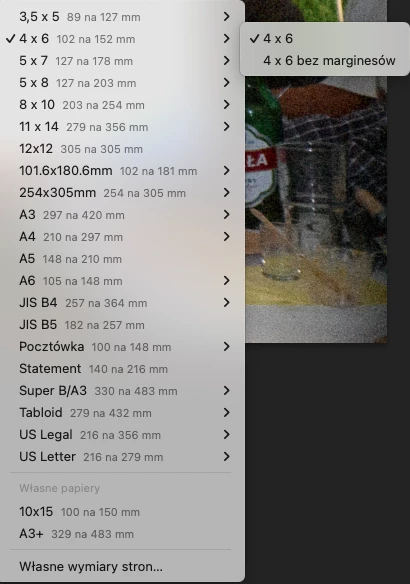
As you see 4x6 is pre-defined but what is more interesting - printing is 100% proper.


To complete the problem. Standard MacOS viewer shows the following formats for this printer:
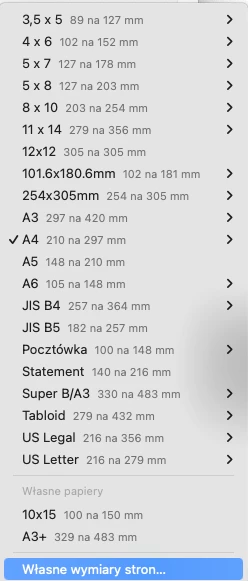
 

Any idea what is wrong? Any workaround?


Regards,

Tomek


This topic has been closed for replies.

1 reply

Big_Lynx
Big_LynxAuthor
Known Participant
October 17, 2024

After plenty of tests, I found a very strange workaround. To properly print on 10x15 (4x6) paper size you can't use user-defined size (see my previous post on how the printing looks like) but you have to use an existing paper format and adjust cell size and it's a position to receive proper prints.  Here is the configuration that works for me:


In summary, this is not just a specific paper size missing in the Lr module's communication with the printer driver; this is just the bug.

Big_Lynx
Big_LynxAuthor
Known Participant
October 17, 2024
Big_Lynx
Big_LynxAuthor
Known Participant
October 25, 2024

There doesn't seem to be a printer driver for MacOS 15 - at least none for my printer (SC P800).


I assume you refer to the EPSON support page. But in my case, when I deleted the printer and added it again, MacOS recognized it and installed it in both cases: cable and IP.