
Participant
January 5, 2025
Question

Part of picture is missing in lightroom and photoshop

  • January 5, 2025
  • 3 replies
  • 647 views

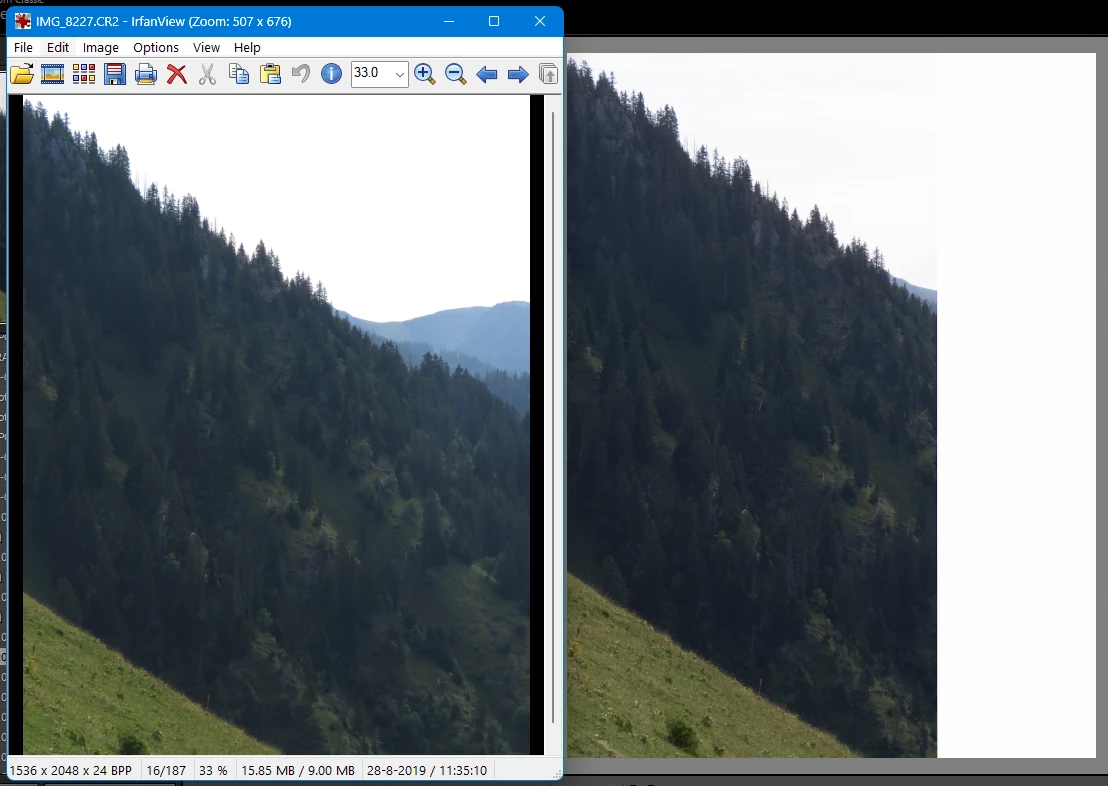
I have several pictures (CR2 files) that appear to be damaged. If I look at them with either Lightroom (14.1) or Photoshop. When I open them in for example Irfanview, the picture is as it should be.

Picture below shows a screencapture of left Irfanview and right lightroom.


Tried:

- removing picture from lightroom and re-import -> no change

- discard smartpreview and then build smartpreview.

-renaming file and importing "new" file


Any help on what to do or where to find an answer is appreciated.
 

3 replies

GoldingD
Legend
January 5, 2025

Can you share the RAW file,, perhaps at DropBox, as so members can test?


ValkenierAuthor
Participant
January 6, 2025

I can. Google Drive:

https://drive.google.com/file/d/1S8z35KBv_QhGBkykJ_1xbiudZR2UGFlk/view?usp=sharing

(let me know if I missed something in the setting of Google Drive..)

GoldingD
Legend
January 6, 2025

So, yes, I am seeing a problem. And now that I look at it with a more critical eye, I can see that part of the right side is missing. Like it was cut out.


The above a screenshot from LrC, and annotated to show the missing part. I get a same result in PS (opening directly into PS)


I suspect a corrupt RAW file. And I suspect that in your alternate viewer you are looking at the embeded JPEG


In Canon Digital PhotoProf 4. I see this:


Definitely showing RAW file corruption.


This is not a problem caused by LrC. You might try a different method of copying the file off of the memory card onto a hard drive (in case your card reader or cable is failing). You might try copying it to a different hard drive, in case a drive is failing. And is that card Ok?


Inquiry: How are you transferring the photos from your camera to your computer? And then into your catalog? And where to you place them (what hard drive)


Community Expert
January 5, 2025

It is likely that irfanview is showing the built-in jpeg preview from the cr2 file instead of interpreting the raw file. You should try another program that actually interprets the raw data to see if the raw data is damaged. Oftentimes, since the jpeg preview is such a smaller part of the raw file than the raw data itself, when raw files get damaged in copying or because of some some problem with the memory card, the jpeg preview is intact while the raw data is mangled.  

ValkenierAuthor
Participant
January 6, 2025

Ah, I didn't know about the build-in JPEG previews. So I learned something already, thanks 😉

Can you suggest a program that actually only reads the raw file?

I've searched and the info is not always clear what the program uses. For example Factstone image viewer shows the good picture, not the damaged one. But I can't find if it uses the jpeg or the raw file. Someone recommended fastrawviewer (which isn't free). Don't mind paying a (small) license fee as long as it does what I hope fore...

dj_paige
Legend
January 6, 2025

Can you suggest a program that actually only reads the raw file?


Lightroom Classic and Photoshop do this. LrC shows the photo is "damaged", the right part isn't there, however I suspect the problem is in the camera, it wasn't able to capture the entire image or it wasn't able to write the entire image to the disk for some reason.


If you want to use the RAW, you get the incomplete photo (as shown in your screen capture on the right). If you want to use the built-in JPG preview, well, that would be much lower resolution than the RAW. Your choice which to use.

dj_paige
Legend
January 5, 2025

What camera took this photo?

ValkenierAuthor
Participant
January 6, 2025

Model - Canon PowerShot SX60 HS