
Known Participant
February 17, 2024
Question

Pb of refreshing datas in LRc

  • February 17, 2024
  • 4 replies
  • 1222 views

Hi everybody,


I'm a little desperate because I've been having a problem for over a month with the LRC Library module but no one has managed to find the solution so far, including 2nd level technical support at Adobe. The number of files data in the navigation window shows 0 even though there are files in the folder. See screenshot.


I've tried a lot of things so far but the problem still persists : creation of a new catalog, deletion of the helper file at the catalog level, in short it's still the same problem which doesn't prevent you from working but it It's still annoying.
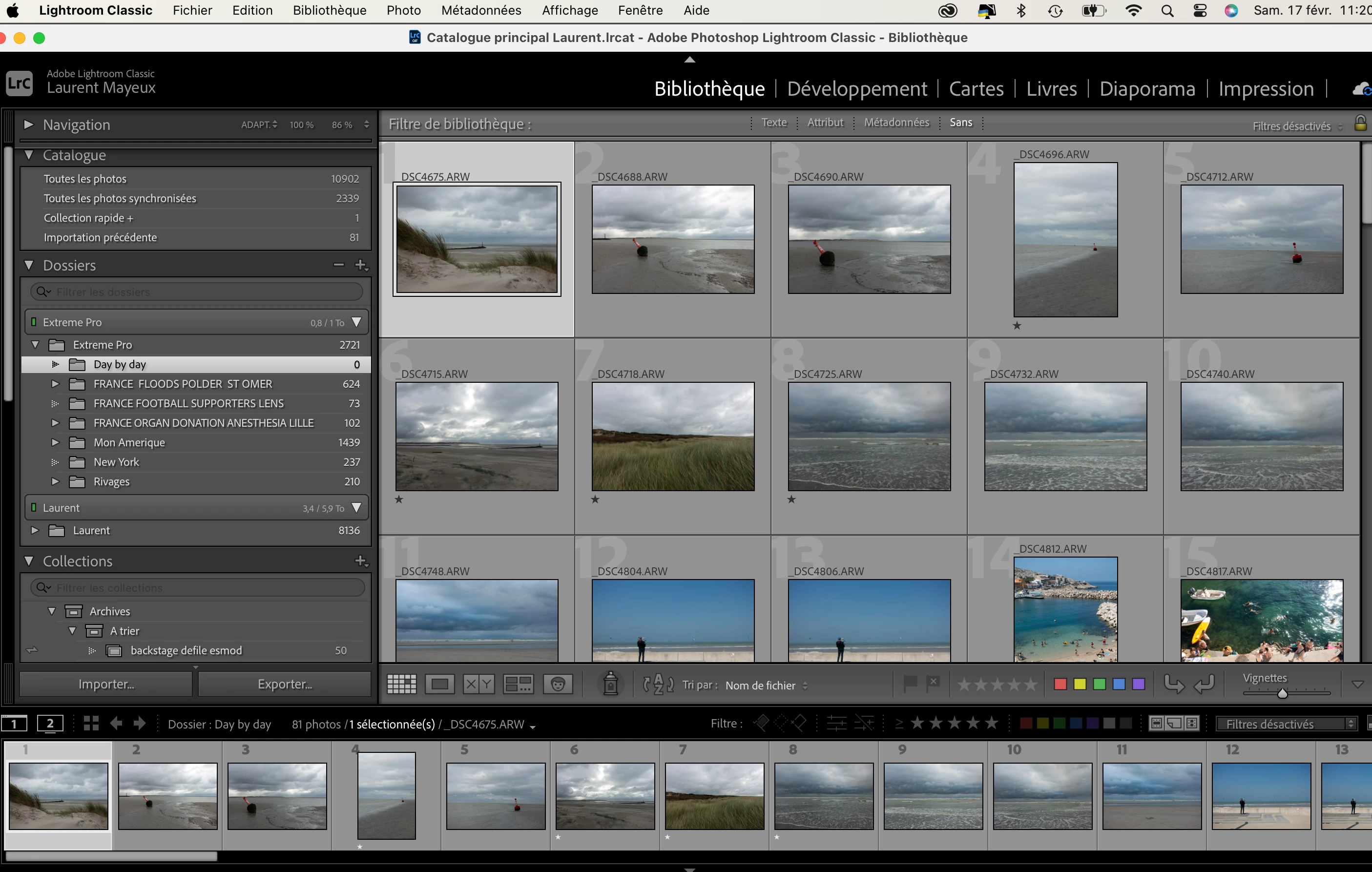
 

This topic has been closed for replies.

4 replies

Mendelsphotography
Participating Frequently
February 19, 2024

Is it just 1 catalog? Or every catalog you make. Also have you maybe tried using another folder instead like let's say moving the files to another folder and then relocate them in Lightroom to that folder?


Not an expert in a way but trying to think of getting down to the issue. I am sure support tried many things and maybe even tried all my suggestions. 1 thing I feel like is when troubleshooting many people just try different things but try maybe narrow down the issue. When you narrow down the issue chances of figuring it out are higher. 

quote

Hi everybody,


I'm a little desperate because I've been having a problem for over a month with the LRC Library module but no one has managed to find the solution so far, including 2nd level technical support at Adobe. The number of files data in the navigation window shows 0 even though there are files in the folder. See screenshot.


I've tried a lot of things so far but the problem still persists : creation of a new catalog, deletion of the helper file at the catalog level, in short it's still the same problem which doesn't prevent you from working but it It's still annoying.


By @Laurent Mayeux


Student photographer, Videographer, and developer.
Mendelsphotography
Participating Frequently
February 19, 2024

Ok I see you said making a new catalog did not help. But how about trying what I said about new folder is that something you have done? 

Student photographer, Videographer, and developer.
Known Participant
February 19, 2024

Good point even if pb is not yet fixed. See 2 screen shots 

1 - When I create a new folder and moove pictures 

2 - After mooving files, the new destination folder seems empty meanwhile it is not. I need to relaunch LR in order to see and develop files inside...


Jim Wilde
Community Expert
Community Expert
February 17, 2024

Using Finder, locate your catalog folder, inside that folder will be a "your catalog name Helper.lrdata" package. Delete ONLY that package that ends with Helper.lrdata, then restart LrC to see if that corrects the issue.

Known Participant
February 17, 2024

Click on the small filled triangle left to the name of the folder and you will see the subfolder wher your pics are.

GoldingD
Legend
February 17, 2024
quote

Click on the small filled triangle left to the name of the folder and you will see the subfolder wher your pics are.


By @hanomann

I thought that at first, but upon re-looking, and testing in my own catalog,. Some situations occur


  • With the option to show photos in subfolders on, the parent folder should show the total number of photos, AND if you select the parent folder the grid view will show the previews.
  • With the option to show photos in subfolders off, the parent folder will show 0 photos, AND the grid view will NOT display those previews.
  • But in this case zero is shown as if show photos in subfolders is off and previews are shown aas if show photos in subfolders is on.


Known Participant
February 17, 2024

Yes, but unfortunately no changes...

F. McLion
Community Expert
Community Expert
February 17, 2024
--- Got your issue resolved? Please label the response as 'Correct Answer' to help your fellow community members find a solution to similar problems. ---
Known Participant
February 18, 2024

Yes, but still bugging