
TheValou917
Participant
November 16, 2021
Answered

Photo from Lightroom CC looks flat and faded when synchronized or exported

  • November 16, 2021
  • 1 reply
  • 2465 views

Hello everyone,


I am facing a problem with my Lightroom library.

When exporting photos (Being careful to export in JPEG color profile sRGB), I realized that they look very flat and faded.

I also noticed that these photos have the same flat aspect when synchronized on the cloud and viewed in Lightroom on my Android phone.

When opening an exported JPEG to share on instagram, all the hard work in coloring that has been done is faded, and a simple boost in saturation does not restore it to how I want it to look.

Did anynone encounter a similar issue ?


Thanks for your help !
This topic has been closed for replies.
Correct answer Per Berntsen

There's a bug in Windows 11 that prevents the monitor profile from loading properly.

Photoshop relies on a sound and correct monitor profile to display correct colors, so you're most likely not seeing correct colors in Photoshop. The Photos app is not color managed, and does not use the monitor profile, so it is unaffected by the issue.


The best thing to do is to roll back to Windows 10. If you can't do that, there's a workaround, but I can't say for certain whether it works properly, and produces correct colors. I'm on Windows 10, and have no desire to upgrade.


Close Lightroom.

Make sure that HDR is disabled in Windows display settings.

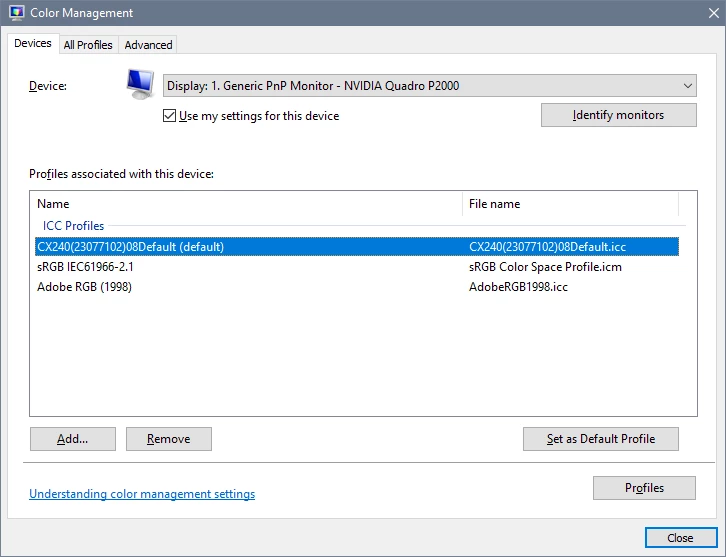
Then press the Windows key + R, type colorcpl in the box and press Enter.

This brings up the color management settings, and will display your monitor profile. (default)

Now go the Advanced tab, and set the monitor profile as Device profile at the top.


1 reply

Per Berntsen
Community Expert
Community Expert
November 16, 2021

In what application are you viewing the exported photos?

And are you on Windows 10 or 11?

TheValou917
Participant
November 16, 2021

I am on windows 11.
The photos have the same faded appearance whatever the device or platform I use after exporting (Windows Photos, the native gallery apps of IOS and Samsung Galaxy S20, or when attempting to export to Instagram).

The photos also appear faded if I synchronize them on my phone's or iPad's Lightroom app.

Per Berntsen
Community Expert
Per BerntsenCommunity ExpertCorrect answer
Community Expert
November 16, 2021

There's a bug in Windows 11 that prevents the monitor profile from loading properly.

Photoshop relies on a sound and correct monitor profile to display correct colors, so you're most likely not seeing correct colors in Photoshop. The Photos app is not color managed, and does not use the monitor profile, so it is unaffected by the issue.


The best thing to do is to roll back to Windows 10. If you can't do that, there's a workaround, but I can't say for certain whether it works properly, and produces correct colors. I'm on Windows 10, and have no desire to upgrade.


Close Lightroom.

Make sure that HDR is disabled in Windows display settings.

Then press the Windows key + R, type colorcpl in the box and press Enter.

This brings up the color management settings, and will display your monitor profile. (default)

Now go the Advanced tab, and set the monitor profile as Device profile at the top.