
Known Participant
January 30, 2017
Answered

Photos imported from external hard drive out of focus

  • January 30, 2017
  • 2 replies
  • 4282 views

Took family photos yesterday and imported into Lightroom from my SD card. They all turned out blurry and out of focus. I thought I took bad photos so I downloaded into my Mac Iphotos and they are perfect, clear and in focus. Why would this happen, could I have done something wrong on the import. Photos in Lightroom from this shoot are terrible.

    This topic has been closed for replies.
    Correct answer Rob_Cullen

    Ok imported my 33 family photos using my SD card and this time they turned out great..

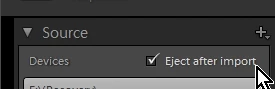
    Quick question. How do I safely eject my SD card from Lightroom?

    John Brehm


    Hi John, nice to know they are now looking good. 

    "eject SD..."

    The expanded Import dialog does have an option box to eject -

    I normally only use the Windows operating system method of clicking on the icon in the task bar after all imports have finished.

    You are on a Mac, so I think that is just a drag of the desktop icon to the Trash basket (which changes to the 'eject' icon)

    I use a card reader (never the camera to usb) and I always format the SD card in the camera before the next shoot (AND I have backed up all the images.)

    2 replies

    Participating Frequently
    January 30, 2017

    I have seen this with my own pictures as well. In my case, I am shooting RAW format. When RAW photos are imported into LR, you see the data as recorded on the sensor once LR has built its own preview from the RAW data. Also included in the RAW file, is the camera's JPEG preview. On first display, you will notice the preview photo is displayed and then it changes. Often, the final photo looks worse. This is because the initial display is the camera built JPEG which is then replaced with the preview LR builds from the RAW file as part of the import process..

    Some software, and I don't use iPhoto, does not "see" the RAW photo but, instead, loads the embedded JPEG preview. The difference is that there has been some in camera processing on the preview which including some sharpening. The RAW data does not go through any processing prior to display on your monitor so the photo will look a bit blurry due to a lack of any sharpening.

    I add a bit of sharpening as part of the import process but not too much. Take an image and try sharpening it to see if the blurriness clears up. If the image is really out of focus and a touch of sharpening does not fix it then there is something else happening here. I'll let others who are smarter than me also weigh in.

    Known Participant
    January 30, 2017

    I imported JPEG files. I have successfully imported other photos no problem. iPhoto photos are in focus.

    Rob_Cullen
    Community Expert
    Community Expert
    January 30, 2017

    We need some more information from you to help-

    Where did Lightroom import the photos from? the SD card? and where are they now in your computer?

    Did you set the option for 1:1 size previews when you imported the photos into Lightroom?

    Are you looking at the images in the Grid thumbnails or Loupe view, or the Develop module?

    Are you looking with a Zoom level larger than 1:1 ?

    Regards. My System: Windows-11, Lightroom-Classic 15.1.1, Photoshop 27.3.1, ACR 18.1.1, Lightroom 9.0, Lr-iOS 10.4.0, Bridge 16.0.2 .