
December 2, 2025
Answered

Photos stuck in Export with Lightroom Classic

  • December 2, 2025
  • 1 reply
  • 1004 views

I could use some help.  I also do not know very much about LrC, so please be kind.  I am a basic user (and could use a class on how to use LrC more in depth).  I have some photos I want to export, but it keeps getting hung up (see photo).  I can wait forever and it doesn't change.  I have tried to export each photo one by one, and some will go and some will get stuck.  I am not sure why some photos are causing this vs. others going.  They are all .jpg photos (no .mov and no .heic photos).  Can anyone give me advice on what to try?  I am updated to the latest firmware for LrC and my Mac OS.  Thanks.
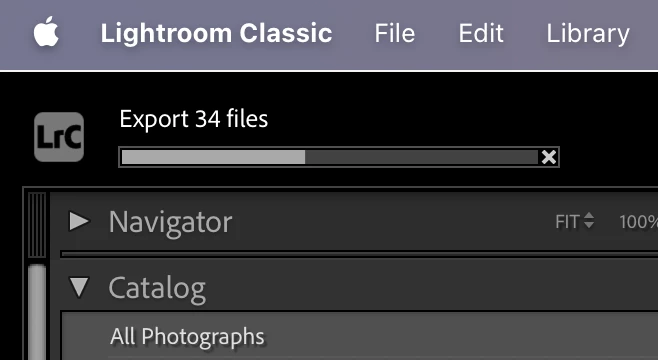
867410i609E2D4773E78773.png

Correct answer denisem59063945

Excellent.


To help others who might have similar symptoms, could you provide details on how you (or Adobe support) repaired the catalog?


I wish I could.  I honestly used ChatGPT, and it problem solved it all the way.  My catalog was so corrupted I am not sure how to explain without loading pages and pages of conversation with ChatGPT.  And I'm not sure it would be helpful.  All I can say is, you helped by identifying the problem (corrupt catalog) and Chat walked me through the steps, especially walking around all the issues that came up.

1 reply

johnrellis
Legend
December 3, 2025

1. As a first step, please do the LR menu command Help > System Info and copy/paste the entire contents here so we can see exactly which versions of hardware and software LR thinks you're running and important LR options that are set.


2. For a particular photo that gets stuck, will it get stuck each time you try to export it individually?  Or does it eventually export?

December 3, 2025

Thanks John, for the help!


1.  Here is the Help > System Info:

Lightroom Classic version: 15.0.1 [ 202511041508-dddee541 ]
License: Creative Cloud
Language setting: en-US
Operating system: Mac OS 15
Version: 15.6.1 [24G90]
Application architecture: arm64
Logical processor count: 16
Processor speed: NA
SqLite Version: 3.36.0
Adobe GSDK Version: 1.4.0.171

Power Source: Battery, 100%
Built-in memory: 65,536.0 MB
Dedicated GPU memory used by Lightroom: 571.4MB / 49,152.0MB (1%)
Real memory available to Lightroom: 65,536.0 MB
Real memory used by Lightroom: 5,657.2 MB (8.6%)
Virtual memory used by Lightroom: 419,947.1 MB
Memory cache size: 431.4MB
Internal Camera Raw version: 18.0 [ 2389 ]
Maximum thread count used by Camera Raw: 5
Camera Raw SIMD optimization: SSE2
Camera Raw virtual memory: 54MB / 32767MB (0%)
Camera Raw real memory: 542MB / 65536MB (0%)

Cache1:
NT- RAM:0.0MB, VRAM:0.0MB, Combined:0.0MB

Cache2:
m:431.4MB, n:0.0MB

U-main: 200.0MB

Standard Preview Size: 1440 pixels
Displays: 1) 3456x2234

Graphics Processor Info:
Metal: Apple M4 Max
Init State: GPU for Export supported by default
User Preference: Auto
Enable HDR in Library: OFF
GPU for Preview Generation: Auto (S5_48)

Application folder: /Applications/Adobe Lightroom Classic
Library Path: /Users/denisemccoy/Pictures/Lightroom/Lightroom/Lightroom 5 Catalog-v13.lrcat
Settings Folder: /Users/denisemccoy/Library/Application Support/Adobe/Lightroom

Installed Plugins:
1) AdobeStock
2) Aperture/iPhoto Importer Plug-in
3) Flickr

Config.lua flags:


2.  Yes, it gets stuck when I try to export it individually.  My work around was to try and find the picture on my phone and re-import it to see if that helps.  Sometimes it does, sometimes not.  Then when I try to export the whole folder again, another photo will do the same.  I've never had this issue before.

johnrellis
Legend
December 3, 2025

@denisem59063945: "Yes, it gets stuck when I try to export it individually.  My work around was to try and find the picture on my phone and re-import it to see if that helps.  Sometimes it does, sometimes not.  Then when I try to export the whole folder again, another photo will do the same.  I've never had this issue before."


I don't recall hearing those precise symptoms before -- strange.


You could narrow down whether it's the catalog causing the issues: In LR, do File > New Catalog to create a test catalog. Then import a bunch of the problem photos from their current locations on your Mac, using the Import Add option (so they don't get copied or moved by importing).  Does the problem occur with the test catalog?