
Known Participant
May 15, 2017
Question

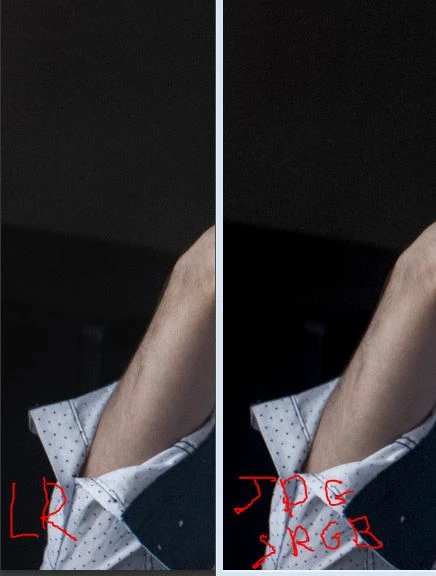
Picture is lighter in LR than in any other program

  • May 15, 2017
  • 1 reply
  • 1770 views

Hello!

Recently I was surprised that LR displays pictures lighter than on exported JPG (exported in sRGB, as well as AdobeRGB, ProPhotoRGB) or other programs (GIMP, DxO, xnView, fast stone, windows viewer and so on). It is very well seen in the darks (please, look at the attached screenshot). If I open the exported JPG in LR, it looks lighter again.

I use LR 5.7 and calibrated display, profiles seem to be loaded correctly in the system.

I have tried many ways to fix this, however didn't succeed. Unfortunately, it is very annoying to keep in mind that deep shadows will be lost after export even if a picture looks just fine in LR.
This topic has been closed for replies.

1 reply

Per Berntsen
Community Expert
Community Expert
May 15, 2017

Most likely, the monitor profile is corrupted, or incompatible with Lightroom.

What version of Windows do you have?

What kind of calibrator?

And are you creating a version 2 or version 4 icc profile?

Lightroom has a problem with version 4 profiles.

Try setting the monitor profile to sRGB (or Adobe RGB if you have a wide gamut monitor).

If that fixes the problem, you have a corrupted or incompatible monitor profile.

Press the Windows key+R, type colorcpl, and hit Enter.

Add the sRGB profile, then set it as Default profile. See screenshot (from Windows 7) below.

Make sure that Use my settings for this device is checked.

12qwer233Author
Known Participant
May 15, 2017

Hello Per,

thanks for your reply.

I use Win7, EIZO CS230 and i1 Display Pro. Calibration was done by Color Navigator (the calibrator appears as i1 Display 3 / Pro there)

Actually, I don't know what version of icc profiles Color Navigator creates when calibrating the display.

Regarding your experiment. After I changed the default profile to sRGB, the difference between the exported JPG and LR disappeared (please, look at the attached screenshot). At least, I can't see noticeable difference.

I'm not sure if the display profile is corrupted (may be it is). But definitely, LR seems to have troubles with display profiles. Other programs doesn't.

12qwer233Author
Known Participant
May 16, 2017

To set the profile version and tone curve, you have to create a new target in Color Navigator.

After having clicked Next a few times, you will see this screen, click Customize profile.

That will present you with this screen, where you choose version 2.2.

Under Tone curve below, although LUT is recommended, choose Gamma value. LUT can create problems.

Then calibrate again with the new target selected in the main window (first screenshot).


Just have done everything as you suggested. I tried several different targets with icc 2.2 or 4.2, LUT or gamma tone curve. Result is the same: exported JPG is much darker. That's a pity. May be, this is a LR problem?

Thank you for very descriptive replies.