
Participant
January 11, 2019
Question

Picture noise after export

  • January 11, 2019
  • 1 reply
  • 4404 views

Hello!

I am using Lightroom to edit my RAW files and export them.

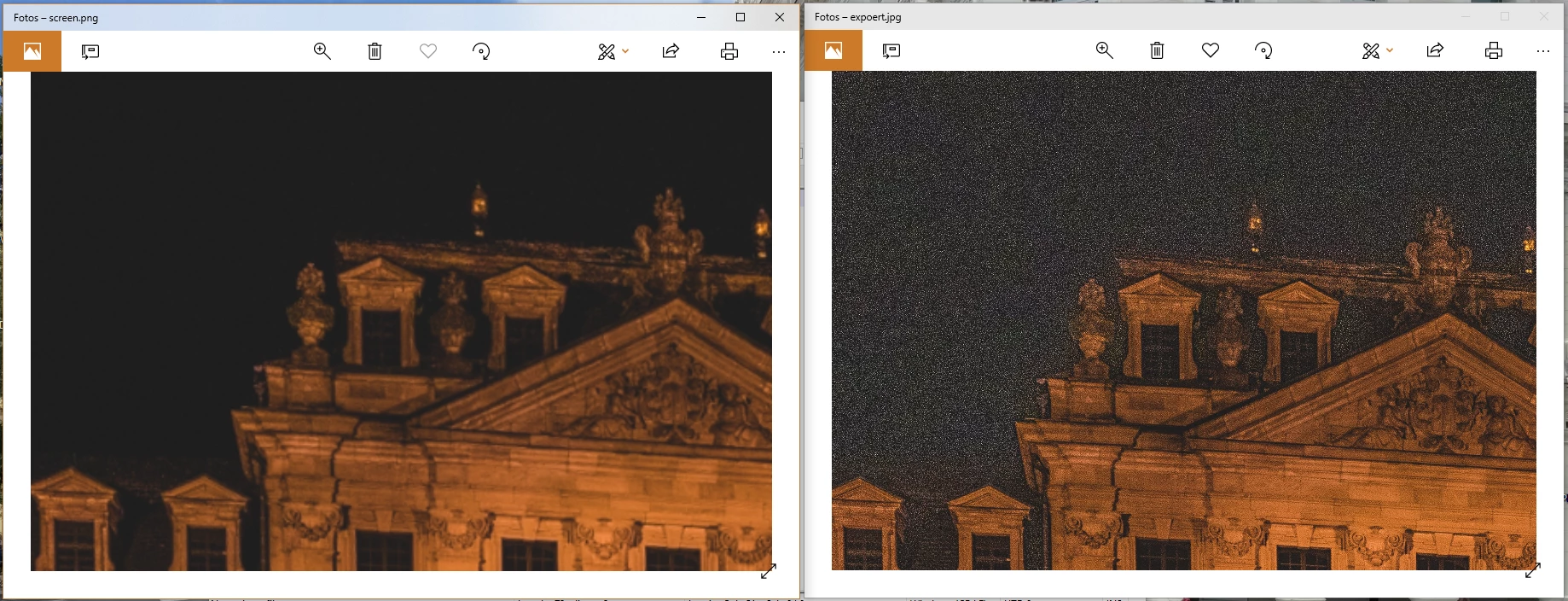
On some files I have the problem that the image in Lightroom looks good, but after I exported it, the noise is extreme high.

At first I thought that it is a problem of the JPEG compression. Then I expoerted the same picture as PNG, but the noise even get worse.

I use the Adobe RGB color space at export and no sharpening at all.

Does anybody can tell me why?

The left side shows the picture as it appears in lightroom(its a screenshot), the right side is the exported PNG from lightroom
This topic has been closed for replies.

1 reply

Just Shoot Me
Legend
January 11, 2019

As far as I know PNG compresses files even more than JPG. Export as a TIFF and look.

Participant
January 11, 2019

Hello JustShootMe,

unfortunately I can not use TIFF for my further use of the photos.

But I tried anybut and the TIFF Picture hat the same problem (a little less noise than in PNG or JPEG, but still not useable for printing or using it on websites)

Todd Shaner
Legend
January 11, 2019

This is almost always due to insufficient Noise Reduction and/or excessive Sharpening settings. Tell us the camera model and ISO setting for this image and a screenshot of the 'Detail' panel settings you applied. Also what version of LR are you using?