
Participant
February 11, 2024
Question

Pictures are grainy after zoom

  • February 11, 2024
  • 1 reply
  • 170 views

After upgrade to the latest version
all my pictures when i zoom are grainy in Lightroom clasic
I have googled and try some solutions like

disable the graphic card proccessor,
Disable smart preview
No Luck.
When i open the same pictures with other software it is clean sharp
Left side is Lightroom right side NX
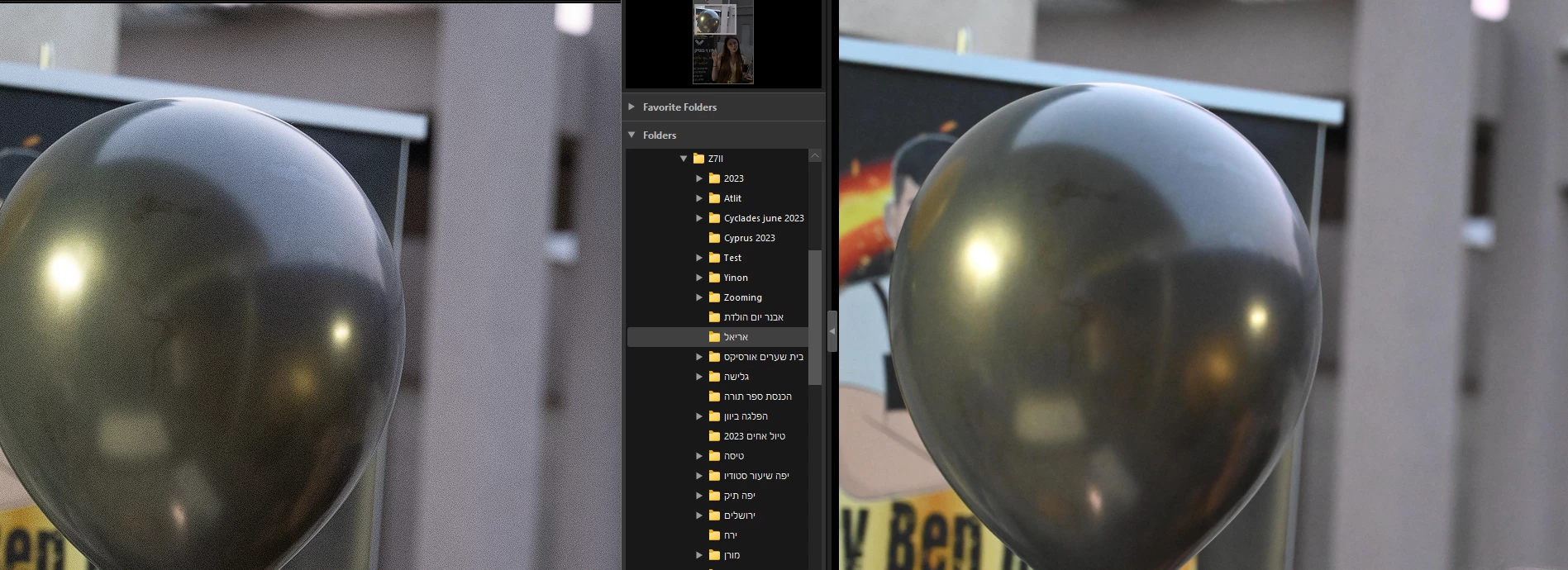
I am using windows 11 
32 GB RAM
RADEON 5700XT 8GB

Lightroom 13.1 Release

Thanks
Avner

This topic has been closed for replies.

1 reply

Participant
February 11, 2024

I guess that to be a stuborn is good ,
tried graphic card settings 
tried most of performance options,
finally seen the presets raw setings, it reminds me the quick develop settings

Changed Quick Develpment from adobe default to camera settings
and it worked 

Sorry for disturbuing 

D Fosse
Community Expert
Community Expert
February 11, 2024

What were your original settings for noise reduction? What ISO? Please show a screenshot.


Camera manufacturer software usually have very aggressive noise reduction applied. Lightroom by contrast is conservative at default settings. You're supposed to find your own best settings for noise reduction. The sliders are there to be used.


In addition, Lightroom has the AI-based "Denoise", which is extremely effective, but does require a good GPU to process efficiently.