- 1 GB of VRAM (Video RAM, or RAM on the video adapter). 2 GB of dedicated VRAM is suggested for large, high-resolution (such as 4K and 5K) monitors.
- OpenGL 3.3. If you're not sure if your card fully supports OpenGL 3.3, contact the card manufacturer.
Copy link to clipboard
Copied
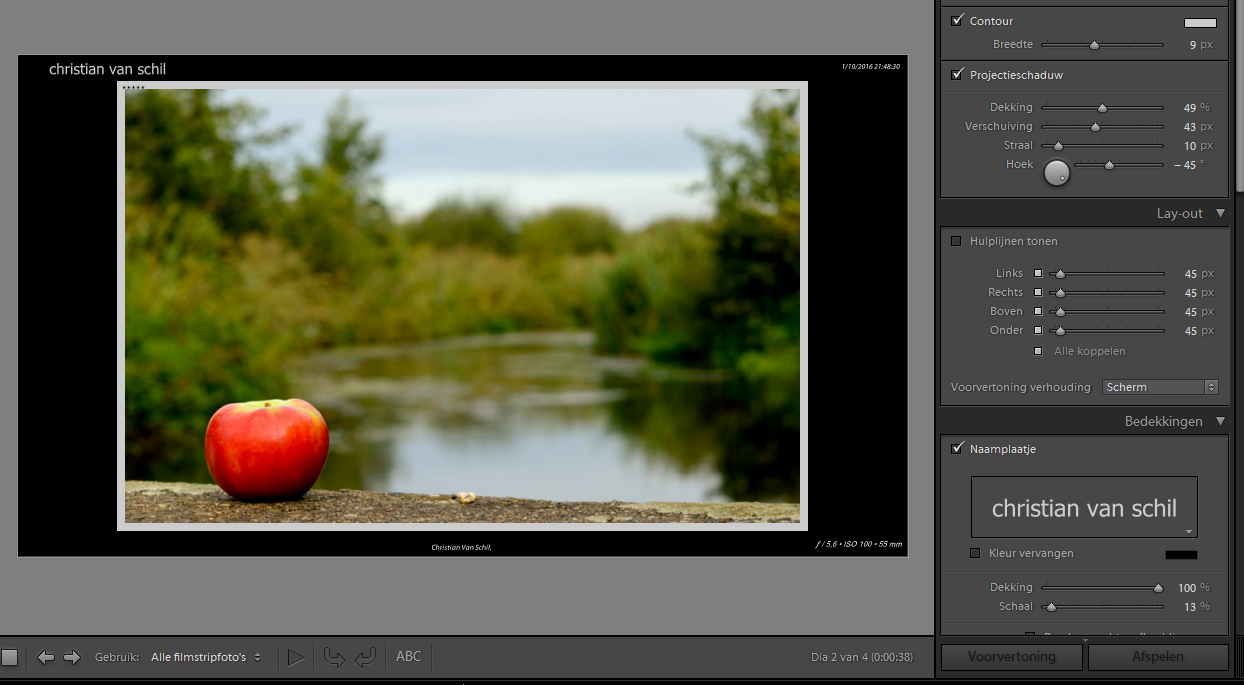
I have LR now for 3 months and now working with the presentation module but the play button is greyed out, also via the menu "played, pauze, etc" is greyed out.
My LR version is :
Lightroom-versie: CC 2015.8 [ 1099473 ]
OS: Windows 10
Thx for any help on this.
Christian
Is your video card compatible with this version of Lightroom? This may be related to your problem.
Adobe Lightroom GPU Troubleshooting and FAQ
Copy link to clipboard
Copied
Can you post a screen shot? Have you been able to use the Presentation feature before? Have you tried selecting a different folder? Are you seeing '!' or '?' on your images?
Copy link to clipboard
Copied
Hi,
As you can see bottom right the dutch word 'afspelen' which means 'play' in English is greyed out.
It is the first time that I use the Presentation feature, everything is working except that I can't use the Play button.

Copy link to clipboard
Copied
Is your video card compatible with this version of Lightroom? This may be related to your problem.
Adobe Lightroom GPU Troubleshooting and FAQ
Mac OS:
Find more inspiration, events, and resources on the new Adobe Community
Explore Now