
Please help me identify my current LR catalog
I just had my Windows PC upgraded from Windows 7 to Windows 10. It was a clean OS install, so I had to re-install all my programs. My user data was kept intact by the upgrade.
After re-installing LR Classic CC (version 8.3, the same version that was running prior to the upgrade) I launched the program. Lightroom told me that it needed to upgrade my catalog. This didn't make any sense to me, since the catalog should have been compatible, but I clicked OK. Lightroom created a new catalog called Lightroom Catalog-3.lrcat. When LR launched after the upgrade, I could see that it must have used an old catalog, rather than finding the latest one.
So obviously, I need to open a different catalog. The trouble is that there are a bunch of catalogs in the Pictures\Lightroom\ folder (see below) and I don't know which one to open!
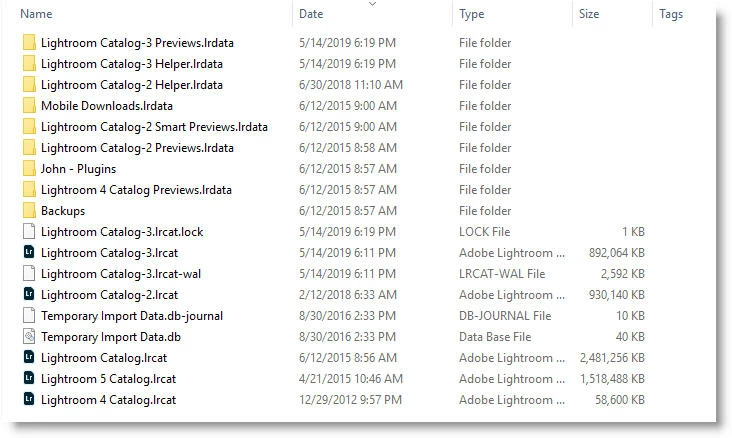
FYI Lightroom Catalog-3.lrcat was open when I made the screenshot above.
Can you help me?
I'm also troubled that Lightroom chose the wrong catalog. Is this indicative of a deeper problem?
 AdChoices