
November 4, 2017
Answered

Plugins for Lightroom Not Showing Up

  • November 4, 2017
  • 2 replies
  • 7573 views

My Google Nik plugins and On1 plugins are not showing up?  What can I do to remedy this?  The On1 plugins are in the Plugin Manager but won't show up in the list of "Edit in".  SilverEffex Pro does show up in the list but none of the other Google Nik plugins do???

Thanks for any help someone can shed on this.
This topic has been closed for replies.
Correct answer cmgap

That IS weird.  On my Windows 10/Lightroom "Classic", my plugins are working fine. 


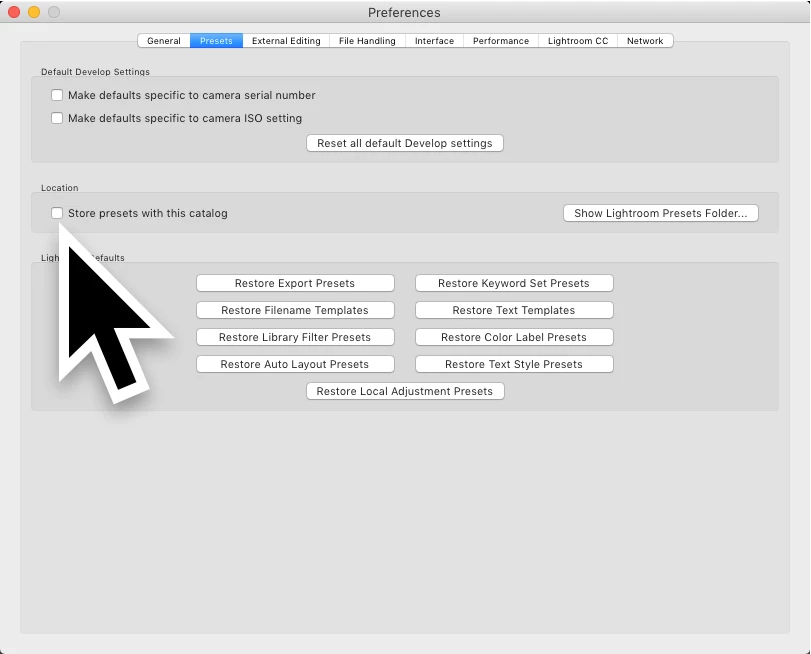
Can you check your settings in Preferences? Uncheck the 'Store presets with this catalog' > quit Lr > Relaunch. Let us know if this works.

2 replies

Scott2257
Known Participant
November 28, 2019

Thanks cmgap!  I appreciate it. 

Community Expert
November 4, 2017

You said noting about your computer configuration or software versions.  But, for NIK, you may have to re-run the free downloadable installer.  ON1 is a moving target right now as they are doing a download free beta campaign.   If it is only the free ON1 Effects 10.5 E you may have to re-run that installer too. 

November 4, 2017

Sorry, I'm running a new PC with Windows 10.  I have paid for the On1 plugins so they're not the Beta ones.  I did re-run the free intaller for the Nik Plugins and was hoping that would help.  It's weird that Silver Effex Pro is showing up and nothing else.

Thanks for your response.

Community Expert
November 5, 2017

That IS weird.  On my Windows 10/Lightroom "Classic", my plugins are working fine.