

alexskunz
Inspiring
April 4, 2018
Question

Poor rendition with new "Adobe Color" profile

  • April 4, 2018
  • 2 replies
  • 1142 views

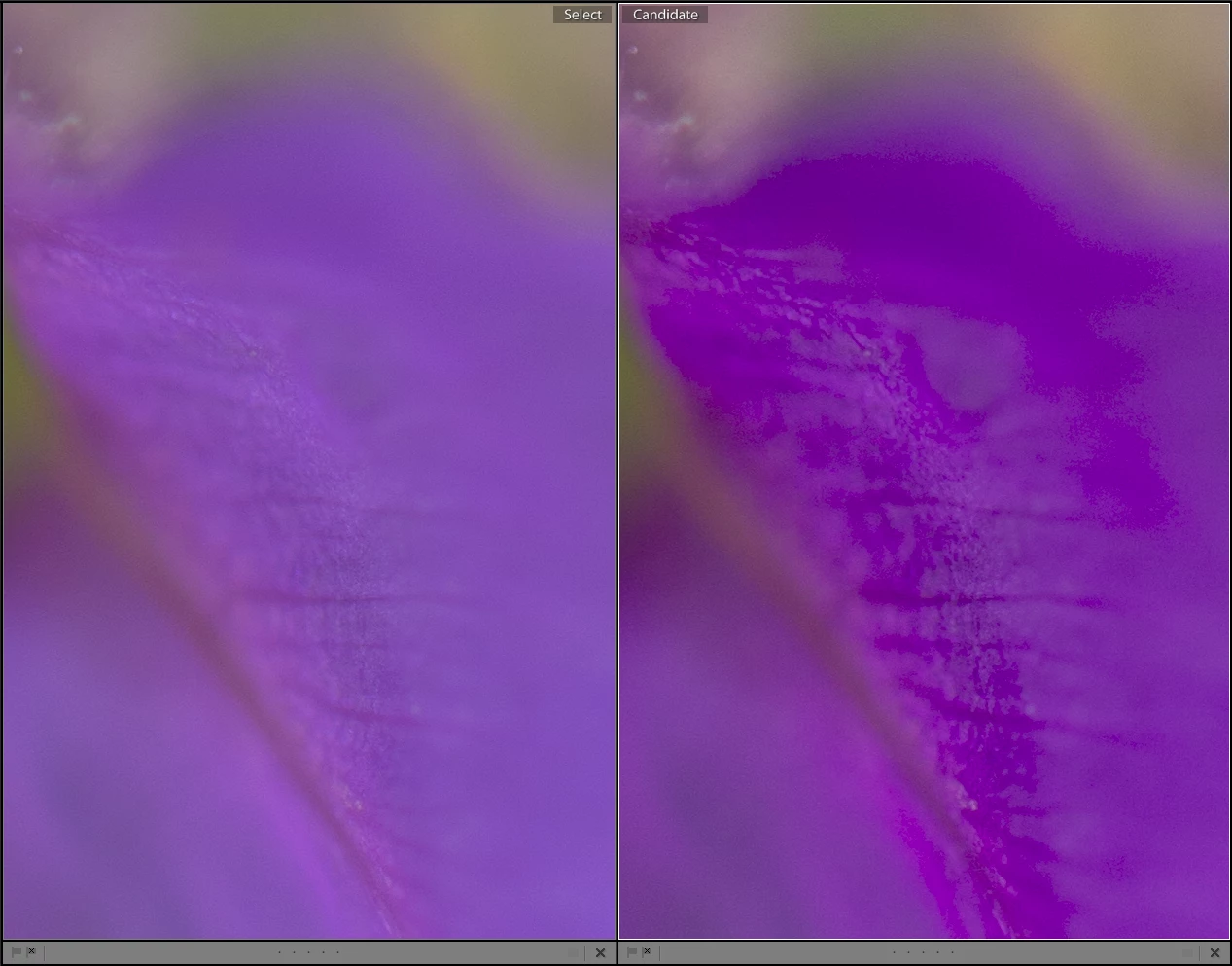
I noticed that fine color gradients in certain color tones render very poorly when using the new "Adobe Color" profile.

I'm using "Camera Neutral" as the default for my D800 files and the screenshot below shows the two side by side in a 100% crop (same photo, area of a purple flower petal, original on the left with "Camera Neutral", virtual copy on the right with "Adobe Color").

This is right after importing the photos, no edits at all, with my develop defaults of Contrast -33 and Blacks +25. Everything else is zeroed.
This topic has been closed for replies.

2 replies

Community Expert
April 4, 2018

In the screenshot they are out of gamut. I am hovering the dropper over one of the purple blotches here and green is showing as zero.

You could check if this is the problem with the monitor gamut warning turned on in Develop in soft proof and soft proofing to a profile wider than your display. It's certainly possible that the Adobe Color profile has issues. I default to Camera Standard or Adobe Standard on my Nikons so I haven't really tried it much with my images.

alexskunz
alexskunzAuthor
Inspiring
April 4, 2018

My monitor definitely doesn't do AdobeRGB so I used that but the soft proof only shows a very small amount of pixels being out of gamut, so I don't think that's really it.

Community Expert
April 4, 2018

Really? The screenshot above shows areas out of monitor gamut. Here is the green channel of your screenshot. All the solid black areas are out of monitor gamut. It corresponds directly to the areas that look bad in your image above.

Community Expert
April 4, 2018

The purple blotches in the right image are way out of gamut of your monitor (the green channel is zero in the blotches). You're probably seeing the clipping of the image to your monitor.

alexskunz
alexskunzAuthor
Inspiring
April 4, 2018

What are you suggesting?

Community Expert
April 4, 2018

If camera neutral works better for you than continue using it. Just because Adobe Color has been introduced doesn't mean that it's right for everyone in every situation. That's why there are still multiple profile choices.


Jim, the issue is of course that this is now the default profile. If there is a major rendering issue with deeply saturated colors it will impact a lot of people