
Participating Frequently
September 30, 2023
Question

Popup error every time I start LR 6.14 "Missing Application Manager

  • September 30, 2023
  • 1 reply
  • 554 views

Every time I start up my LR 6.14 , I get a message:
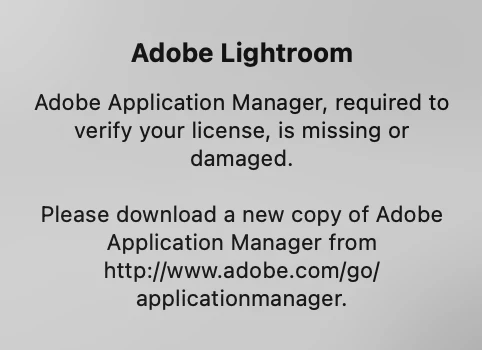
But the URL does not take me there, it just defaults to creative cloud account page and there is no way I can figure out how to find a download. Has anyone else seen this or know what to do?

This topic has been closed for replies.

1 reply

dj_paige
Legend
September 30, 2023

The file or CD from which you install Lr 6.14 contains everything you need. So I think you will need to do a complete uninstall (and use the Adobe Creative Cloud Cleaner Tool) and then install.

wantphotoAuthor
Participating Frequently
September 30, 2023

I see. thank you for the reply. Follow-up question... If I do as you say will I lose any of the updates from Adobe that I had since the first install of from disc?

dj_paige
Legend
September 30, 2023

You can download the Lr 6.14 download file which contains everything up to Lr 6.14 in one download file.

https://helpx.adobe.com/lightroom-classic/help/lightroom-6-end-of-support.html


As this download file will not be available much longer, please be sure you save a copy somewhere that you can find it in the future if you need it.


To fix your Lr 6 problem you need to use the Cleaner Tool. You do have to use the Creative Cloud with Lr 6 to make sure you have a valid serial number and that it is installed and actived on at most two computers. THat's all you would use the Creative Cloud for, its not files stored in the cloud, but make no mistake, Lr 6 requires you to have the Creative Cloud application manager, which you will get if you install it from the download file at the link above.