brieb40336071
Inspiring
April 20, 2018
Answered

Presets not working

  • April 20, 2018
  • 6 replies
  • 8204 views

I recently purchased a preset pack and they don't work. The preset will show up in the picture preview but won't apply to the actual photo. Even the presets that lightroom provides don't work. This is my first time trying to use a preset and I have no clue how to fix the problem. I'm still fairly new to LR as well

This topic has been closed for replies.
Correct answer Rob_Cullen

1) I don't subscribe to creative cloud (honestly just thinking I should at this point though) but I am able to access it on my laptop from a few years ago when I was doing a free trial.

2) I hope I'm answering this question correctly, I have Lightroom 6. I bought a code from best buy so I could install it onto my laptop.


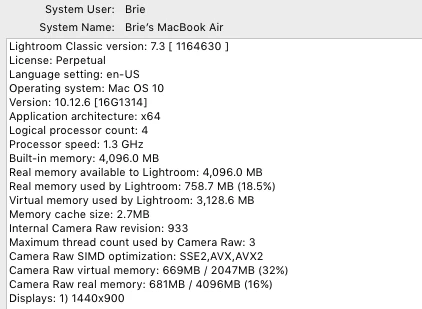
Your system is messed up! "Classic" as a Perpetual install should not be possible.

Another user sucked in to an upgrade that does not work (and should NOT work without a subscription)

After un-installing Lightroom- You have two choices to get Lightroom working as it should-

1) Re-install v6.0 and update it to v6.14, then stay with v6.14

2) Subscribe to the Creative Cloud Photography Plan and install LR-Classic-CC

6 replies

Participant
August 22, 2023

Hi!

I'm having this EXACT!!! same issue currently 2023


Hovering over all presets displays a preview of what the photo would look like with the preset, but when double clicked (to apply) and then you move the mouse back over to the photo, the preset has not been applied. I have Lighroom in subscribtion all updated.... it hapend suddelny- PLEASE HELP!


Rikk Flohr_Photography
Community Manager
August 22, 2023

You’ve posted to a very old thread. It is highly unlikely that the issue described in this thread, though not impossible, is the same issue which you are currently experiencing. Rather than resurrect an old thread that is seemingly similar, you are better posting to a new thread with fresh, complete information including system information, a complete description of the problem and step-by-step instructions for reproduction. 


In the unlikely event the issue is the same, we will merge you back into the appropriate location. 


Thank you!


Rikk Flohr: Adobe Photography Org
Rob_Cullen
Community Expert
Community Expert
November 29, 2019

This link below identifies an acknowledged bug in Lr-Classic that occurs when a Preset created with a non-raw file is applied to a raw file. This 'bug' may have other consequences for Presets that I am unaware of.

https://feedback.photoshop.com/photoshop_family/topics/lightroom-preset-hover-preview-incorrect-for-incremental-temperature-tint?rfm=1&topic_submit=true


@hellolaurenzo - Would you post a screen-clip of the report from - Main Menu: Help > System Info....  please.

and- only one click on a Preset is required to 'apply'.

Regards. My System: Windows-11, Lightroom-Classic 15.1.1, Photoshop 27.3.1, ACR 18.1.1, Lightroom 9.0, Lr-iOS 10.4.0, Bridge 16.0.2 .
PatyRubio
Participant
October 5, 2019

Help!  I have LR Class 8.4.1 and I cannot work with any presets.  The screen and picture change when I scroll through the presets, but as soon as I go to the picture, the effect is NOT applied!  What can I do?  Any suggestions?  PS.  I do have a suscription to Adobe

Participant
November 29, 2019

I'm having this EXACT same issue currently. Hovering over all presets displays a preview of what the photo would look like with the preset, but when double clicked (to apply) and then you move the mouse back over to the photo, the preset has not been applied. 

Participating Frequently
November 13, 2018

Hi there,

For what it's worth, I, a former LR 5 user upgraded to LR Classic CC yesterday (Release 8) (and I'm on a Mac with Mojave OS) and my presets have been buggy/non functioning. They worked at first (both the ones built into LR and those I imported), and then over the course of the day things went wonky. The preset panel on the left of the screen would show high level folders but no presets were in the actual folders. After closing and re-launching LR that fixed it however thereafter I noticed mousing over the presets would give a preview of the action however clicking on a preset wouldn't actually change the image in any way. It's worth mentioning I see the presets in my LR catalog in the Settings folder and they have been updated to all have .xmp extensions. Plus in the Preferences panel I have "store presets with this catalog" checked. But then the presets (both my own imported 3rd party presets, my own that I created, and the native Adobe presets) are all not working. I have also signed out of Adobe Creative Cloud and back in and then uninstalled the app and shut down my iMac and then restarted my machine and re-installed Lightroom Classic CC and the same thing happened. I gave up trying and didn't see anyone mentioning this situation on forums. I spent 40 minutes on the phone with Adobe today and even after they took control of my computer remotely, they still couldn't resolve the issue. This was after trying to open more than one catalog and even downgrading Release 8 to 7. The issue has now been escalated and I supposedly will receive a call back within 24-48 hours. I'll keep you posted. Super frustrating... I have to wonder if it's Mojave related however the Adobe rep didn't even ask about that.

Participating Frequently
April 22, 2018

When you click on a Preset, do you see anything added to the History panel?

Participant
April 22, 2018

No. ;(

brieb40336071
Inspiring
April 23, 2018

Your system is messed up! "Classic" as a Perpetual install should not be possible.

Another user sucked in to an upgrade that does not work (and should NOT work without a subscription)

After un-installing Lightroom- You have two choices to get Lightroom working as it should-

1) Re-install v6.0 and update it to v6.14, then stay with v6.14

2) Subscribe to the Creative Cloud Photography Plan and install LR-Classic-CC


Is lightroom classic cc worth it? I'd rather just get that so I don't run into these issues again.

F. McLion
Community Expert
Community Expert
April 20, 2018

Please post the exact (numbers, not 'latest' or alike) version of LR you are using.

--- Got your issue resolved? Please label the response as 'Correct Answer' to help your fellow community members find a solution to similar problems. ---
brieb40336071
Inspiring
April 20, 2018

I'm using Lightroom 6 version 7.3 camera raw 10.3; I hope that's what you were asking about.

Bob Somrak
Legend
April 20, 2018

There is no Lightroom 6 version 7.3.  I believe there is a bug that erronously allows a Lr6 update to 7 but it causes all kinds of issues like you are seeing.

M4 Pro Mac Mini. 48GB