
Participant
October 18, 2019
Answered

Presets preview problem.

  • October 18, 2019
  • 2 replies
  • 314 views

Hello. Do you also have a problem with previewing presets in the lightroom? The problem is very annoying when I hover the mouse accidentally on presets list, the preview is already in the picture, it hangs. Maybe the option to disable preset preview on the main window would help. I can't work normally at this time. Thanks for help.
    This topic has been closed for replies.
    Correct answer Ian Lyons

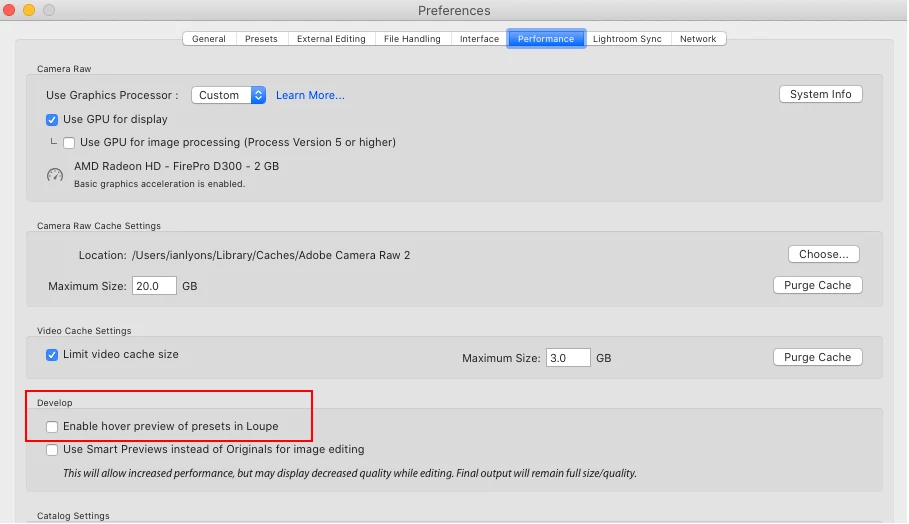
    You can disable the preset preview in the Lightroom Preferences Performance panel (see below screenshot)


    2 replies

    Ian Lyons
    Community Expert
    Ian LyonsCommunity ExpertCorrect answer
    Community Expert
    October 18, 2019

    You can disable the preset preview in the Lightroom Preferences Performance panel (see below screenshot)


    AxelMatt
    Community Expert
    Community Expert
    October 18, 2019

    Please try switch off the GPU support from the Lightroom preferences and check if that helps to fix the issue 

    Go to Lightroom > Preferences > Performance tab > Uncheck "Use Graphics Processor" > Restart Lightroom. 

    Adobe Lightroom GPU Troubleshooting and FAQ 


    My System: Intel i7-8700K - 64GB RAM - NVidia Geforce RTX 3060 - Windows 11 Pro 25H2 -- LR-Classic 15 - Photoshop 27 - Nik Collection 8 - PureRAW 5 - Topaz Photo