

Previews and backup issues, Lightroom Classic v13 (fixed)
Solved: I can't see anywhere to mark as solved or just delete the message, so updating info. When opening and updating catalog to v13, I selected an older catalog, one just a day older. That opened with previews and will successfully backup.
Original post:
Yesterday I started having preview issues, some previews not showing up while work in Library mode. I tried to exit and backup the catalog. The backup process hangs up in the same place each time. I tried deselecting the option to test the catalog integrity before backup. Even if I leave it for an hour, it never gets past that spot. I uninstalled and reinstalled LR. I've updated to 13.0 (Lightroom Classic). Previews on all images in my entire catalog are now not showing and the catalog still hangs when trying to backup. I'm adding a screenshot of where it hangs up. I've also tried to select a single image and generate a new preview, but the progress bar just sits there and does nothing. No preview generates.
On top of that, when it doesn't back up and stalls, I have to force quit. After opening back up, my main catalog doesn't auto open and I have to select the v12 catalog and update it again to v13. But this doesn't seem to stick and I have to update it to v13 each time.
macOS Sonoma v14.0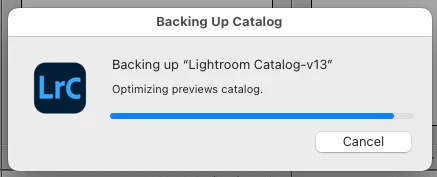
 AdChoices