
jodyoalaska
Participating Frequently
March 19, 2021
Resuelto

Previews are rendering very dark

  • March 19, 2021
  • 3 respuestas
  • 1223 visualizaciones

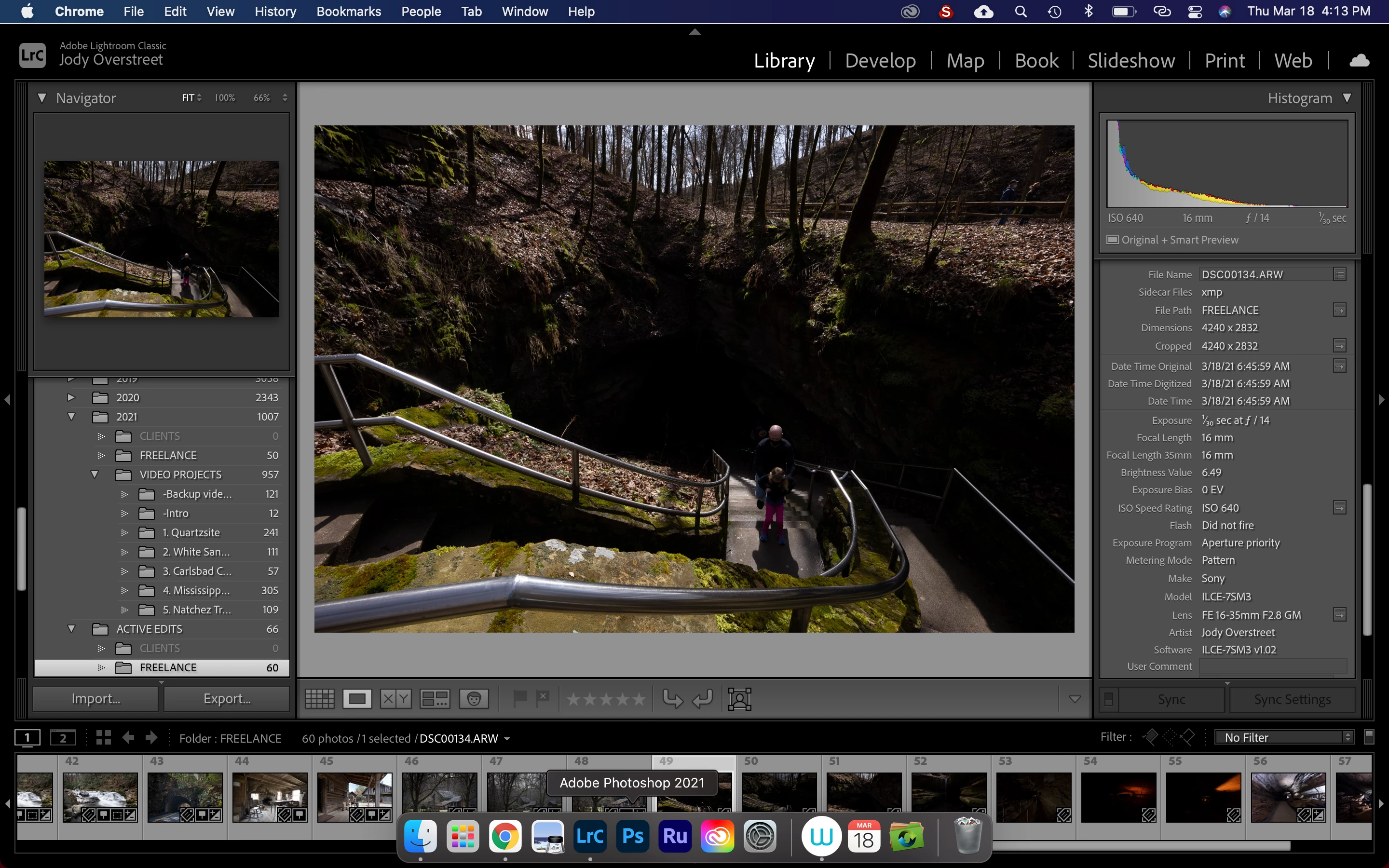
I just did a trial run with my new Sony A7SIII, shooting in RAW. When I uploaded files, LR flashed a well exposed preview for half a second, then it went dark. Exif data indicates image should have been well exposed, but you sure can't tell this by the preview. I haven't had this problem with my A7RIII, so don't know if it's a Sony problem or LR problem. Running macOS Big Sur Version 11.2.3. 
Este tema ha sido cerrado para respuestas.
Mejor respuesta de D Fosse

In the menus for the a7riii, there are settings for "creative style", "picture effect" and "picture profile". Don't ask me what they do, I just make sure they're all "off" 😉


In any case, these settings will only affect the jpeg/camera LCD, not the raw data.


I agree with WobertC - the histogram seems very much in agreement with the actual image.

3 respuestas

Community Expert
March 20, 2021

For the files you shot in the automatic underexpose mode, try applying the "Camera Settings" Preset. This reads some camera settings and tries to approximate the in camera rendering of the raw data. Perhaps that will help for those files. You can also set this as the default for this camera in the presets tab of preferences.

D Fosse
Community Expert
D FosseCommunity ExpertRespuesta
Community Expert
March 19, 2021

In the menus for the a7riii, there are settings for "creative style", "picture effect" and "picture profile". Don't ask me what they do, I just make sure they're all "off" 😉


In any case, these settings will only affect the jpeg/camera LCD, not the raw data.


I agree with WobertC - the histogram seems very much in agreement with the actual image.

jodyoalaska
Participating Frequently
March 20, 2021

Thanks D Fosse! You helped me pinpoint the problem. I had set up the camera for video by following another 7SIII user's recommendations, which included setting a creative style and picture profile. I turned both off per your recommendation and now correctly exposed thumbnails are loading in LR. Beforehand, LR racheted down the exposure by at least 2 stops before I made the change.


Since I want to use the camera for both videography and stills, I'm wondering if there is a universal setup that would be best for both applications where I don't have to dig into menu each time I want to switch between shooting video and stills. Guess I'll have to do some more research. Maybe even [horrors] reading the manual.


For the sake of anyone else encountering this problem, here's how a photo appeared in camera and then the same image loaded into LR [with creative style and picture profiles turned on].  


D Fosse
Community Expert
Community Expert
March 20, 2021
quote

Maybe even [horrors] reading the manual.


By @jodyoalaska


The Sony alphas are of course notorious for their endless menus. But that can be your good friend if you spend a little time on it, because these cameras are highly customizable. You can assign almost any menu item to almost any physical button on the camera, even the control wheel. You're not bound by the actual labels.


It's almost like building your own camera, with all the controls exactly where you want them. So anything you need frequently, just find a handy button to use.


Here it is:

Rob_Cullen
Community Expert
Community Expert
March 19, 2021

The image Histogram indicates the raw photo data is very under-exposed.

Does the camera have D-Range Optimizer set in the options that may be adjusting the raw exposure? (It would show the camera screen JPG correct, which is the preview you see flash before the raw loads in LrC.

(Me- Not a Sony person! Others may have a better answer!!)


Regards. My System: Windows-11, Lightroom-Classic 15.1.1, Photoshop 27.3.1, ACR 18.1.1, Lightroom 9.0, Lr-iOS 10.4.0, Bridge 16.0.2 .