
Inspiring
November 9, 2018
Answered

Prints intermittently not centering with Epson SC-P800

  • November 9, 2018
  • 8 replies
  • 6058 views

I'm experiencing a frustrating and expensive paper and ink-wasting issue when printing 13x19 size prints from Mac OSX 10.13.4 and LR Classic CC v8.0 on my Epson SC-P800. Things are printing well for awhile and then if I have a paper jam, say, or have to cancel a job because I started printing the wrong photo, when I try to print again with the same exact settings (page size, print size), the prints come out with the left margin suddenly a lot wider and the right side having no margin (borderless).

I have tried to troubleshoot this  problem with Epson and they believe it is something with LR software and/or OSX because I'm able to print fine from Preview using a jpeg created in LR's print to file feature and the same Epson printer driver settings.

The major reason this is so infuriating is because of its intermittent nature. I seem to always be able to print small page sizes fine (4x6s, letter) in LR, but it's the bigger sheets where I run into this problem. I've finally learned that once this problem starts, even if I can subsequently print smaller prints fine, there is no way to predict if I'll be able to print the bigger sheet sizes with correct centering. Sometimes miraculously the problem goes away--rarely--but usually I'll have wasted another half sheet of 13x19 exhibition fiber paper before i discover the uncentered printing problem.

Anyway, the only temporary solution I've found is to do a major Epson printer software purge:

  • Restart Epson SC-P800
  • Delete Epson folder in Library/Caches
  • Reset printing system in System Preferences
  • Reinstall Epson SC-P800 driver software

This 15-minute solution definitely works, but is obviously a major pain.

So this discussion is mostly a rant and a plea for Adobe software engineers to get to the bottom of this. For what it's worth, the problem seems to occur more often when I use Printer Manages Color, 16b output, and the Epson ABW (advanced black and white) settings, though I have not paid attention consistently.

For now, for 13x19 or bigger sheet size prints, I will use LR's print to file feature and then print the job with Preview--a slowdown in my workflow, but very reliable.

---------

Addendum

Now even Preview does not print correctly: similar issues with the LR print to file jpegs not printing centered, or with different sizes (8.5x11 on a 13x19 sheet, for example). Just f@#^ing infuriating.
Correct answer Paul Takeuchi

KR,

I thank you for taking the time to reply to my post, and I'm sorry for taking so much time to reply. I was under a tight deadline and very frustrated last week. I finally reached an Epson support person and after an hour of on-phone support discovered how to rectify my issue.

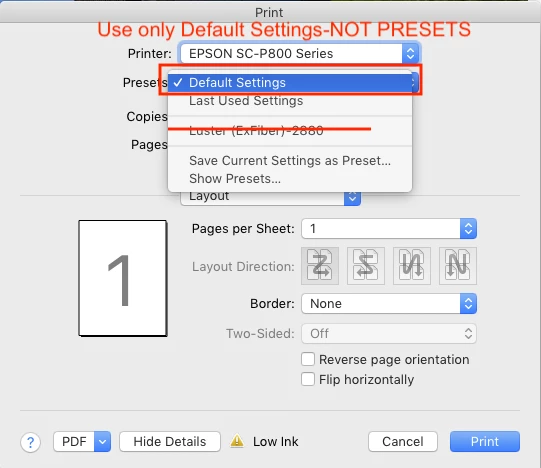
The solution was not because of my page setup sizes or my margins or anything else related to Lightroom. It turns out that there is a "bug" with Epson's OSX P800 printer driver when you use saved presets. I had a ton of Print Presets for the P800, like I've had for other Epson printers. These were for fast contact sheets at 1440 dpi on luster paper, highest quality prints on exhibition fiber at 2880, cold-toned black and white prints using ABW on glossy paper, etc. It turns out that while it appears that the presets store your print quality and media settings, they wreak havoc with page layout and in many cases contributed to the margin printing issues I was having. The technician told me that the best practice was to use Default Settings and change all the settings manually for each print type I did, a pain, but something that has worked for me every time since then, no matter what paper size, media, sheet or rollpaper feed, and margins I switch to. The Epson technician would not say who was at fault, Epson or Apple, but did acknowledge that use of the presets was not advised. The Default Settings do seem to remember the last settings you used so you don't necessarily have to start over again.

This solution defies logic, but the fix seems to work for me. Perhaps there is some quirk with OSX 10.13.4 print system and the latest P800 driver, I don't know.

So to summarize, when you print with OSX and the P800:

1) In LR Print Module, check your Page Setup and that you're using the correct page size, whether it be standard ones or custom ones

2) Check the margins in LR

3) Use correct profile for LR color management

4) Make sure you use Default Settings in OSX Print dialog and manually change the Printer Settings for quality, media, etc. and verify Paper Handling is correct or your paper type (Roll paper, sheet feeder, front loading, etc.)

Hopefully if someone else has a similar problem, this will help them.

Paul

8 replies

Participant
October 13, 2025

Yesterday, for the first time ever, I encounter this exact same problem when attempting to print from Adobe Photoshop CS5 on my Surface pro 8 running windows 11. I was using 13x19 sheets, Red River Premium Matte paper. Had setting set on the printer to match sheet size selected in PhotoShop. I have been printing this way for years without an issue.


After wasting a lot of paper and ink, I solved my problem thus ...


1. Reset print setting in Photoshop to "Defaults". Also set the 13x19 Sheet size as default in the Windows printer driver.

2. Powered off my windows surface pro. IMPORTANT: I did a complete SHUTDOWN, not a restart, nor did I put it into sleep mode.

3. Powered off my P800-SC printer

4. Left all powered off for a couple minutes.

5. Powered on the Epson P800-SC printer. Let it completely iniitialize and boot up.

6. Powered on my Windows Surface pro 8.

7. Logged on and opened Photoshop.

8. Loaded my test document.

9. Confirmed sheet size, orientation and printier setting were as desired for a centered image on a 13x19 sheet of RR premium matte paper.

10. Ran print job.

11. Job was correctly sized and centered.


Now I know it seems like a system reset is too simple a solution; however in my case, I routinely leave my Surface pro logged on and let the unit lock and eventually go into sleep mode when I leave my desk for extended peiods. Often overnight and even over weekends. If you have similar habits and are experiencing this same problem, the fix may be as simple as powering the printer and desktop/laptop/tablet off and turning it all back on.


Computers .... always an adventure.

Participating Frequently
October 13, 2025
Delighted you worked through it ... and just FYI, a 'Restart' is a FULL
stop/start, whereas 'Shutdown' and then Start uses some shortcuts to save
stuff & then get the system up again quickly ... totally counterintuitive!!!

Best regards,
Gary
--
Gary Rowe

a: Sandyford, D18W0H2, Ireland

w: www.garyrowe.ie
m: +353 (0)87 6750779
andrey_9696
Participant
August 13, 2025

I have the same problem, and it’s been going on for a long time. I keep meaning to contact Epson because I think it’s their issue.
This happens to me in different programs. In Affinity Photo and Photoshop, I have the same problem — though sometimes, after the 3rd or 4th print, everything goes back to normal.

Carmanah12
Participant
September 21, 2024

In case anyone else is still using the P800 and has this issue; I have a work around that so far has enabled printing on 13x19 paper. I had not used the print in several months then printed a 12x16 on 13x19 Moab Lasal Luster. That came out fine. Then recropped the image to print 12x18 on the same paper. That exhibited the problem described by the OP.

I had always used the default preset in the print dialog box and then each time checked the print settings before printing. They all were fine but every print came out as if was doubled in size.

The consensus here is the issue only occurs when printing on 13x19 paper. Having had experience printing test images on smaller pieces of paper by shrinking the LR layout box; I thought that might work here. I added a new LR template of size 16x20 with a print window of 12x18 in the top left corner with .5 inch borders. Then put the 13x19 paper in the printer; it doesn't care that it's only been fed smaller paper, only that it's big enough for the print box. That worked fine; so far.

Hopefully it continues to do so and it be useful for anyone else having the issue.

Participating Frequently
July 22, 2024

And today, July 2024, on Windows, my preset for 4 5x7 prints on 13x19 paper has decided to go this way too - and it hasn't been changed in a year! I use this preset several times a month (same paper, same profile etc.) and now today it goes wacky and shifts the pictures to the right on the paper, with a larger left margin and a much reduced right margin, even though the printer driver's 'preview' option shows a page exactly as intended ... but its not what prints! I wonder how many things I'll have to waste time, paper and ink on until it goes away ... leaving me none the wiser 😞

Participant
July 20, 2021

well, here we are in July of 2021 and I am experiencing this same issue. Even more frustrating is that I spent a couple hours on the phone with Epson Tech support (exhausted Rep #1, had to go to level 2), and they had no knowledge of this issue.

Went through all the checks, deleted and re-installed the printer, updated the Printer Driver, could not download and update the Printer Firmware. Final recommendation was to take the printer to a computer maintenance place. 

So thanks for all your comments, I will not be wasting my time and money on that trip.


My symptoms are similar: prints and margins work fine on smaller paper, or even larger paper that is not 13X19 (I print on Japanese papers and silks, so there are a lot of odd sizes). The margin on the 13x19 paper was too big on the left side and non-existant on the right side. Same results printing with Photoshop and with Preview.

I am in the same boat with not wanting to waste my good 13x19 paper, not to mention the ink. I think my settings are always on Default, and then I select from one of my preset sizes and margins. Does this mean I have to delete all my presets and create a new setting each time? yuk.

I am printing from a Mac, OS 10.15.x (OS Catalina). Epson Printer Driver is 10.85.

and here is me, trying to print some last minute pieces for my art fair on the weekend. Plan B? Plan C?

Most aggravating is that Epson Support does not recognize this as a known problem.

jbrazza
Participant
August 14, 2022

Now it's August 2022 & luck me, I've just encountered this same bug after having had no problems for the last 3+ years of successful printing in all sizes with my P800.  I'm PC-based (WIN10) not Mac. But I'm struggling with this exact same issue.  13x19 Exhibition Fiber seems to be the insurmountable hurdle. I can mostly print successfully with Luster & Glossy but even those are not 100% reliable.  The Exhibition Fiber is 100% unreliable.  It prints off the paper regardless of margins or cell dimensions or with grossly off-center dimensions. 
I've updated firmware, uninstalled & reinstalled printer profiles to no avail.  I haven't completely uninstalled the P-800 software yet and reinstall it. I'll try the next. 
I am not a novice when it comes to printing with Epson printers & Lightroom.  I've been doing so without issue for over 10 years but now I'm baffled by this obvious bug.  Something has changed but what?  I'll try the suggestions some of you have recommended before calling Epson Support. 

jbrazza
Participant
August 15, 2022

CORRECTION;   I've been printing with the p800 for 7 years without issues until now in 2022 with the problem I've described in my original post.

Participant
June 27, 2020

Thanks. Your workabout was great for an A3 print. Very frustrating though

Participant
August 10, 2020

I'm having the same issue OS10-15-6. Ive done all the work arounds listed above, I haven't had any success, every time I print it prints off centre.

Thanks

Phil

KR Seals
Community Expert
Community Expert
November 10, 2018

I made two test prints:

13x19 Epson ultra premium lustre paper

1/2 inch margins.

2015 MB High Sierra, LR CC CL V 8.0, First two prints with Epson driver 10.01. Third print with current Epson print driver 10.16. The driver version made no difference.

See the photo. All three prints printed with the designated 1/2" margins on the sides, but the top margin was 0" and the bottom margin 1". All settings were triple checked. As you can see on the MBP screen, the preview has equal 1/2" margins all the way around.

Since I almost never print from this MAC, I'm not going to put any effort into fixing the problem except for updating the printer driver which made no difference.

Ken Seals - Nikon Z 9, Z 8, 14mm-800mm. Computer Win 11 Pro, I7-14700K, 64GB, RTX3070TI. Travel machine: 2021 MacBook Pro M1 MAX 64GB. All Adobe apps.
Paul TakeuchiAuthorCorrect answer
Inspiring
November 17, 2018

KR,

I thank you for taking the time to reply to my post, and I'm sorry for taking so much time to reply. I was under a tight deadline and very frustrated last week. I finally reached an Epson support person and after an hour of on-phone support discovered how to rectify my issue.

The solution was not because of my page setup sizes or my margins or anything else related to Lightroom. It turns out that there is a "bug" with Epson's OSX P800 printer driver when you use saved presets. I had a ton of Print Presets for the P800, like I've had for other Epson printers. These were for fast contact sheets at 1440 dpi on luster paper, highest quality prints on exhibition fiber at 2880, cold-toned black and white prints using ABW on glossy paper, etc. It turns out that while it appears that the presets store your print quality and media settings, they wreak havoc with page layout and in many cases contributed to the margin printing issues I was having. The technician told me that the best practice was to use Default Settings and change all the settings manually for each print type I did, a pain, but something that has worked for me every time since then, no matter what paper size, media, sheet or rollpaper feed, and margins I switch to. The Epson technician would not say who was at fault, Epson or Apple, but did acknowledge that use of the presets was not advised. The Default Settings do seem to remember the last settings you used so you don't necessarily have to start over again.

This solution defies logic, but the fix seems to work for me. Perhaps there is some quirk with OSX 10.13.4 print system and the latest P800 driver, I don't know.

So to summarize, when you print with OSX and the P800:

1) In LR Print Module, check your Page Setup and that you're using the correct page size, whether it be standard ones or custom ones

2) Check the margins in LR

3) Use correct profile for LR color management

4) Make sure you use Default Settings in OSX Print dialog and manually change the Printer Settings for quality, media, etc. and verify Paper Handling is correct or your paper type (Roll paper, sheet feeder, front loading, etc.)

Hopefully if someone else has a similar problem, this will help them.

Paul

Participant
February 7, 2019

Thank you for this! I was experiencing the same issue with 13 x 19 paper in my Epson P800. In my case the image was shifted way to the left and off the edge! Simply setting the preset to "default" fixed it -- so far.

KR Seals
Community Expert
Community Expert
November 9, 2018

I would like to test this on my P800. I have printed many sizes with no issue, 4x5, 5x7, 8x10 and 16x20 on 17x22 paper with no issues. But I haven't tried 13x19. My usual machine is a PC, but I will try it on my 2015 MBP with High Sierra.

I take it from your post that you are using 13x19 paper. What margin settings are you using?

Ken Seals - Nikon Z 9, Z 8, 14mm-800mm. Computer Win 11 Pro, I7-14700K, 64GB, RTX3070TI. Travel machine: 2021 MacBook Pro M1 MAX 64GB. All Adobe apps.