

Laurent Urbain
Participant
May 9, 2024
Answered

Problème fonctions IA Lightroom 13.2

  • May 9, 2024
  • 2 replies
  • 762 views

Bonjour à toutes et à tous,

Aprés un fonctionnement parfais jusqu'à présent. Tout ce qui comporte un lien avec l'IA se termine par une erreure dans lightroom. Que ça soit le débruitage, le flou d'objectif ou certains "presets". L'analyse commece et renvoie sustématiquement une erreure "Une erreure inatendue s'est produite et la demande n'a pu être traitée". J'ai réinitialisé toutes les options à l'état par défaut, rien n'a changé. J'ai réinstallé LrC, pas de changement. Au niveau matériel, rien n'est changé depuis des mois (même si mon système est un peu faible, ça a touours fonctionné raisonablement). Peut-être une mise à jour de windows 11 ??? La derniére mise à jour effectuée est la "2024-04 Mise à jour cumulative pour Windows 11 Version 24H2 pour les systèmes x64 (KB5036908)".

Merci d'avance pour des pistes de résulution du probléme eventuelles.
This topic has been closed for replies.
Correct answer johnrellis

[This post contains formatting and embedded images that don't appear in email. View the post in your Web browser.]


" DirectX : NVIDIA GeForce GT 710 (30.0.14.7482)"


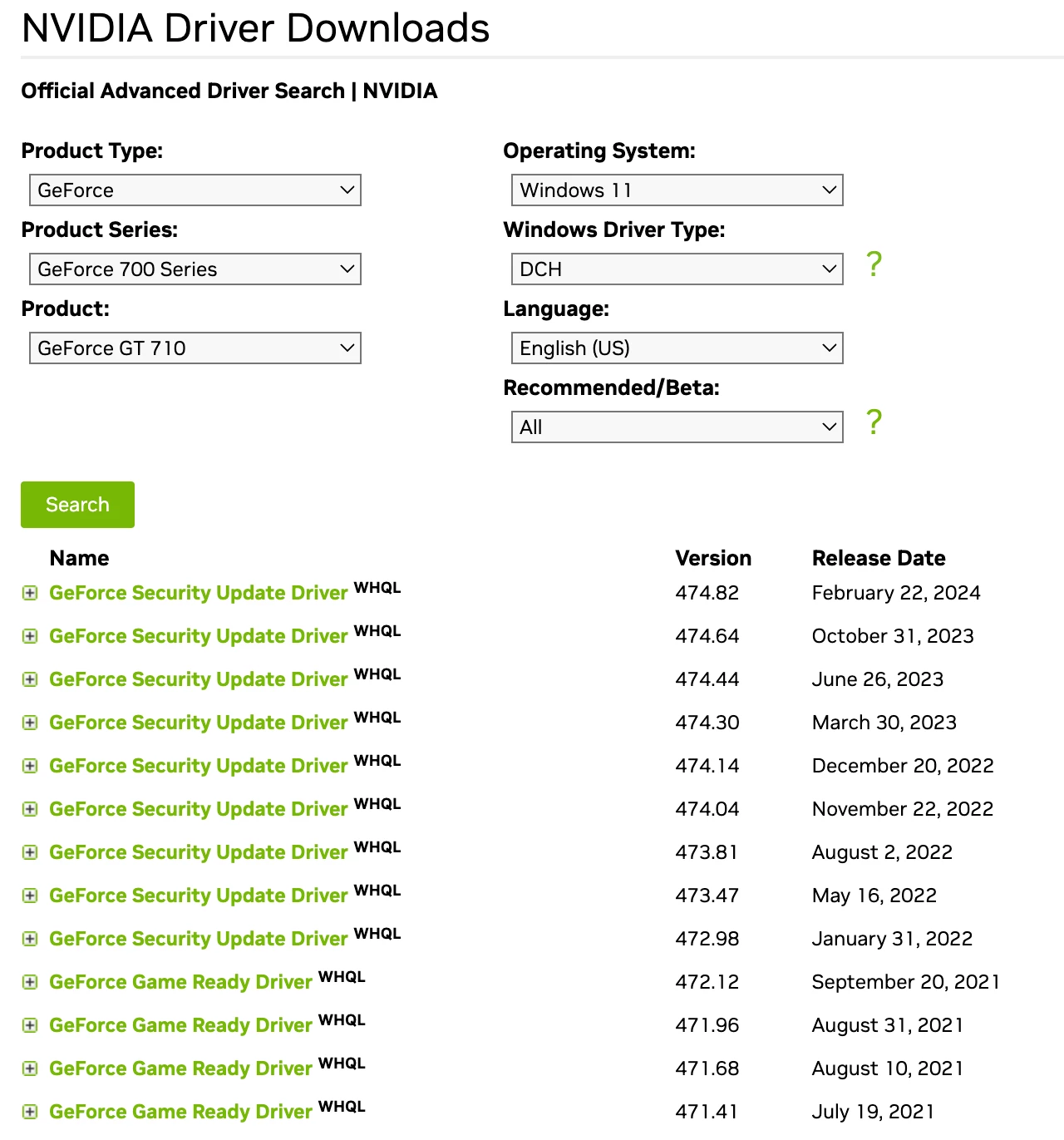
Building on dj_paige's reply, that GPU is actually 8 years old, and Nvidia stopped fixing graphics bugs in its driver three years ago.  You've got the most recent driver, 474.82, released 2/24/2024. But the last version that included fixes to the graphics functions (as opposed to security fixes) was from 9/30/2021:


LR and Camera Raw are constantly improving how they use the GPU, so the change in behavior you observe is likely due to a recent change in LR and/or CR that's tripping over an old bug in the graphics driver. You could try rolling back to an earlier version of LR that worked for you. But if you want the latest version, you'll have to get a new GPU.


Unfortunately, Adobe inexplicably refuses to allow users to disable the use of the GPU by the AI commands. If they did, the commands would run significantly slower, but at least you could use them. 


2 replies

Laurent Urbain
Participant
May 12, 2024

Bonjour,

 -> DirectX : NVIDIA GeForce GT 710 (30.0.14.7482)

Mais le matériel est le même depuis plusieurs mois, le probléme est récent. Quelques semaines.

Merci, belle suite.

dj_paige
Legend
May 12, 2024

Your GPU is over 7 years old. I am not surprised that it will not work with AI functions in LrC. A much newer and much more powerful GPU is need to work with AI functions.

Laurent Urbain
Participant
May 12, 2024

[This post contains formatting and embedded images that don't appear in email. View the post in your Web browser.]


" DirectX : NVIDIA GeForce GT 710 (30.0.14.7482)"


Building on dj_paige's reply, that GPU is actually 8 years old, and Nvidia stopped fixing graphics bugs in its driver three years ago.  You've got the most recent driver, 474.82, released 2/24/2024. But the last version that included fixes to the graphics functions (as opposed to security fixes) was from 9/30/2021:


LR and Camera Raw are constantly improving how they use the GPU, so the change in behavior you observe is likely due to a recent change in LR and/or CR that's tripping over an old bug in the graphics driver. You could try rolling back to an earlier version of LR that worked for you. But if you want the latest version, you'll have to get a new GPU.


Unfortunately, Adobe inexplicably refuses to allow users to disable the use of the GPU by the AI commands. If they did, the commands would run significantly slower, but at least you could use them. 


Merci pour ces derniéres précisions.

Je vais essayer un "downgrade", sans beaucoup de convictions. Je vais aussi essayer d'acitiver la puce graphique du µP. Elle n'est pas récente, mais peut-être que les bugs ne sont pas les mêmes. Sans vraiment y croire.

Bien à vous.

dj_paige
Legend
May 9, 2024

what is the exact make and model of your GPU? What is the exact version number of the GPU driver? (Both pieces of information can be obtained from the LrC menu command Help->System Info)