 Adobe Community

- Home
- Lightroom Classic
- Discussions
- Problem: Lightroom Classic would like to access fi...
- Problem: Lightroom Classic would like to access fi...

Copy link to clipboard
Copied
I recently upgraded my Mac Pro to OSX 10.15.1 Catalina and now when I try to start Lightroom Classic 9.0 a dialog pops up that says: “Adobe Lightroom Classic.app” would like to access files in your Documents folder. It offers a [Don't Allow] and [OK] choice in the dialog, but as soon as I move my mouse over the dialog the buttons underintensify and are non-responsive with greyed out buttons.
It seems the program is hanging on load and is unreposive (red) in Activity Monitor. Seemingly it wants to access something in my Documents folder(s). I can't figure out what or how to give it permission. Also, I don't think I should need to be need to change things at the operating system level. I have used Lightroom on this machine since 2013.
When I try to kill Lightroom from the Activity Monitor, another dialog pops up that has the same behavior with the buttons becoming greyed out when I move my mouse over it.
I have uninstalled and reinstalled Lightroom Classic and the problem persists.


 1 Correct answer
I found my solution. To add Lightroom (or any other app, I suppose) to the Files and Folders window, I need to go to the Full Disk Access tab and add it there using the selectable + button. Once I dadded it to this tab, it appeared as allowed in Files and Folders.


 6
Replies
6
6
Replies
6


Copy link to clipboard
Copied
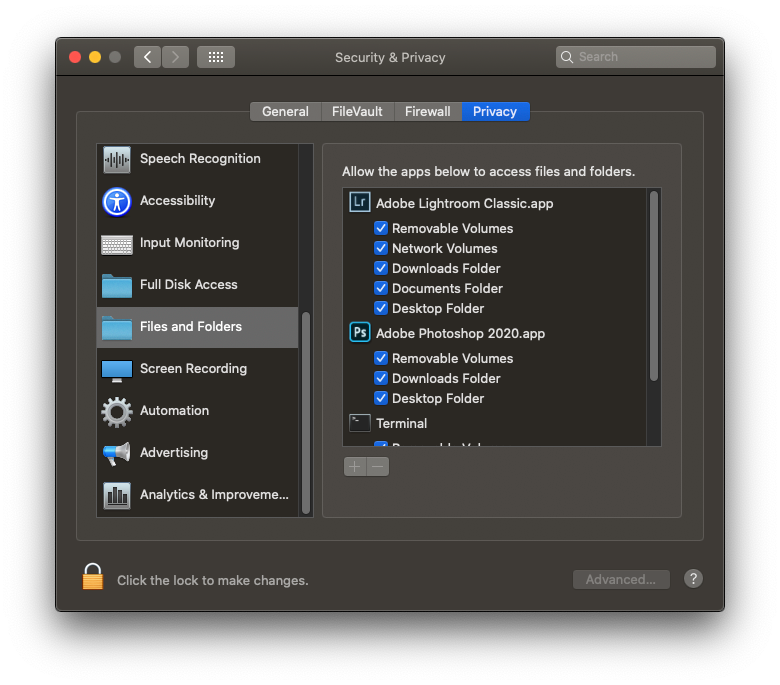
Go to the new System Preferences pane Security and Privacy and go to the Privacy tab. Set the Lightroom Classic access items as follows:
Copy link to clipboard
Copied
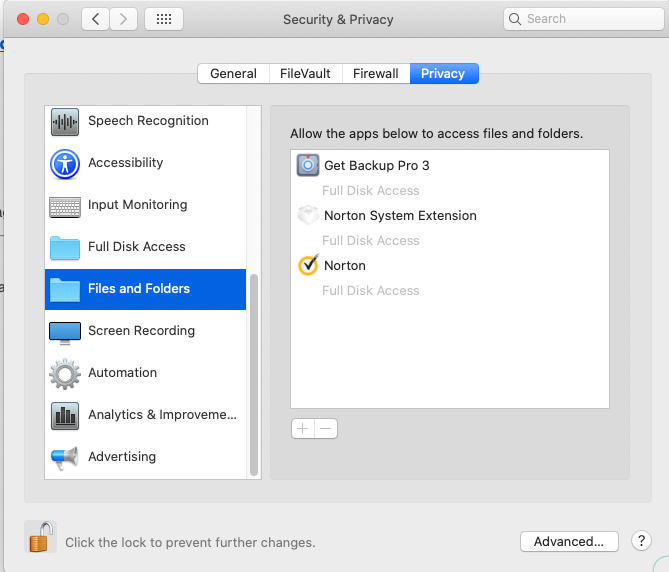
@Jao_vdL thank you. I had visited that dialog, it felt like what I needed to nudge, but I don't see Adobe apps in the window and cant't figure out how to make them appear there.
I do see the little + and - buttons typically used to add and subtract from this type of dialog, but they seem to be perpertual greyed out, non-responsive.
Copy link to clipboard
Copied
The list should get automatically updated when you run software that asks for access to documents, desktop, removable volumes, etc. Strange that there is nothing in the list with checkboxes. In this case I am worried about Norton antivirus showing up here. This is notoriously crappy software and in my opinion worse than the problem it attempts to solve. I wouldn't be surprised if having that installed is actually the cause of the problems you are having. Don't know if that is the problem here but I have nothing but bad experiences with that software.
regarding the initial hung pop-up, can you trying using command-tab to go back and forth from Lightroom to another program such as finder. Perhaps the dialog will regain focus and allow you to click the allow button.
Copy link to clipboard
Copied
I found my solution. To add Lightroom (or any other app, I suppose) to the Files and Folders window, I need to go to the Full Disk Access tab and add it there using the selectable + button. Once I dadded it to this tab, it appeared as allowed in Files and Folders.

Copy link to clipboard
Copied
Hey Jao, I'd been trying to sort this out for ages and I found your post, voila! Thanks so much. Steve
Copy link to clipboard
Copied
Awesome! Glad it helped


 AdChoices