
Exit
  • Global community
    • Language:
      • Deutsch
      • English
      • Español
      • Français
      • Português
  • 日本語コミュニティ
  • 한국 커뮤니티
0

Problem with monitor profile on my iMac

Community Expert ,
Jun 17, 2019 Jun 17, 2019

I have been using a ColorMunki Display to profile my iMac display. See the specs of my computer.Screenshot 2019-06-17 at 8.33.09 PM.png

Soft ware is ColorMunki V 1.1.5, the recent profile with my monitor displays images very saturated with a significant shift in the colours on the display.

Images look fine on my iPad Pro which is synced to LR Classic  on the iMac, however if I save a file from the iPad and display it displays the same weird colours on the iMac.

Is there a problem with the software? any advice. . 

Regards, Denis: iMac 27” mid-2015, macOS 11.7.10 Big Sur; 2TB SSD, 24 GB Ram, GPU 2 GB; LrC 12.5,; Lr 6.5, PS 24.7,; ACR 15.5,; (also Laptop Win 11, ver 24H2, LrC 15.1, PS 27.1; ) Camera Oly OM-D E-M1.
664
Translate
Report
Community guidelines
Be kind and respectful, give credit to the original source of content, and search for duplicates before posting. Learn more
community guidelines
LEGEND ,
Jun 17, 2019 Jun 17, 2019

Anything odd when you clcik on that Displays tab?

Translate
Report
Community guidelines
Be kind and respectful, give credit to the original source of content, and search for duplicates before posting. Learn more
community guidelines
Community Expert ,
Jun 17, 2019 Jun 17, 2019

Like what?? I have never interfered with that tab.

Regards, Denis: iMac 27” mid-2015, macOS 11.7.10 Big Sur; 2TB SSD, 24 GB Ram, GPU 2 GB; LrC 12.5,; Lr 6.5, PS 24.7,; ACR 15.5,; (also Laptop Win 11, ver 24H2, LrC 15.1, PS 27.1; ) Camera Oly OM-D E-M1.
Translate
Report
Community guidelines
Be kind and respectful, give credit to the original source of content, and search for duplicates before posting. Learn more
community guidelines
Community Expert ,
Jun 18, 2019 Jun 18, 2019

It seems that Lightroom has a problem with the monitor profile.

It may have become corrupted, or it might have been created using wrong parameters.

Run the calibration again, and make sure to create a version 2 (not version 4), matrix-based (not table-based) profile.

Matrix may be referred to as Curves or Gamma in the calibration software.

Translate
Report
Community guidelines
Be kind and respectful, give credit to the original source of content, and search for duplicates before posting. Learn more
community guidelines
Community Expert ,
Jun 18, 2019 Jun 18, 2019

@ Per Berntsen, See the screen capture of the Profile I created recently. it says specification version 4.2. Is that what you are referring to.

Where do I get the option to change that?

Screenshot 2019-06-18 at 4.33.04 PM.png

Regards, Denis: iMac 27” mid-2015, macOS 11.7.10 Big Sur; 2TB SSD, 24 GB Ram, GPU 2 GB; LrC 12.5,; Lr 6.5, PS 24.7,; ACR 15.5,; (also Laptop Win 11, ver 24H2, LrC 15.1, PS 27.1; ) Camera Oly OM-D E-M1.
Translate
Report
Community guidelines
Be kind and respectful, give credit to the original source of content, and search for duplicates before posting. Learn more
community guidelines
Community Expert ,
Jun 18, 2019 Jun 18, 2019

Although I use a ColorMunki calibrator too, I don't use the software.

But I found this, which shows where to set the profile version.

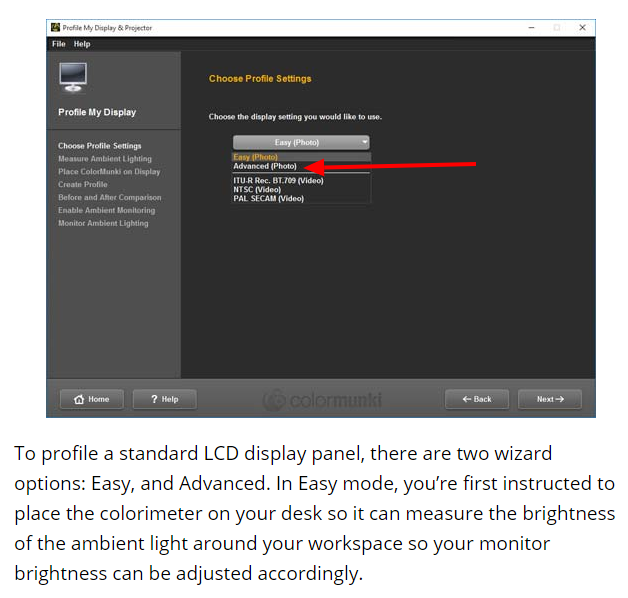
You have to be in Advanced mode to get these options.

Leave Tone response curve at default, and change version 4 to version 2.

Lightroom doesn't like version 4 profiles.

The whole article is here: https://www.photographyblog.com/reviews/x_rite_colormunki_display_review

Translate
Report
Community guidelines
Be kind and respectful, give credit to the original source of content, and search for duplicates before posting. Learn more
community guidelines
Community Expert ,
Jun 18, 2019 Jun 18, 2019

I just do not get that option in my preferences to make those choices.

Regards, Denis: iMac 27” mid-2015, macOS 11.7.10 Big Sur; 2TB SSD, 24 GB Ram, GPU 2 GB; LrC 12.5,; Lr 6.5, PS 24.7,; ACR 15.5,; (also Laptop Win 11, ver 24H2, LrC 15.1, PS 27.1; ) Camera Oly OM-D E-M1.
Translate
Report
Community guidelines
Be kind and respectful, give credit to the original source of content, and search for duplicates before posting. Learn more
community guidelines
Community Expert ,
Jun 19, 2019 Jun 19, 2019

Did you choose Advanced in this screen?
Translate
Report
Community guidelines
Be kind and respectful, give credit to the original source of content, and search for duplicates before posting. Learn more
community guidelines
Community Expert ,
Jun 19, 2019 Jun 19, 2019

Yes I did a profile in the Advanced mode. Are those options available in the Easy mode?

Regards, Denis: iMac 27” mid-2015, macOS 11.7.10 Big Sur; 2TB SSD, 24 GB Ram, GPU 2 GB; LrC 12.5,; Lr 6.5, PS 24.7,; ACR 15.5,; (also Laptop Win 11, ver 24H2, LrC 15.1, PS 27.1; ) Camera Oly OM-D E-M1.
Translate
Report
Community guidelines
Be kind and respectful, give credit to the original source of content, and search for duplicates before posting. Learn more
community guidelines
Community Expert ,
Jun 19, 2019 Jun 19, 2019
LATEST

I have used instructions from the trouble shooting help on ColorMunki website titled "Poor results with ColorMunki Display on Mac" and now getting much better results.

X-Rite: +Poor Results With ColorMunki Display On Mac
Regards, Denis: iMac 27” mid-2015, macOS 11.7.10 Big Sur; 2TB SSD, 24 GB Ram, GPU 2 GB; LrC 12.5,; Lr 6.5, PS 24.7,; ACR 15.5,; (also Laptop Win 11, ver 24H2, LrC 15.1, PS 27.1; ) Camera Oly OM-D E-M1.
Translate
Report
Community guidelines
Be kind and respectful, give credit to the original source of content, and search for duplicates before posting. Learn more
community guidelines
Advocate ,
Jun 18, 2019 Jun 18, 2019

Can you post a cropped screenshot of the comparison ? (Saturated vs otherwise)  . . .

Translate
Report
Community guidelines
Be kind and respectful, give credit to the original source of content, and search for duplicates before posting. Learn more
community guidelines
