
Exit
  • Global community
    • Language:
      • Deutsch
      • English
      • Español
      • Français
      • Português
  • 日本語コミュニティ
  • 한국 커뮤니티
0

Problem with raw files

New Here ,
Jan 21, 2025 Jan 21, 2025

Hi,
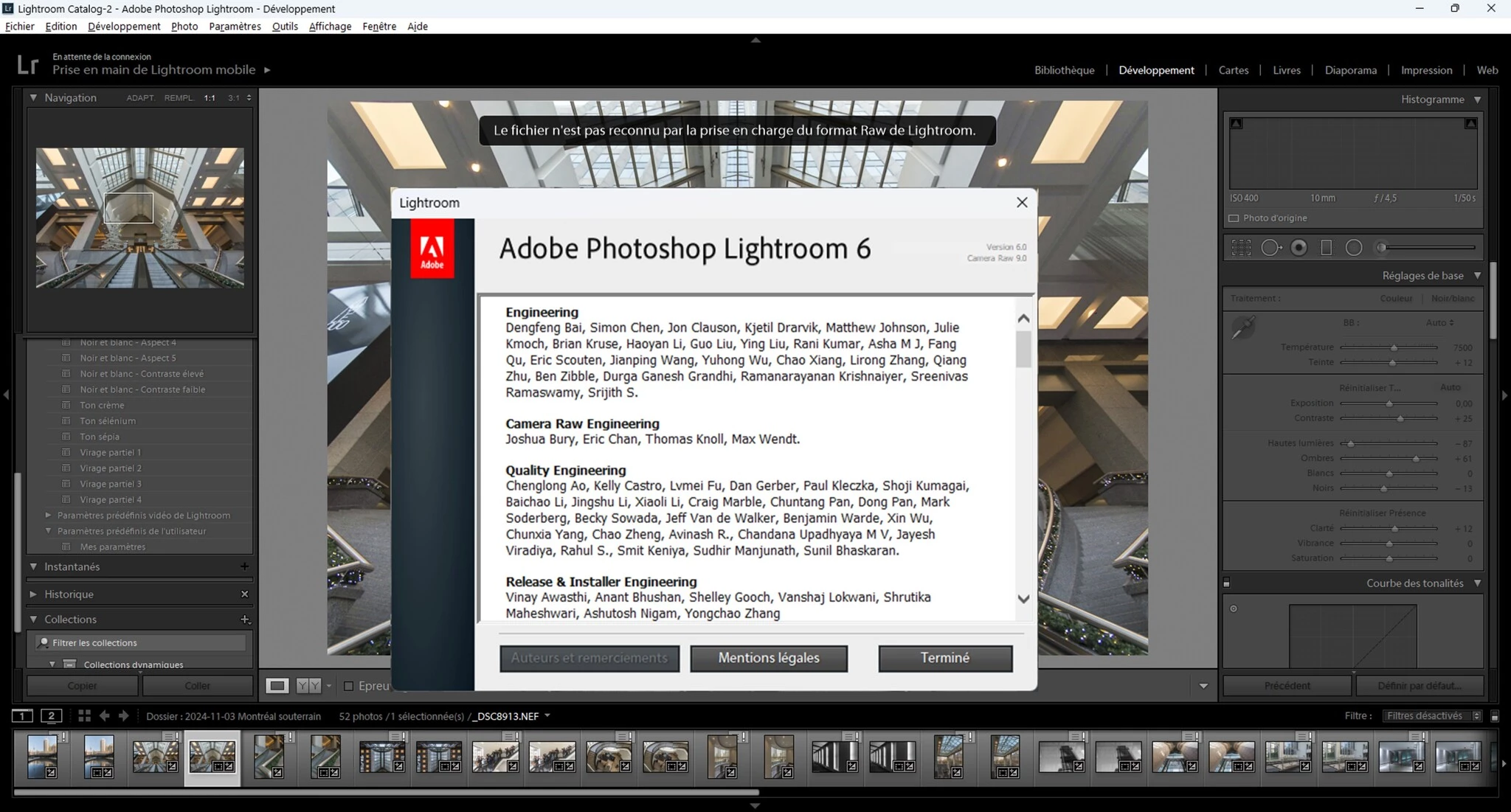
I have Lightroom 6 since many years and a Nikon D7500 since many years too. With Windows 10, everything was ok and Lightroom open my raw. Windows 10 is dead and I have now Windows 11. So I have to reinstall Lightroom 6 on my PC. Since that, I have this message "The file is not recognized by Lightroom's raw format support." Usually this message appear when you change  camera but I have a Nikon D7500 since many years. Why it was OK with Windows 10 and not with Windows 11 with the same camera? 

I try the offline activation and nothing change. I have the same problem.
Ciao, Diane
TOPICS
Windows
1.8K
Translate
Report
Community guidelines
Be kind and respectful, give credit to the original source of content, and search for duplicates before posting. Learn more
community guidelines

correct answers 1 Correct answer

Community Expert , Jan 21, 2025 Jan 21, 2025

You posted about the same problem yesterday (please do not create multiple threads about the same issue), and I suspected that you were using version 6.0 that does not support your camera, you need version 6.12 or later.

The post is here: https://community.adobe.com/t5/lightroom-classic-discussions/lightroom-6-windows11-nikon-d7500/m-p/15101490#M393680


The screenshot you posted here shows that you are using version 6.0.

Download and install version 6.14 using the link I gave you in the other t

...
Translate
LEGEND ,
Jan 21, 2025 Jan 21, 2025

"The file is not recognized by Lightroom's raw format support."


Please tell us the exact unedited word-for-word message.


Also please tell us the exact version NUMBER of your Lr 6 (like 6.2 or 6.10 or whatever)

Translate
Report
Community guidelines
Be kind and respectful, give credit to the original source of content, and search for duplicates before posting. Learn more
community guidelines
New Here ,
Jan 21, 2025 Jan 21, 2025

The text is in French on the nef so I translate it... " The file is not recognized by Lightroom's Raw format support ".
I send you a picture where you see the number of Lr 6

Translate
Report
Community guidelines
Be kind and respectful, give credit to the original source of content, and search for duplicates before posting. Learn more
community guidelines
LEGEND ,
Jan 21, 2025 Jan 21, 2025

Tell us the French words, unedited, word-for-word, complete. I can't view your (or anyone's) file attachments, just type in the version NUMBER of your Lr 6.

Translate
Report
Community guidelines
Be kind and respectful, give credit to the original source of content, and search for duplicates before posting. Learn more
community guidelines
New Here ,
Jan 21, 2025 Jan 21, 2025

In French, it's... « Le fichier n'est pas reconnu par la prise en charge du format Raw de Lightroom. »

So now if I take photos with my camera and want to place them on Lightroom, nef files and jpgs are refused.
Those problems are there only since Windows 11 . Lightroom accept dng. So I have to convert all nef in dng before dowloading pictures on Lightroom.

Translate
Report
Community guidelines
Be kind and respectful, give credit to the original source of content, and search for duplicates before posting. Learn more
community guidelines
LEGEND ,
Jan 21, 2025 Jan 21, 2025

Asking again: what version NUMBER of Lr 6 do you have?

Translate
Report
Community guidelines
Be kind and respectful, give credit to the original source of content, and search for duplicates before posting. Learn more
community guidelines
New Here ,
Jan 21, 2025 Jan 21, 2025

Lightroom 6 on a CD

Translate
Report
Community guidelines
Be kind and respectful, give credit to the original source of content, and search for duplicates before posting. Learn more
community guidelines
LEGEND ,
Jan 21, 2025 Jan 21, 2025

So if you go to Help->System Info, it should say 6.0 or 6.1 or 6.2 or whatever. What is the full version NUMBER?

Translate
Report
Community guidelines
Be kind and respectful, give credit to the original source of content, and search for duplicates before posting. Learn more
community guidelines
New Here ,
Jan 21, 2025 Jan 21, 2025

Version de Lightroom : 6.0 [1014445]
Licence: Permanente

Translate
Report
Community guidelines
Be kind and respectful, give credit to the original source of content, and search for duplicates before posting. Learn more
community guidelines
Community Expert ,
Jan 21, 2025 Jan 21, 2025

Are you sure you did not convert the D7500 raw files to DNG when you were using Windows 10? The raw files of the Nikon D7500 were supported for the first time in Lightroom Classic 9.12, so there is no way that you could have used them in Lightroom 6 in Windows 10 without first converting them to DNG in DNG Converter.


Update: I think there is a mistake in the Adobe page and this is probably Lightroom 6.12, not Lightroom Classic 9.12 (which I think never existed). So update to 6.12 after installing 6.0 from the CD.


-- Johan W. Elzenga
Translate
Report
Community guidelines
Be kind and respectful, give credit to the original source of content, and search for duplicates before posting. Learn more
community guidelines
New Here ,
Jan 21, 2025 Jan 21, 2025

Are you sure you did not convert the D7500 raw files to DNG when you were using Windows 10? OH! I'm absolutly sure! I used them in Lightroom 6 with Windows 10 until January 16th when I change for Windows 11.

Translate
Report
Community guidelines
Be kind and respectful, give credit to the original source of content, and search for duplicates before posting. Learn more
community guidelines
Community Expert ,
Jan 21, 2025 Jan 21, 2025
quote

Update: I think there is a mistake in the Adobe page and this is probably Lightroom 6.12, not Lightroom Classic 9.12 (which I think never existed). So update to 6.12 after installing 6.0 from the CD.


By @JohanElzenga


9.12 refers to Camera Raw version, 6.12 refers to perpetual Lightroom version.

You have scroll up quite a bit to see the labels for the columns. They should ideally scroll with the page.


image.png

Translate
Report
Community guidelines
Be kind and respectful, give credit to the original source of content, and search for duplicates before posting. Learn more
community guidelines
Community Expert ,
Jan 21, 2025 Jan 21, 2025
quote
quote

Update: I think there is a mistake in the Adobe page and this is probably Lightroom 6.12, not Lightroom Classic 9.12 (which I think never existed). So update to 6.12 after installing 6.0 from the CD.


By @JohanElzenga


9.12 refers to Camera Raw version, 6.12 refers to perpetual Lightroom version.

You have scroll up quite a bit to see the labels for the columns. They should ideally scroll with the page.


image.png


By @Per Berntsen


Ah, of course. I should have looked better (as I normally do).


-- Johan W. Elzenga
Translate
Report
Community guidelines
Be kind and respectful, give credit to the original source of content, and search for duplicates before posting. Learn more
community guidelines
Community Expert ,
Jan 21, 2025 Jan 21, 2025

You posted about the same problem yesterday (please do not create multiple threads about the same issue), and I suspected that you were using version 6.0 that does not support your camera, you need version 6.12 or later.

The post is here: https://community.adobe.com/t5/lightroom-classic-discussions/lightroom-6-windows11-nikon-d7500/m-p/1...


The screenshot you posted here shows that you are using version 6.0.

Download and install version 6.14 using the link I gave you in the other thread – 

https://web.archive.org/web/20231220005239mp_/https://prdl-download.adobe.com/Lightroom/60BA1251F1BC...


image.png

Translate
Report
Community guidelines
Be kind and respectful, give credit to the original source of content, and search for duplicates before posting. Learn more
community guidelines
New Here ,
Jan 21, 2025 Jan 21, 2025

Thank you very much, You are a love! Everything is ok now. 

Translate
Report
Community guidelines
Be kind and respectful, give credit to the original source of content, and search for duplicates before posting. Learn more
community guidelines
Community Expert ,
Jan 21, 2025 Jan 21, 2025

Download the installation file of the latest version of LR 6 (version 6.14) from the Internet Archive:

Win: https://web.archive.org/web/20231220005239mp_/https://prdl-download.adobe.com/Lightroom/60BA1251F1BC...


Note that the downloads can take a minute or two to start and can proceed slowly, so be patient.


Install this version and you should access the RWA file from your Nikon again.


My System: Intel i7-8700K - 64GB RAM - NVidia Geforce RTX 3060 - Windows 11 Pro 25H2 -- LR-Classic 15 - Photoshop 27 - Nik Collection 8 - PureRAW 5 - Topaz Photo
Translate
Report
Community guidelines
Be kind and respectful, give credit to the original source of content, and search for duplicates before posting. Learn more
community guidelines
New Here ,
Jan 21, 2025 Jan 21, 2025

Thank you very much, You are a love! Everything is ok now. 

Translate
Report
Community guidelines
Be kind and respectful, give credit to the original source of content, and search for duplicates before posting. Learn more
community guidelines
Community Expert ,
Jan 21, 2025 Jan 21, 2025

Please copy the file(s) you download to an save place, like an external drive if you need it in the future.

It isn't sure how long these files are availabe for download.


My System: Intel i7-8700K - 64GB RAM - NVidia Geforce RTX 3060 - Windows 11 Pro 25H2 -- LR-Classic 15 - Photoshop 27 - Nik Collection 8 - PureRAW 5 - Topaz Photo
Translate
Report
Community guidelines
Be kind and respectful, give credit to the original source of content, and search for duplicates before posting. Learn more
community guidelines
New Here ,
Jan 21, 2025 Jan 21, 2025
LATEST

Thanks, I did it!

Translate
Report
Community guidelines
Be kind and respectful, give credit to the original source of content, and search for duplicates before posting. Learn more
community guidelines