

Problems importing into LRC from Sony XQD cards
Good morning all. My first time posting on this forum so please be kind. I have been using Sony XQD cards (64GB and 240GB) G Type cards for some time now and frequently experience import failures when attempting to import into LrC. This does not happen all the time, perhaps 2 out of 10 imports but I have not recorded the failure rate. I (mostly) always format my cards in camera before a shoot, but this does not seem to reduce the occurences of a failed import. I use Nikon D850, D500 and Z6II cameras. The choice of camera does not seem to have a bearing on when a failure occurs.
When I begin an import the card appears to be read OK, and generates the image thumbnails in the import window. I then set my destination folder, create my keywords, and press IMPORT.
I then get an Import Results pop-up window stating;
"Some import operations were not performed"
- Could not copy a file to the destination folder because it is not writable or there is not enough free space (xx - number of images)
- There is a problem with the file (xx - number of images)
- The folder(s) could not be found (xx number of images)
see screen grab below;
I have also had this occur whilst attempting to upload video files.
After a failed import I typically insert my SD card (backup) from the same shoot and this imports without any issues whatsoever.
I have sufficient disk space on my destination hard drives.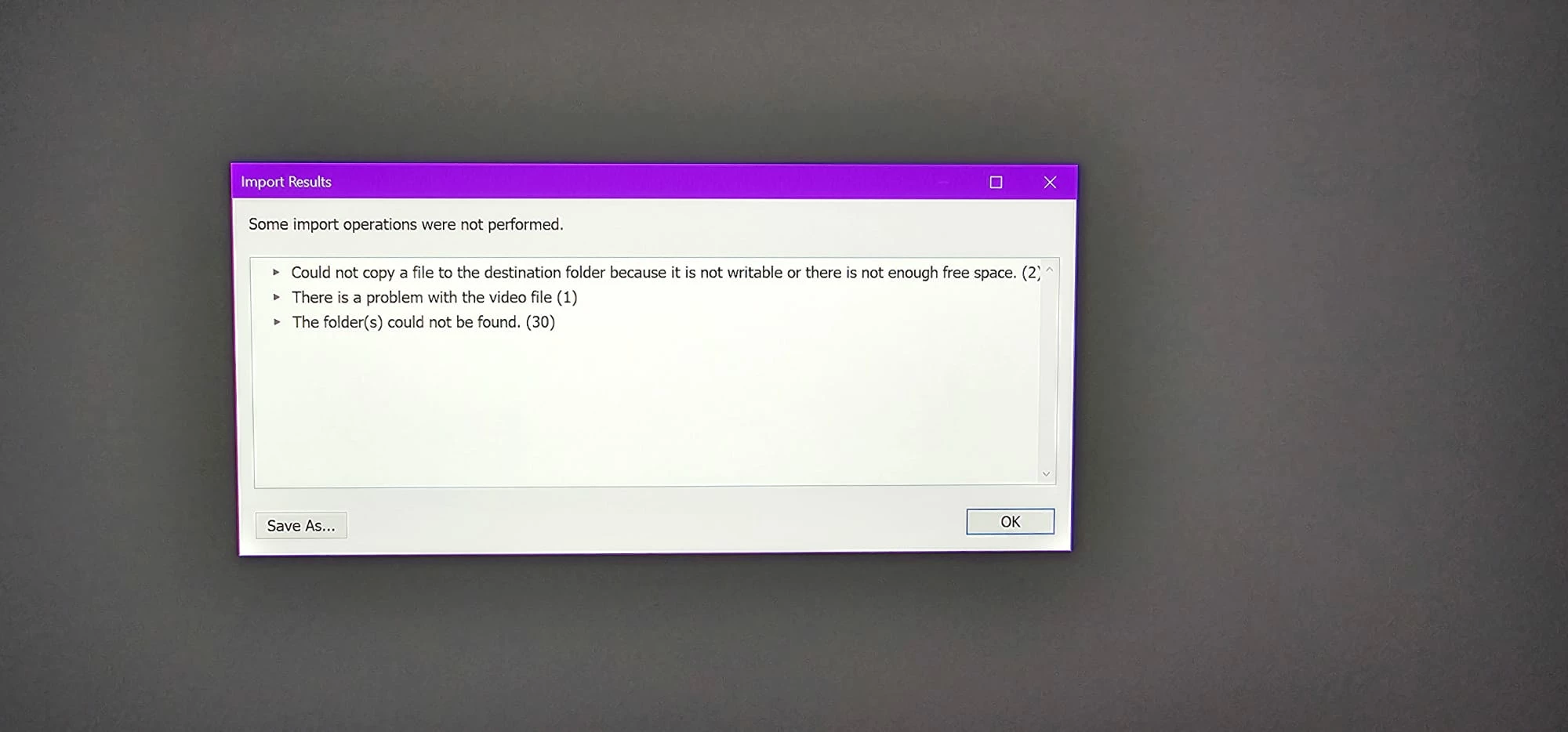
Can anyone please assist with this very frustrating issue?
Many thank in advance.
Lindsay Wright
 AdChoices