
Inspiring
April 25, 2024
Answered

Question about the histogram

  • April 25, 2024
  • 2 replies
  • 1641 views

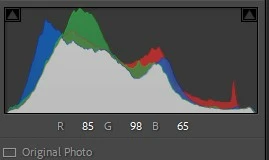
I still use LrC quite a bit, but I don't participate in the forums much anymore. Found that I was giving too many incorrect replies. However, I have a question about the histogram. I've noticed that lately all of my images  have a significant white overlay over them that I haven't noticed previously. Is this new, or is there an anomaly in my installation? Just curious.
Correct answer Rob_Cullen

It shows the individual three channels— red, green and blue— (all overlapping each other) as well as a white graph showing the overall luminance (or brightness).

Information gleaned from "The Missing FAQ" by the Lightroom Queen

https://www.lightroomqueen.com/


2 replies

Rob_Cullen
Community Expert
Rob_CullenCommunity ExpertCorrect answer
Community Expert
April 25, 2024

It shows the individual three channels— red, green and blue— (all overlapping each other) as well as a white graph showing the overall luminance (or brightness).

Information gleaned from "The Missing FAQ" by the Lightroom Queen

https://www.lightroomqueen.com/


Regards. My System: Windows-11, Lightroom-Classic 15.1.1, Photoshop 27.3.1, ACR 18.1.1, Lightroom 9.0, Lr-iOS 10.4.0, Bridge 16.0.2 .
johnrellis
Legend
April 26, 2024

"Gray appears when all three channels overlap; yellow, magenta, and cyan appear when two of the RGB channels overlap (yellow equals the Red + Green channels, magenta equals the Red + Blue channels, and cyan equals the Green + Blue channels)."


That documentation is out of date and incorrect. The histogram changed in LR 13.0 and 13.1 and now uses semi-transparency and lines to indicate where the different channels overlap:


johnrellis
Legend
April 26, 2024

@Rikk Flohr: Photography, perhaps alert the documentation team that the section on the histogram wasn't updated after the changes in LR 13.0 and 13.1:

https://helpx.adobe.com/lightroom-classic/help/image-tone-color.html#adjust_images_using_the_histogram


Conrad_C
Community Expert
Community Expert
April 25, 2024

The Adobe help article Adjust the tonal scale using the histogram says (bold formatting is mine):

quote

A histogram is made up of three layers of color that represent the Red, Green, and Blue color channels. Gray appears when all three channels overlap; yellow, magenta, and cyan appear when two of the RGB channels overlap (yellow equals the Red + Green channels, magenta equals the Red + Blue channels, and cyan equals the Green + Blue channels).


So if an area of the histogram is gray, all three channels occupy that tonal level.