
riccardozulian
Participant
August 19, 2019
Question

"Don't import suspected duplicates" isn't working properly

  • August 19, 2019
  • 3 replies
  • 2948 views

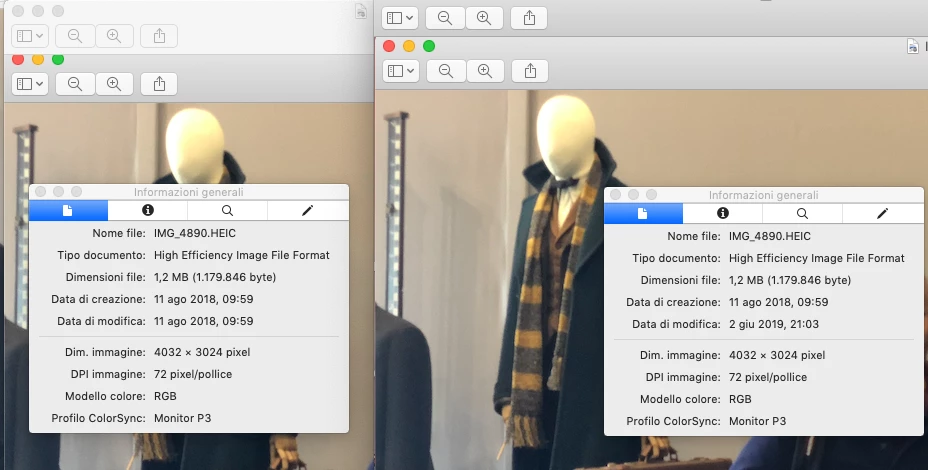
I'm trying to import photos from a directory, but I've noticed that isn't working properly. LR doesn't catch duplicates even if they are  the same file, same size, same capture time: I've attached a screenshot comparing the photo that exists in LR and the one which it is trying to re-import. What's wrong?
    This topic has been closed for replies.

    3 replies

    Participant
    November 17, 2022

    Did anyone find a solution to this?


    In one of my work catalogs LR, is trying to import files that are certainly duplicates (all files have 100% matching metadata including camera exif data, creation and modification dates, they are on the same drive but differnt folders). 


    I tired what the original poster did (testing the files in a new test database) and had her same result which indicates a cat file issue: I created a new catalog, first imported the original file, and when I tried to import the duplicate, LR would not allow it this time (it did the right thing in the new database). 


    I also tried zapping the PRam and restarting, disconnecting drives, and starting up the old catalog again and connecting the drive. The old/main catalog file still has this problem.


    I have years of work, edits, colorgrades, etc. and tens of thousands of picures from around 10 professional shoots on this catalog so it's a big problem (I can't not just start a new catalog). 


    At work I'm pressured to use CaptureOne and the only reason I don't for post production is Lightroom's intergration with Photoshop.  This LR duplicate issue is a massive problem for me now as I'm trying to clean up over a hundred thousand possible duplicates from drives before wiping them. 


    Participant
    September 6, 2023

    The detection of duplicates does not understand time zones. If you reimport using a different time zone, none of the duplicates are detected as such.

    This is probably a different case from what you have, but I think it's still worth mentioning.

    JohanElzenga
    Community Expert
    Community Expert
    September 6, 2023

    Please check the dates of the thread messages before replying to them. This question was asked in November 2022 (and the rest of the thread is even three years older than that), so I do hope the person who asked this wasn't still waiting for an answer!...


    -- Johan W. Elzenga
    Just Shoot Me
    Legend
    August 19, 2019

    Are these 2 images in the same or different folders? If in different folders, which they must be as 2 files with the same exact name can NOT be in the same folder, then that is part of your problem.

    LR sees them as different files not only because of the modify date/time but also they are in different folders.

    I just did a test by copying a folder with a few images in it to another root folder on the same drive. No modifications of any type was done to the copied files and LR would not allow me to Reimport them.

    So it must be the different folder and the modify date that is tripping up the option to Not import suspected duplicates.

    riccardozulian
    Participant
    August 19, 2019

    Thanks for the input. Using the same two photos, I've created a new catalog from scratch. In this case LR is detecting the second photo as a duplicate of the existing one. I guess the problem is in the current catalog I'm using. Is there a way to rebuild it?

    cmgap
    Community Expert
    Community Expert
    August 19, 2019

    If you are able to identify the 3k duplicates by camera type, date or other filterable criteria can you remove them?

    AxelMatt
    Community Expert
    Community Expert
    August 19, 2019

    The modification date differs between the two pictures. So for Lightroom they are different pictures.

    My System: Intel i7-8700K - 64GB RAM - NVidia Geforce RTX 3060 - Windows 11 Pro 25H2 -- LR-Classic 15 - Photoshop 27 - Nik Collection 8 - PureRAW 5 - Topaz Photo
    riccardozulian
    Participant
    August 19, 2019

    I've understood that was all about the name, creation date and size. Does the modification date matter as well? BTW, that's something about the import process, I haven't modified the photo. IS there a way to solve this? I've 3000 photos with probably the same problem

    riccardozulian
    Participant
    August 19, 2019

    Not sure if this is related, but the photo in LR has a hint, which displays the following: