
Participant
October 22, 2017
Answered

Range Mask Seelction and Sliders Off Screen

  • October 22, 2017
  • 1 reply
  • 1723 views

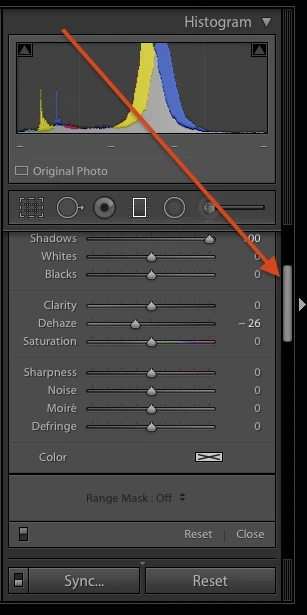
With Lightroom CC Classic I find that when using the adjustment brush or the radial or graduated filters the Range Mask Selection and sliders are out of sight. In order to see them I have to either resize the picture strip at the bottom of the display or turn off the histogram. Is there a way to get that window to scroll when the Range Mask elements are off the screen?
This topic has been closed for replies.
Correct answer johnrellis

Use the scrollbar on the far right:

1 reply

johnrellis
johnrellisCorrect answer
Legend
October 22, 2017

Use the scrollbar on the far right:

Participant
October 22, 2017

Thanks for the reply. Now why didn't I see that? It would be nice if my scroll wheel would scroll it without hovering over the scroll bar, but at least there is an easy way to get to those range sliders.

johnrellis
Legend
October 22, 2017

Now why didn't I see that?

Because it's grey-on-grey and non-standard in its appearance? :->