
Participant
November 12, 2016
Answered

Raws not displaying in lightroom

  • November 12, 2016
  • 1 reply
  • 256 views

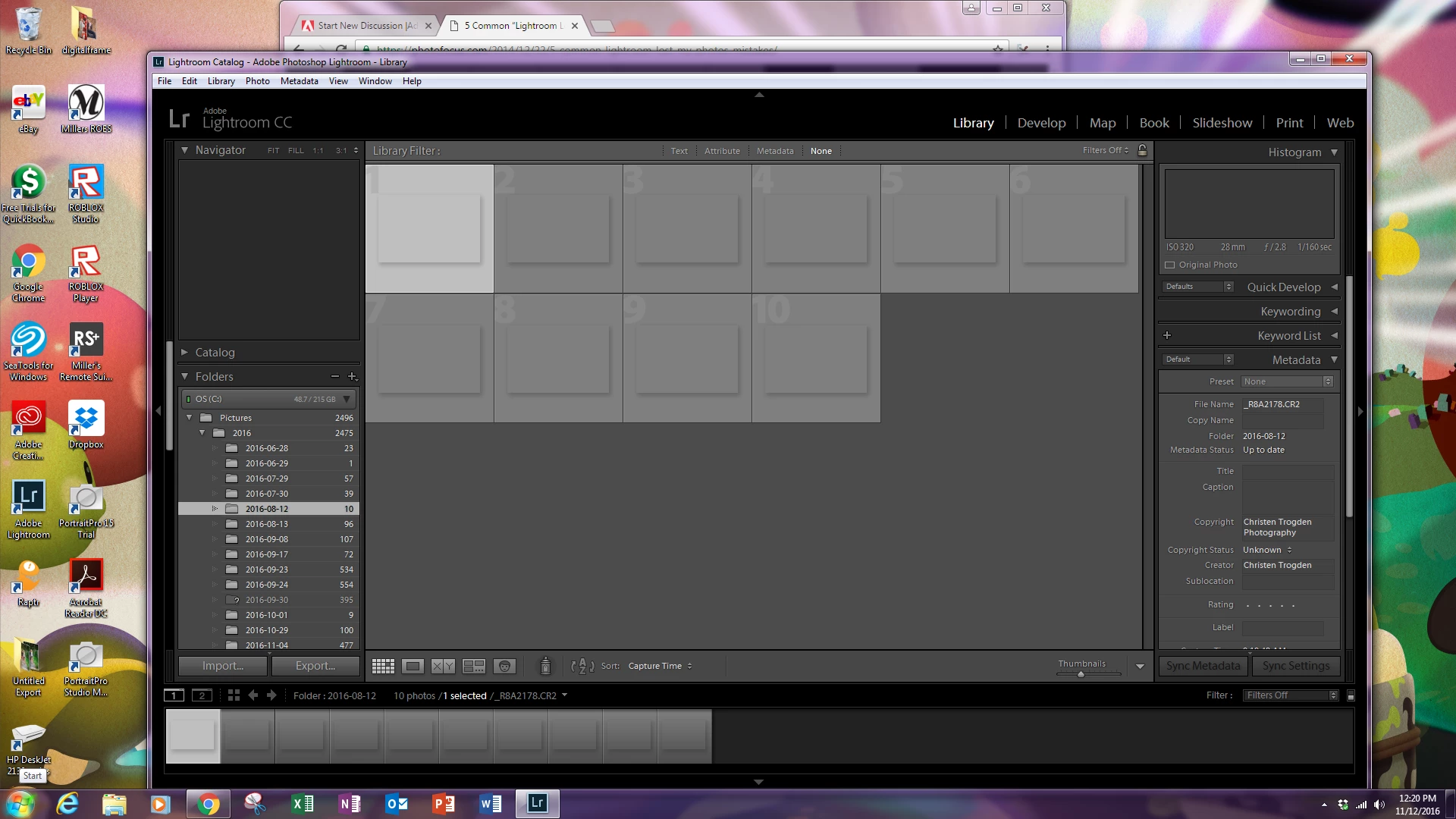
So its up to date, the images are listing in library, i see them when I go to import them but they are not displaying in lightroom. the previews/thumbnails are blank with a silhouette of the picture. even clicking the image to edit doesn't show the image either. no changes made. the images open and display fine in photoshop. its even lists the file name just won't show
    This topic has been closed for replies.
    Correct answer dj_paige

    Two possibilities:

    1. How do I change my monitor profile to check whether it’s corrupted? - The Lightroom Queen
    2. Delete your preview cache, it is in a folder whose name ends with Previews.LRDATA, it is in the same folder as your catalog file. Do not delete anything else.

    1 reply

    dj_paige
    dj_paigeCorrect answer
    Legend
    November 12, 2016

    Two possibilities:

    1. How do I change my monitor profile to check whether it’s corrupted? - The Lightroom Queen
    2. Delete your preview cache, it is in a folder whose name ends with Previews.LRDATA, it is in the same folder as your catalog file. Do not delete anything else.