
Known Participant
November 5, 2023
Question

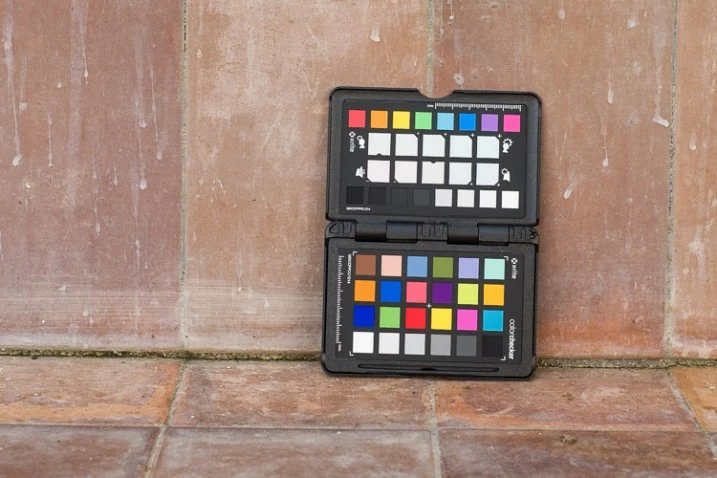
Re-Calibrate x-rite colorchecker when change location in Lightroom

  • November 5, 2023
  • 2 replies
  • 694 views


i am using x-rite, i have indoor and outdoor photography work, i have used x-rite for projects where they need accurate colors for the product

But when I went to my next project, indoor and outdoor photos, the lighting environment changed

So do I need to recalibrate the x-rite? Do I need to create separate profiles for each different lighting environment?

Thank you very much, wish everyone a very happy day


This topic has been closed for replies.

2 replies

DdeGannes
Community Expert
Community Expert
November 5, 2023

The profile you created is a monitor profile. My suggestion is if you wish to get the White Balance corrected for the changing light conditions you would be better off including a photo with a white balance card included.

As an example, the screen capture below is from a shoot I doing for a family member. It was an internal shoot. I was able to get accurate color and brightness using the card. There is a white card and a gray card.


Regards, Denis: iMac 27” mid-2015, macOS 11.7.10 Big Sur; 2TB SSD, 24 GB Ram, GPU 2 GB; LrC 12.5,; Lr 6.5, PS 24.7,; ACR 15.5,; (also Laptop Win 11, ver 24H2, LrC 15.0.1, PS 27.0; ) Camera Oly OM-D E-M1.
DdeGannes
Community Expert
Community Expert
November 5, 2023

I may have misunderstood your post, are you creating Camera Profiles to apply to your raw camera files?

Using a white balance card is also useful.

Regards, Denis: iMac 27” mid-2015, macOS 11.7.10 Big Sur; 2TB SSD, 24 GB Ram, GPU 2 GB; LrC 12.5,; Lr 6.5, PS 24.7,; ACR 15.5,; (also Laptop Win 11, ver 24H2, LrC 15.0.1, PS 27.0; ) Camera Oly OM-D E-M1.
DdeGannes
Community Expert
Community Expert
November 5, 2023

It depends on the lighting. LED and fluorescent light have very irregular spectral distribution, with sharp spikes and deep troughs over the visible spectrum. In these circumstances, it makes sense to make a new profile.


For daylight, incandescent light and, notably, flash units, there is no point. These light sources output a continuous spectrum and a single dual-illuminant profile will cover all situations.


With that said, I have never been able to improve on the Adobe profiles for any of my cameras. All my custom profiles had "runaway" colors and other problems that required a lot of correction in post - so it simply wasn't worth it. But maybe that's just me -


@D Fosse , I agree with your sentiments, " With that said, I have never been able to improve on the Adobe profiles for any of my cameras. All my custom profiles had "runaway" colors and other problems that required a lot of correction in post - so it simply wasn't worth it. But maybe that's just me -"

In the early days of Lightroom, I regularly had Profiles created for many of my cameras with good results. However, I

discontinued using them from around 2017 due to the improvement in the Adobe LrC / Adobe Camera Raw profiles.   I am completely satisfied with the profiles for my current camera. I regularly go back to the original raw images from 2005 to the present time. All my raw images from 6 camera models during this time are still supported. 

Regards, Denis: iMac 27” mid-2015, macOS 11.7.10 Big Sur; 2TB SSD, 24 GB Ram, GPU 2 GB; LrC 12.5,; Lr 6.5, PS 24.7,; ACR 15.5,; (also Laptop Win 11, ver 24H2, LrC 15.0.1, PS 27.0; ) Camera Oly OM-D E-M1.
JohanElzenga
Community Expert
Community Expert
November 5, 2023

You can create a 'dual illuminant' profile with Colorchecker Passport, so I don't think you will have to. That said, creating a specific profile for a specific situation will never hurt, and might increase the accuracy.


-- Johan W. Elzenga